DonationCoder.com forum
 
Read-only archive. This is a static copy of the DonationCoder.com forum. Reading and searching work as before; logging in, posting and private messages do not.
Archive of 2026-10-21 · About this archive · Main site

Last post Author Topic: DONE: Sync folders by renaming files  (Read 36,834 times)

DyNama

  • Are you a good witch or a bad witch?
  • Supporting Member
  • Joined in 2010
  • **
  • Posts: 73
DONE: Sync folders by renaming files
« on: June 01, 2013, 09:10 PM »
Hi, gang,
When i download photos and videos from my camera, i move them off the sd card, and then immediately back them up to an external hard drive. eventually i rename the original photos with notes about the contents. the problem i'd like to solve is that the backup copies did not get the new name. i don't want to recopy them, that could take too long, i just want to match the files by size, date & time, and extention, none of which will change (i don't think i need checksum comparison), and put the new name on them.

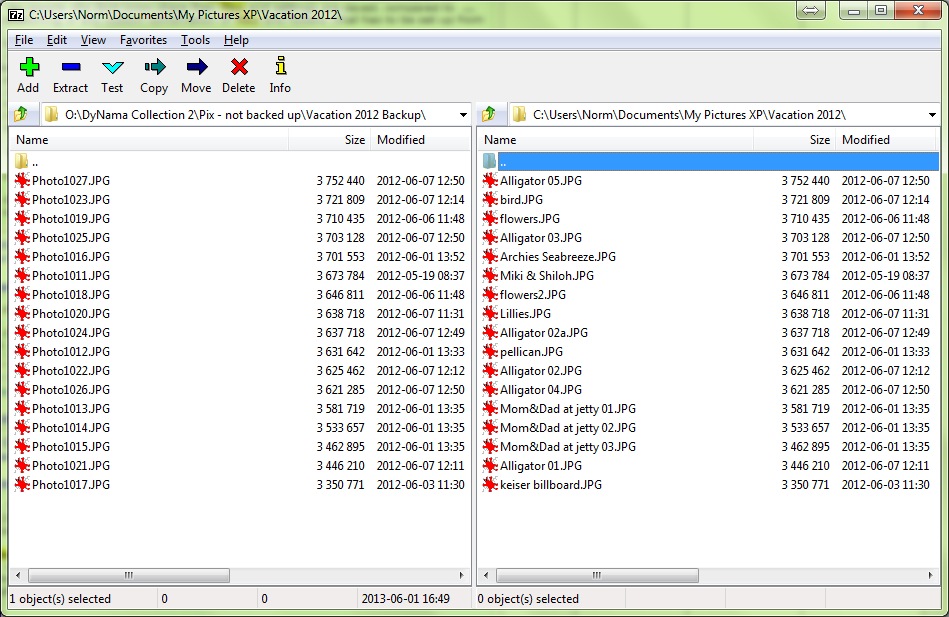
[attachimg=#1]

I can actually match them manually by just sorting by size, which i've done in the file browser in the photo above. (isn't it amazing that no two photos or videos are exactly the same size!) now all i need is to copy each filename to the clipboard 1-at-a-time in the right panel, then apply the new name to the matching file in the left panel. but with dozens if not hundreds of files, that's a lot of work. i'd like an easier way to do that, please.

My thinking is a duplicate finder that offers to apply 1 filename to the other (in addition to deleting one, which i won't use, but that's what dupe finders usually offer to do), a file-syncing program that recognizes duplicate files, a program that shows the files that match together with a rename button or a checkbox and a Rename Selected button, a program that pops up a window for each match and offers to rename the right file to match the left or vice versa, a dual-pane explorer just like the above pic where i highlight the 2 files and press a button, whatever is easier.
« Last Edit: June 01, 2013, 11:54 PM by DyNama »

4wd

  • Pedantic Old Bastard
  • Supporting Member
  • Joined in 2006
  • **
  • Posts: 5,652
    • Coding Snacks
Re: DONE: Sync folders by renaming files
« Reply #1 on: June 02, 2013, 04:49 AM »
NOTE: Latest version down there.

If your only matching criteria is size then this should do what you want.

Save it as RenSS.cmd and then at a command prompt type RenSS.cmd <source> <dest> - put quote around things with spaces in.

It'll only do *.jpg, (unless you change the appropriate parameter), and it's recursive - so if your destination is a sub-directory of your source then you're in deep shit.

Code: (generic)
@echo off
rem RenSS.cmd
rem Rename files in dest with same size as files in source
rem
rem RenSS.cmd <srce> <dest>

setlocal EnableExtensions

for /r %1 %%a in (*.jpg) do (call :CheckB "%~2" %%~za "%%~nxa")
goto End

:CheckB
for /r %1 %%b in (*.jpg) do (if %2 equ %%~zb ren "%%b" "%~3")
goto :EOF

:End

So using your example above:

RenSS.cmd "C:\Users\Norm\Documents\My Pictures XP\Vacation 2012" "O:\DyNama Collection 2\Pix - not backed up\Vacation 2012 Backup"

Yes, I know, it's not as easy as clicking buttons, (see V3 below), but then most people would use a dual pane filemanager and just do something like RenSS.cmd %s %d

NOTE: Worked here on my small test scenario but who knows what might happen on your machine, ie. test it first on some duplicated files.

If there happens to be more than two files with the same size then subsequent rename operations for them will fail after the first, (ie. file already exists).
"I will not follow where the path may lead, but I will go where there is no path, and I will leave a trail." - Muriel Strode, 1903
« Last Edit: June 07, 2013, 01:55 AM by 4wd »

cmpm

  • Charter Member
  • Joined in 2006
  • ***
  • Posts: 2,026
Re: DONE: Sync folders by renaming files
« Reply #2 on: June 02, 2013, 05:36 AM »
I was thinking to suggest a sync program.
Or a cloud app like dropbox or box.

app103

  • That scary taskbar girl
  • Global Moderator
  • Joined in 2006
  • *****
  • Posts: 5,888
    • Participated in NANY Challenge Six Times
    • Coding Snacks
    • Gathering Badge
    • Cody Award
    • Volunteers/Staff
Re: DONE: Sync folders by renaming files
« Reply #3 on: June 02, 2013, 09:19 PM »
Perhaps one of those duplicate file finders, but one that can rename the duplicates, rather than delete them?

skwire

  • I eat Coding Snacks for breakfast...
  • Global Moderator
  • Joined in 2005
  • *****
  • Posts: 5,297
    • Participated in NANY Challenge Seventeen Times
    • Coding Snacks
    • Superboy Coder
    • Cody Award
    • Volunteers/Staff
    • Gathering Badge
Re: DONE: Sync folders by renaming files
« Reply #4 on: June 02, 2013, 09:25 PM »
As an aside, I think basing the rename off of file sizes is just asking for trouble since the chance of a collision does exist, however small.  On any modern computer, generating any kind of checksum for such small files wouldn't be much of a price to pay to better guard against collisions.

4wd

  • Pedantic Old Bastard
  • Supporting Member
  • Joined in 2006
  • **
  • Posts: 5,652
    • Coding Snacks
Re: DONE: Sync folders by renaming files
« Reply #5 on: June 03, 2013, 01:05 AM »
As an aside, I think basing the rename off of file sizes is just asking for trouble since the chance of a collision does exist, however small.  On any modern computer, generating any kind of checksum for such small files wouldn't be much of a price to pay to better guard against collisions.

V2 with MD5 checksum, requires MS File Checksum Integrity Verifier in your path somewhere:

Code: (generic)
@echo off
rem RenSS.cmd
rem Rename files in dest with same size as files in source
rem
rem RenSS.cmd <srce> <dest>

setlocal EnableExtensions
setlocal EnableDelayedExpansion

for /r %1 %%a in (*.jpg) do (call :CheckSize "%2" %%~za "%%~fa")
goto End

:CheckSize
for /r %1 %%b in (*.jpg) do (if %2 equ %%~zb call :CheckMD5 "%~3" "%%~b")
goto :EOF

:CheckMD5
for /f "skip=3 delims= " %%i in ('fciv -md5 %1') do set md5_1=%%i
for /f "skip=3 delims= " %%i in ('fciv -md5 %2') do set md5_2=%%i

if "!md5_1!"=="!md5_2!" (ren "%~2" "%~nx1")
set md5_1=
set md5_2=
goto :EOF

:End
endlocal

Still has built in overwrite safeguard, (ie. you can't rename to a name that already exists).

Had to find it again, the MD5 check routine came from here courtesy of James L.

V3 adds folder requesters so you can now just double-click on the cmd file :D

Code: (generic)
@if (@CodeSection == @Batch) @then

    @echo off
    setlocal EnableExtensions
    setlocal EnableDelayedExpansion
    
    for /F "delims=" %%S in ('CScript //nologo //E:JScript "%~F0"') do (
        if %%S=="" exit
        set srce=%%S
    )
    for /F "delims=" %%D in ('CScript //nologo //E:JScript "%~F0"') do (
        if %%D=="" exit
       set dest=%%D
    )
    echo Source folder: "%srce%"
    echo Destination folder: "%dest%"

    for /r "%srce%" %%a in (*.jpg) do (call :CheckSize "%dest%" %%~za "%%~fa")
:End
    set srce=
    set dest=
    pause
    exit

    :CheckSize
    for /r %1 %%b in (*.jpg) do (if %2 equ %%~zb call :CheckMD5 "%~3" "%%~b")
    goto :EOF

    :CheckMD5
    for /f "skip=3 delims= " %%i in ('fciv -md5 %1') do set md5_1=%%i
    for /f "skip=3 delims= " %%i in ('fciv -md5 %2') do set md5_2=%%i

    if "!md5_1!"=="!md5_2!" (ren "%~2" "%~nx1")
    set md5_1=
    set md5_2=
    goto :EOF

    endlocal

    End of Batch section
@end


// JScript section

// Creates a dialog box that enables the user to select a folder and display it.
var title = "Select a folder", rootFolder = 0x11;
var shl = new ActiveXObject("Shell.Application");
var folder = shl.BrowseForFolder(0, title, 0, rootFolder);
WScript.Stdout.WriteLine(folder ? folder.self.path : "");

That particular bit of sorcery came from Antonio at DosTips.

I'm starting to wonder why I bother with AutoIt  :P

EDIT: Renamed to RenSSMD5.cmd to differentiate it from V4.

NOTE: Because of the EnableDelayedExpansion setting in V4, any filename that has an exclamation mark (!) in it will NOT be renamed.  Use V9 below if you want hash comparison and you use ! in filenames.
"I will not follow where the path may lead, but I will go where there is no path, and I will leave a trail." - Muriel Strode, 1903
« Last Edit: June 06, 2013, 12:01 PM by 4wd »

DyNama

  • Are you a good witch or a bad witch?
  • Supporting Member
  • Joined in 2010
  • **
  • Posts: 73
Re: DONE: Sync folders by renaming files
« Reply #6 on: June 03, 2013, 07:35 AM »
The first batch file really does work! it is very clever! i couldn't have written it. a little low tech tho. perhaps i lied about the "whatever is easier".  :D

I'm an old DOS man, but i eventually forgot most of the DOS i knew when i reluctantly converted to Windows in 1995. i don't actually know how to set my path any more, so i put fciv in the same folder RenSSv3 is in. i neglected to say i'm running this on a win7 x64 Dell laptop with several external hard drives.

It's good to have a checksum option, but i just checked a couple hundred .jpgs and videos and couldn't find a single pair of files that were exactly the same size, even pix taken within seconds of each other. i do have lots of videos too, and i'm afraid checksums would take a long time. before i asked this question, i tried a few sync programs and dupe finders; FreeFileSync when given 2 dozen videos on each side to examine estimated it would take 2 hours. can it check the date and time instead of checksum?

4wd

  • Pedantic Old Bastard
  • Supporting Member
  • Joined in 2006
  • **
  • Posts: 5,652
    • Coding Snacks
Re: DONE: Sync folders by renaming files
« Reply #7 on: June 03, 2013, 07:59 AM »
It's good to have a checksum option, but i just checked a couple hundred .jpgs and videos and couldn't find a single pair of files that were exactly the same size, even pix taken within seconds of each other.

I didn't think it would work to well due to the EXIF data contained within the JPG possibly being different even though the image data and size might be identical.

Quote
i do have lots of videos too, and i'm afraid checksums would take a long time. before i asked this question, i tried a few sync programs and dupe finders; FreeFileSync when given 2 dozen videos on each side to examine estimated it would take 2 hours. can it check the date and time instead of checksum?

Should be doable, so you want size, date and time to be matched ?
"I will not follow where the path may lead, but I will go where there is no path, and I will leave a trail." - Muriel Strode, 1903

DyNama

  • Are you a good witch or a bad witch?
  • Supporting Member
  • Joined in 2010
  • **
  • Posts: 73
Re: DONE: Sync folders by renaming files
« Reply #8 on: June 03, 2013, 08:14 AM »
i tried RenSSv1 (filesize only) on 2 folders with 16 ~320meg videos each and it worked just fine once i changed the file to ".avi", then ".wmv", then ".mp4". there's a way to pass the extension to the batch file too, isn't there?

then i tried RenSSv3 on a folder with 110 videos = 29.6gigs, and it's backup, of which only about a dozen files actually needed renaming. 22 .mp4s = 8gigs took about 15 minutes. 75 .wmvs = 16.8gigs took about 25minutes. does the program detect whether the file needs renaming? i much prefer selecting folders from a list rather than typing at a command prompt―thanx!

some files that should have been did not get renamed. also i get a DOS error message: The system cannot find the file specified. on one run i got it 9 times before it was done. most if not all of the new file names had punctuation marks in them, especially exclamation points, for example homerun!_from_@steve.mpg. is there anything in the process that would balk at that?

Thanx for the help!

4wd

  • Pedantic Old Bastard
  • Supporting Member
  • Joined in 2006
  • **
  • Posts: 5,652
    • Coding Snacks
Re: DONE: Sync folders by renaming files
« Reply #9 on: June 03, 2013, 08:39 AM »
there's a way to pass the extension to the batch file too, isn't there?

No, but who knows, there may be a way to hack it in.

Quote
then i tried RenSSv3 on a folder with 110 videos = 29.6gigs, and it's backup, of which only about a dozen files actually needed renaming. 22 .mp4s = 8gigs took about 15 minutes. 75 .wmvs = 16.8gigs took about 25minutes. does the program detect whether the file needs renaming?

It checks the size, if they are the same then it generates an MD5 checksum for each file, if they are the same it will rename one.  Generating MD5 checksums take time on large files.

Quote
is there anything in the process that would balk at that?

It uses the standard DOS rename command, so if it can't handle it then it will fail.  However, maybe I forgot something, I'll check.

V4 RenSSDT.cmd - matches size, date and time and asks for an extension.

Code: (generic)
@if (@CodeSection == @Batch) @then

    @echo off
    setlocal EnableExtensions
    setlocal DisableDelayedExpansion
    
    for /F "delims=" %%S in ('CScript //nologo //E:JScript "%~F0"') do (
        if %%S=="" exit
        set srce=%%S
    )
    for /F "delims=" %%D in ('CScript //nologo //E:JScript "%~F0"') do (
        if %%D=="" exit
       set dest=%%D
    )
    echo Source folder: "%srce%"
    echo Destination folder: "%dest%"
    set /P ext=Please enter extension [eg. jpg]: 
    if %ext%=="" exit
    
    for /r "%srce%" %%a in (*.%ext%) do (call :CheckSize "%dest%" %%~za "%%~fa")
:End
    set srce=
    set dest=
    set ext=
    pause
    exit

    :CheckSize
    for /r %1 %%b in (*.%ext%) do (if %2 equ %%~zb call :CheckDate "%~3" "%%~b")
    goto :EOF

    :CheckDate
    if "%~t1" equ "%~t2" (
        pushd "%~dp1"
        ren "%~nx2" "%~nx1"
    )
    popd
    goto :EOF
    
    endlocal

    End of Batch section
@end


// JScript section

// Creates a dialog box that enables the user to select a folder and display it.
var title = "Select a folder", rootFolder = 0x11;
var shl = new ActiveXObject("Shell.Application");
var folder = shl.BrowseForFolder(0, title, 0, rootFolder);
WScript.Stdout.WriteLine(folder ? folder.self.path : "");

It seems to handle files with ! in the name now, (! doesn't get passed if Delayed Expansion is enabled).

BTW, I hope you're trying these out on copies of your files before you let it run for real over your real files.  As I said, it works for me with the limited testing I do but then my machine is not your machine.

EDIT: I just realised after doing all these different versions that I think I've got the source and destination around the wrong way - won't change it now, it'll only be confusing, (as if I aren't already).  FIXED!
"I will not follow where the path may lead, but I will go where there is no path, and I will leave a trail." - Muriel Strode, 1903
« Last Edit: June 05, 2013, 01:55 PM by 4wd »

DyNama

  • Are you a good witch or a bad witch?
  • Supporting Member
  • Joined in 2010
  • **
  • Posts: 73
Re: DONE: Sync folders by renaming files
« Reply #10 on: June 03, 2013, 04:10 PM »
That'll do, 4wd! terrific!

i did switch %dest% and %srce% in the for loop
   for /r "%dest%" %%a in (*.%ext%) do (call :CheckSize "%srce%" %%~za "%%~fa")
cuz it is indeed backwards from v3 which i was just using 7 hours ago! no, i was in fact using the real files this time, but i was trying it on an extension that doesn't have that many renames. being backwards means it un-renamed 2 files! i retrieved their old filenames from a catalog, no problem.

i also put in prompts when choosing the folders:
   echo Choose Source Folder
so i don't lose track of what i'm doing. would it be presumptuous of me to post here the whole file of my minor changes?

the neat thing about this program is that if i choose the wrong folder or type the wrong extension, it won't find any matches so it'll do nothing. another good thing is a folder that got partially backed up to 2 different destination just renames the files that are there and doesn't copy the missing files, something every sync program wants to do. after i run the program, i use Vice Versa Free, a file comparing program, to verify it got all the files renamed.

Thanx!

« Last Edit: June 03, 2013, 04:18 PM by DyNama »

mouser

  • First Author
  • Administrator
  • Joined in 2005
  • *****
  • Posts: 40,931
    • Gathering Badge
    • Plugin Coding Medal
    • Participated in NANY Challenge Seventeen Times
    • Cody Award
    • Coding Snacks
    • Volunteers/Staff
Re: DONE: Sync folders by renaming files
« Reply #11 on: June 03, 2013, 04:33 PM »
I love to see threads like this  :up:

4wd

  • Pedantic Old Bastard
  • Supporting Member
  • Joined in 2006
  • **
  • Posts: 5,652
    • Coding Snacks
Re: DONE: Sync folders by renaming files
« Reply #12 on: June 03, 2013, 05:03 PM »
cuz it is indeed backwards from v3 which i was just using 7 hours ago!

i also put in prompts when choosing the folders:
    echo Choose Source Folder
so i don't lose track of what i'm doing. would it be presumptuous of me to post here the whole file of my minor changes?

That's fine but I may as well add them to V4 above, (later when I wake up - that's right, I'm technically supposed to be asleep - it's 0300).

Quote
Thanx!

No problem, quite a fun small script - certainly beats wracking my brain over Dll calls in AutoIt  :-\
"I will not follow where the path may lead, but I will go where there is no path, and I will leave a trail." - Muriel Strode, 1903

DyNama

  • Are you a good witch or a bad witch?
  • Supporting Member
  • Joined in 2010
  • **
  • Posts: 73
Re: DONE: Sync folders by renaming files
« Reply #13 on: June 03, 2013, 05:30 PM »
just a few minor changes. i can do Echos! is there any way it can announce how many files were checksummed and how many were renamed?

yep, mouser, it's all good!

Code: (generic)
@if (@CodeSection == @Batch) @then

    @echo off
    setlocal EnableExtensions
    setlocal DisableDelayedExpansion
    
    echo Choose Source Folder
    for /F "delims=" %%S in ('CScript //nologo //E:JScript "%~F0"') do (
        if %%S=="" exit
        set srce=%%S
    )
    echo _
    echo Source folder: "%srce%"
    echo Choose Destination Folder
    for /F "delims=" %%D in ('CScript //nologo //E:JScript "%~F0"') do (
        if %%D=="" exit
       set dest=%%D
    )
    echo Destination folder: "%dest%"
    set /P ext=Please enter extension [eg. jpg]: 
    if %ext%=="" exit
    
    for /r "%dest%" %%a in (*.%ext%) do (call :CheckSize "%srce%" %%~za "%%~fa")
:End
    set srce=
    set dest=
    set ext=
    pause
    exit

    :CheckSize
    for /r %1 %%b in (*.%ext%) do (if %2 equ %%~zb call :CheckDate "%~3" "%%~b")
    goto :EOF

    :CheckDate
    if "%~t1" equ "%~t2" (
        pushd "%~dp1"
        ren "%~nx1" "%~nx2"
    )
    popd
    goto :EOF
    
    endlocal

    End of Batch section
@end


// JScript section

// Creates a dialog box that enables the user to select a folder and display it.
var title = "Select a folder", rootFolder = 0x11;
var shl = new ActiveXObject("Shell.Application");
var folder = shl.BrowseForFolder(0, title, 0, rootFolder);
WScript.Stdout.WriteLine(folder ? folder.self.path : "");
« Last Edit: June 03, 2013, 05:40 PM by DyNama »

mouser

  • First Author
  • Administrator
  • Joined in 2005
  • *****
  • Posts: 40,931
    • Gathering Badge
    • Plugin Coding Medal
    • Participated in NANY Challenge Seventeen Times
    • Cody Award
    • Coding Snacks
    • Volunteers/Staff
Re: DONE: Sync folders by renaming files
« Reply #14 on: June 03, 2013, 05:53 PM »
ps. I always remind people that although certainly not required, it's always a nice gesture to donate to someone on the forum who creates something useful if you can afford it.

4wd

  • Pedantic Old Bastard
  • Supporting Member
  • Joined in 2006
  • **
  • Posts: 5,652
    • Coding Snacks
Re: DONE: Sync folders by renaming files
« Reply #15 on: June 04, 2013, 02:13 AM »
is there any way it can announce how many files were checksummed and how many were renamed?

Yes, the more direct way would however require you to stop using ! in filenames since Delayed Expansion would need to be enabled.

But there's probably a more creative way around the problem.

V5 with statistics and colour!  ;D

I fixed the reversed srce/dest in the rename section where I had it backwards.

Code: (generic)
@if (@CodeSection == @Batch) @then

    @echo off
    color 1a
    setlocal EnableExtensions
    setlocal DisableDelayedExpansion
    
    echo Select SOURCE folder
    for /F "delims=" %%S in ('CScript //nologo //E:JScript "%~F0"') do (
        if %%S=="" exit
        set srce=%%S
    )
    echo Selected folder: "%srce%"
    
    echo Select DESTINATION folder
    for /F "delims=" %%D in ('CScript //nologo //E:JScript "%~F0"') do (
        if %%D=="" exit
       set dest=%%D
    )
    echo Selected folder: "%dest%"
    
    set /P ext=Please enter extension [eg. jpg]: 
    if %ext%=="" exit
    set /a totfiles=0
    set /a renfiles=0
    
    for /r "%srce%" %%a in (*.%ext%) do (call :CheckSize "%dest%" %%~za "%%~fa")
:End
    echo Total files:   %totfiles%
    echo Renamed files: %renfiles%
    set totfiles=
    set renfiles=
    set srce=
    set dest=
    set ext=
    pause
    exit

    :CheckSize
    set /a totfiles+=1
    for /r %1 %%b in (*.%ext%) do (if %2 equ %%~zb call :CheckDate "%~3" "%%~b")
    goto :EOF

    :CheckDate
    if "%~t1" equ "%~t2" (
        pushd "%~dp2"
        ren "%~nx2" "%~nx1"
        if not exist "%~nx2" (set /a renfiles+=1)
        popd
    )
    goto :EOF

    endlocal

    End of Batch section
@end


// JScript section

// Creates a dialog box that enables the user to select a folder and display it.
var title = "Select a folder", rootFolder = 0x11;
var shl = new ActiveXObject("Shell.Application");
var folder = shl.BrowseForFolder(0, title, 0, rootFolder);
WScript.Stdout.WriteLine(folder ? folder.self.path : "");
"I will not follow where the path may lead, but I will go where there is no path, and I will leave a trail." - Muriel Strode, 1903
« Last Edit: June 04, 2013, 04:06 PM by 4wd »

DyNama

  • Are you a good witch or a bad witch?
  • Supporting Member
  • Joined in 2010
  • **
  • Posts: 73
Re: DONE: Sync folders by renaming files
« Reply #16 on: June 05, 2013, 12:57 AM »
done, mouser, from my meager resources.

4wd, wonderful!

so is it actually checking all 3 criteria, size, date, and checksum?

one more request. when RenSS finishes, could it loop back and ask for another extension using the same 2 folders, and only exit when i hit {enter}?
« Last Edit: June 05, 2013, 01:05 AM by DyNama »

4wd

  • Pedantic Old Bastard
  • Supporting Member
  • Joined in 2006
  • **
  • Posts: 5,652
    • Coding Snacks
Re: DONE: Sync folders by renaming files
« Reply #17 on: June 05, 2013, 01:17 AM »
so is it actually checking all 3 criteria, size, date, and checksum?

No - you said it wasn't finding any matches when it used the checksums, so that's not in this version.  It's just size, date and time.

Besides unless I can find a way to get it to work with Delayed Expansion enabled and ! in filenames I can't use the MD5 routine since it relies on Delayed Expansion.

Quote
one more request. when RenSS finishes, could it loop back and ask for another extension using the same 2 folders, and only exit when i hit {enter}?

Easy enough.

V6 Added repeatability and fixed cancelling of folder requesters.
V7 Added log file and option to display at end, (written to same folder as batch file), it just keeps getting bigger until you delete it

Code: (generic)
@if (@CodeSection == @Batch) @then

    @echo off
    color 1a
    setlocal EnableExtensions
    setlocal DisableDelayedExpansion
    
    echo Select SOURCE folder
    for /F "delims=" %%S in ('CScript //nologo //E:JScript "%~F0"') do (
        set srce=%%S
    )
    if "%srce%"=="" goto :End2
    echo Selected folder: "%srce%"
    
    echo Select DESTINATION folder
    for /F "delims=" %%D in ('CScript //nologo //E:JScript "%~F0"') do (
       set dest=%%D
    )
    if "%dest%"=="" goto :End2
    
    echo Selected folder: "%dest%"
    
    :GetExt
    echo.
    set /P ext=Please enter extension [eg. jpg] ENTER to exit: 
    if %ext%=="" goto :End2
    set /a totfiles=0
    set /a renfiles=0

    echo --------------------------- >>"%~dp0%RenSSDT.log"
    echo %date%  %time% >>"%~dp0%RenSSDT.log"
    echo --------------------------- >>"%~dp0%RenSSDT.log"

    for /r "%srce%" %%a in (*.%ext%) do (call :CheckSize "%dest%" %%~za "%%~fa")

    :End
    echo Total files:   %totfiles%
    echo Renamed files: %renfiles%
    set totfiles=
    set renfiles=
    set ext=
    if exist "%~dp0%RenSSDT.log" (
        choice /c yn /m "View logfile"
        if errorlevel 2 goto :GetExt
        if errorlevel 1 (start notepad.exe "%~dp0%RenSSDT.log")
    )
    goto :GetExt
    :End2
    set srce=
    set dest=
    pause
    exit

    :CheckSize
    set /a totfiles+=1
    for /r %1 %%b in (*.%ext%) do (if %2 equ %%~zb call :CheckDate "%~3" "%%~b")
    goto :EOF

    :CheckDate
    if "%~t1" equ "%~t2" (
        pushd "%~dp2"
        ren "%~nx2" "%~nx1"
        if not exist "%~nx2" (
            set /a renfiles+=1
            echo Renamed: "%~nx2" To: "%~nx1" >>"%~dp0%RenSSDT.log"
        )
        popd
    )
    goto :EOF

    endlocal

    End of Batch section
@end


// JScript section

// Creates a dialog box that enables the user to select a folder and display it.
var title = "Select a folder", rootFolder = 0x11;
var shl = new ActiveXObject("Shell.Application");
var folder = shl.BrowseForFolder(0, title, 0, rootFolder);
WScript.Stdout.WriteLine(folder ? folder.self.path : "");

Log file output:
Code: (generic)
--------------------------- 
Wed 05/06/2013  23:36:35.97 
--------------------------- 
Renamed: "gyjkhgjkgh.jpg" To: "20012.jpg" 
Renamed: "51jbbjbjk.jpg" To: "homerun!_from_@steve.jpg" 

Wow, this thing's getting huge....it's cracked 2kB in size.
"I will not follow where the path may lead, but I will go where there is no path, and I will leave a trail." - Muriel Strode, 1903
« Last Edit: June 06, 2013, 04:09 AM by 4wd »

DyNama

  • Are you a good witch or a bad witch?
  • Supporting Member
  • Joined in 2010
  • **
  • Posts: 73
Re: DONE: Sync folders by renaming files
« Reply #18 on: June 05, 2013, 05:13 PM »
so is it actually checking all 3 criteria, size, date, and checksum?

No - you said it wasn't finding any matches when it used the checksums, so that's not in this version.  It's just size, date and time.

Besides unless I can find a way to get it to work with Delayed Expansion enabled and ! in filenames I can't use the MD5 routine since it relies on Delayed Expansion.

That's okay, that explains how it is so fast!

V7 Added log file and option to display at end, (written to same folder as batch file), it just keeps getting bigger until you delete it

i love logs! unfortunately my 2 runs of RenSSDTv7 did not make a log. i searched everywhere! the path to the batch file is C:\My Stuff\RenSS\RenSSDTv7.cmd―i put "home-made" stuff in it's own folder cuz Win7 doesn't always let me write to Program Files (x86).

DyNama

  • Are you a good witch or a bad witch?
  • Supporting Member
  • Joined in 2010
  • **
  • Posts: 73
Re: DONE: Sync folders by renaming files
« Reply #19 on: June 05, 2013, 05:57 PM »
i thot maybe the space in the path C:\My Stuff\RenSS\RenSSDTv7.cmd was bothering the log file so i replaced every instance of
Quote
%~dp0%RenSSDT.log
with
Quote
"%~dp0%RenSSDT.log"
and voilà! it created the log file and logs every rename! but if
Quote
choice /c ny /m "View logfile"
is supposed to ask me if i want to view the log, it still doesn't. it echos a "goto" in the CMD window and then closes.

f0dder

  • [Well, THAT escalated quickly!]
  • Charter Honorary Member
  • Joined in 2005
  • ***
  • Posts: 9,153
    • Participated in NANY Challenge Once
Re: DONE: Sync folders by renaming files
« Reply #20 on: June 05, 2013, 10:33 PM »
It's good to have a checksum option, but i just checked a couple hundred .jpgs and videos and couldn't find a single pair of files that were exactly the same size, even pix taken within seconds of each other. i do have lots of videos too, and i'm afraid checksums would take a long time.
Unless you're going to check several gigabytes at a time, checksumming isn't too bad - even for several years old computers, the hashing speed will be I/O limited, even for hashes that are stronger than md5. A slightly sophisticated tool could hash source and destination files at the same time (given that they're on different physical media), which should be pretty fast.

OK, an USB2 enclosure will max out at ~25MB/s regardless of how fast the disk inside is, but even if you're processing a chunk of a couple of gigabytes, that's less than two minutes of extra processing, to be sure that things are going to be all in order. Two minutes might sound like a fair chunk of time, but how long is it going to take you to recreate the photos? - or, if nothing has been lost, just the time spent sorting out the mess? :)
- carpe noctem

4wd

  • Pedantic Old Bastard
  • Supporting Member
  • Joined in 2006
  • **
  • Posts: 5,652
    • Coding Snacks
Re: DONE: Sync folders by renaming files
« Reply #21 on: June 06, 2013, 04:34 AM »
Quote
choice /c ny /m "View logfile"
is supposed to ask me if i want to view the log, it still doesn't. it echos a "goto" in the CMD window and then closes.

I modified v7 to add the quotes around everything referring to the log file - I normally avoid spaces in folder/file names so I rarely have this problem.

And the line before the choice command now refers to the full path for the log, (which I forgot).

Two minutes might sound like a fair chunk of time, but how long is it going to take you to recreate the photos? - or, if nothing has been lost, just the time spent sorting out the mess? :)

I think the problem with this method regarding photos, is that the EXIF data can vary even between two photos taken at the same time, (ISO speed, etc), which throws off the checksum - if you could checksum just the image data, ignoring any EXIF/extras then it's certainly a viable option.

There's a example on stackoverflow of doing it using python, I might have a play and see what kind of mess I can come up with for a batch file :)

But you have a very valid point about the mucking up of names, even though a file can't be overwritten, (internal DOS ren command just fails) - so you won't lose files.

V8 Generates Undo cmd files in the form of Undo-YYYYMMDDHHMMSS.cmd in the batch file folder.

eg. Here's the log:

Quote
---------------------------
Thu 06/06/2013  14:57:24.40
---------------------------
Renamed: "fdv s fds 89ds fdg fd78g 6.jpg" To: "homerun!_from_@steve.jpg"

Here's the Undo file, (Undo-20130606145946.cmd):
Quote
ren "U:\test\3 8\homerun!_from_@steve.jpg" "fdv s fds 89ds fdg fd78g 6.jpg"

BTW, I'm just adding the latest version to my last posts and leaving the others there in case someone wants some earlier version to valmorphanize into something else.  If that's a problem, let me know and I'll delete all the previous.
"I will not follow where the path may lead, but I will go where there is no path, and I will leave a trail." - Muriel Strode, 1903
« Last Edit: June 06, 2013, 05:37 AM by 4wd »

DyNama

  • Are you a good witch or a bad witch?
  • Supporting Member
  • Joined in 2010
  • **
  • Posts: 73
Re: DONE: Sync folders by renaming files
« Reply #22 on: June 06, 2013, 08:55 AM »
OMG, this program keeps getting better! i never thot to ask for logging and undo files! works great! now there's less fear that i enter the source and destination folders backwards accidently.

4wd

  • Pedantic Old Bastard
  • Supporting Member
  • Joined in 2006
  • **
  • Posts: 5,652
    • Coding Snacks
Re: DONE: Sync folders by renaming files
« Reply #23 on: June 06, 2013, 11:50 AM »
Probably the final version.

V9 Added choice between matching Date and Time or matching SHA-1 hash, requires FCIV mentioned above for SHA-1, (it will always match size obviously).
   Changed log output to name the Undo file for each run and match criteria.

eg.
Quote
---------------------------
Thu 06/06/2013  21:36:13.35
Matching: SHA-1 hash
Undo file: Undo-20130606213613.cmd
---------------------------
Renamed: "fdv s fds 89ds fdg fd78g 6.jpg" To: "homerun!_from_@steve.jpg"
---------------------------
Thu 06/06/2013  21:36:55.53
Matching: Date and Time
Undo file: Undo-20130606213655.cmd
---------------------------
Renamed files: 0

If it says Renamed files: 0 then there won't be an Undo cmd file even though it lists one.

Broken the 3kB barrier, I suppose I could put in checking for the existence of fciv.exe in the path but maybe someone else wants to do it.

Addendum: Found a fault with v9 - still requires Delayed Expansion for doing the hash values.  I'm going to write a small SHA-1 program to avoid the for loop that causes this problem.  See v9.5 here.
"I will not follow where the path may lead, but I will go where there is no path, and I will leave a trail." - Muriel Strode, 1903
« Last Edit: June 08, 2013, 05:11 AM by 4wd »

DyNama

  • Are you a good witch or a bad witch?
  • Supporting Member
  • Joined in 2010
  • **
  • Posts: 73
Re: DONE: Sync folders by renaming files
« Reply #24 on: June 06, 2013, 08:52 PM »
4wd, i am satisfied. it's a very nice program, saves me a lot of time, and ensures i don't lose my file notes in a disk failure. i'm going to put a shortcut to it on my start menu.

i concede that checksum makes the file matching almost perfect, and programs should be robust enough to do the job and not make mistakes, but i'm happy enough with size + date most of the time identifying distinct and unique files without making me wait. even on an i5 core computer, i appreciate tasks being fast enough so i don't get distracted. i may never notice files renamed wrongly as these are just the backups. now i'll have the logs too, and i will keep them―for some reason i've kept activity logs from my computers since 2004! i even upload them to the cloud!

Original address: https://www.donationcoder.com/forum/index.php?topic=35086.0

