DonationCoder.com forum
 
Read-only archive. This is a static copy of the DonationCoder.com forum. Reading and searching work as before; logging in, posting and private messages do not.
Archive of 2026-10-21 · About this archive · Main site

Author Topic: Preferences UI accept / apply button naming & function  (Read 8,048 times)

cathie28

  • Participant
  • Joined in 2011
  • *
  • Posts: 84
Question & slight issue w/ function of the preferences UI accept & apply buttons.
1st, aren't apply & accept synonyms?  I believe so.  Confusing.  Shouldn't they be Apply (the changes) & OK (to close the UI)?

Also, when make a change & click Apply, the Apply button is still focused & isn't grayed out after applying (it should be grayed out).  Can't tell for sure if you correctly hit the Apply button or if it accepted changes.
Almost any app grays out the Apply button once clicked & then immediately moves the focus to the OK button, so can close the screen by just hitting Enter - if wish to exit right away.  Otherwise, can continue making other changes.

hamradio

  • Amateur Radio Guy
  • Charter Honorary Member
  • Joined in 2006
  • ***
  • Posts: 893
    • Plugin Coding Medal
    • Participated in NANY Challenge Fifteen Times
    • Cody Award
    • Coding Snacks
    • Volunteers/Staff
    • Hardware Hacker
Re: Preferences UI accept / apply button naming & function
« Reply #1 on: May 17, 2013, 11:46 PM »
Just another SC user and my understanding is the accept button closes the preferences saving the changes and apply saves them, but keeps the preferences open. :)

cathie28

  • Participant
  • Joined in 2011
  • *
  • Posts: 84
Re: Preferences UI accept / apply button naming & function
« Reply #2 on: May 18, 2013, 12:30 AM »
OK - thanks.  Still, after applying changes in most apps, convention is to gray them after applying changes. 

Not a big fan of making / naming things differently than everyone else, just to be different. 

Mouser - you march to the beat of a different drummer, which is often needed for innovation.  I can identify.

mouser

  • First Author
  • Administrator
  • Joined in 2005
  • *****
  • Posts: 40,931
    • Gathering Badge
    • Plugin Coding Medal
    • Participated in NANY Challenge Seventeen Times
    • Cody Award
    • Coding Snacks
    • Volunteers/Staff
Re: Preferences UI accept / apply button naming & function
« Reply #3 on: May 18, 2013, 05:54 PM »
Quote
Not a big fan of making / naming things differently than everyone else, just to be different.
i'm not either -- i hate that! i'm just very bad at figuring out what the standard way to do things is !  :-[

Quote
Still, after applying changes in most apps, convention is to gray them after applying changes.
yes, that would be better -- i just don't track changes well enough to do that for the SC options.

the apply button is pretty much useless in this case -- it only has value for a couple of settings like thumbnail options, where hitting Apply can show you what the effect of a settings change would be before you accept.

cathie28

  • Participant
  • Joined in 2011
  • *
  • Posts: 84
Re: Preferences UI accept / apply button naming & function
« Reply #4 on: May 18, 2013, 10:48 PM »
Quote
Still, after applying changes in most apps, convention is to gray them after applying changes.

>>yes, that would be better -- i just don't track changes well enough to do that for the SC options.
I don't understand what that means.  "I don't track changes well enough..."  Does that mean you don't think you'd change the apply button to gray out after clicking?
If it means that SSC doesn't track changes, any change made in prefs would light up "Apply" & clicking it would gray it out.  Maybe you're saying SSC has no way to check if changes have been made?

As far as HOW to do it, there'd be 1000's of examples, because that's the way it's almost always done.  It's not a big issue, though.

I didn't know it would show you a "preview" of some changes.  In apps w/ that ability, they name that the Preview button.  Then have another called Save (settings), or Apply.  There may / may not be another button - OK (which closes the screen) or just Close.

Apps that deviate much from standard convention of controlling UIs are confusing to me.  I've seen apps / addons that have NO buttons to save, apply, close, OK - nothing.  Just make changes, exit & hope for the best.

mouser

  • First Author
  • Administrator
  • Joined in 2005
  • *****
  • Posts: 40,931
    • Gathering Badge
    • Plugin Coding Medal
    • Participated in NANY Challenge Seventeen Times
    • Cody Award
    • Coding Snacks
    • Volunteers/Staff
Re: Preferences UI accept / apply button naming & function
« Reply #5 on: May 19, 2013, 12:04 AM »
What I mean is simply this:

There are hundreds of checkboxes and options in the SC options dialog.  In order to have the Apply button enable after you make a change to one of them, I'd have to Enable the Apply button after you change any of those hundreds of controls, which means that I'd have to trigger an event time any of those hundreds of control get triggered, and that's simply not something I do.

cmpm

  • Charter Member
  • Joined in 2006
  • ***
  • Posts: 2,026
Re: Preferences UI accept / apply button naming & function
« Reply #6 on: May 20, 2013, 02:39 AM »
I don't think Apply should grey out because it's not a permanent change.
Which gives me time to check and test if I like the changed settings.
You can hit Cancel to discard changes or Accept to keep them.

imho fwiw

cathie28

  • Participant
  • Joined in 2011
  • *
  • Posts: 84
Re: Preferences UI accept / apply button naming & function
« Reply #7 on: May 20, 2013, 03:52 PM »
EDIT:  Note that in working tools, like resize canvas, you make changes & there's a Preview button & an OK button to make changes permanent (which is also called Apply in many apps).  That probably sums up the inconsistency in SSC button names, depending on which screen or menu you're in.  I didn't realize that this topic would be controversial in the least or have much debate about unconventional button naming in Preferences.
End of Edit.

cmpm - you're correct, in that "previews" of changes shouldn't be "final" or gray out buttons.  It's a moot point, as mouser doesn't want to change it.  That's OK - it's his time involved to make changes & maintain it.

Strictly talking points, my OP was about the button naming vs function - compared to most professional apps' convention.  For most apps w/ such buttons, Apply means the final step in saving changes.  Often, they can be undone / reverted, by hitting Cancel - before you leave the screen.  

In this context, Apply & Accept generally mean the same thing to the avg person, but I can't recall seeing Accept used to save all changes vs Apply or Save.

If buttons just show what the changes look like (I have no idea what all options do that in SSC), that's usually named Preview or View Changes, not Apply.

Some high lighting or pop up (even momentarily), could easily be added to the final Accept / Apply button - or not, once clicked  to show it'd actually been clicked.
That  wouldn't require tracking events in prefs.  But clarity of buttons' function (naming) is more important.
« Last Edit: May 20, 2013, 05:26 PM by cathie28 »

tomos

  • Charter Member
  • Joined in 2006
  • ***
  • Posts: 11,970
    • Gathering Badge
    • Participated in NANY Challenge Once
Re: Preferences UI accept / apply button naming & function
« Reply #8 on: May 20, 2013, 04:18 PM »
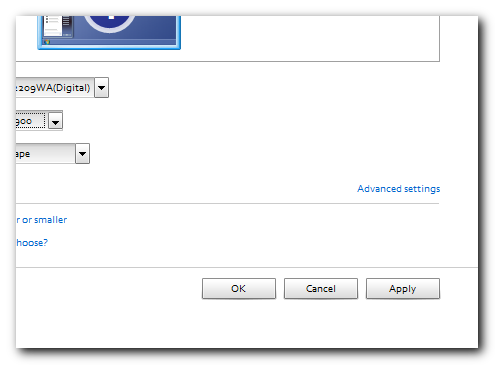
as said above I think the [Accept] button is normally the [OK] button - otherwise it's pretty much as normal for windows (here the dialogue for changing screen resolution):

[attachimg=#]

Tom

Original address: https://www.donationcoder.com/forum/index.php?topic=34960.0