DonationCoder.com forum
 
Read-only archive. This is a static copy of the DonationCoder.com forum. Reading and searching work as before; logging in, posting and private messages do not.
Archive of 2026-10-21 · About this archive · Main site

Author Topic: Trying to find icon location.  (Read 6,673 times)

pilgrim

  • Cogito ergo ?
  • Supporting Member
  • Joined in 2008
  • **
  • Posts: 316
Trying to find icon location.
« on: May 11, 2013, 12:02 PM »
I have just created a new shortcut for a batch file that runs my main internet connection and put it in Quick Launch.
I would like to change the icon to match my other network shortcuts but I can't find the icon which is this:

[attach]
I spent 25 years training to be an eccentric then I woke up one morning and realised that I'd cracked it.
I've not had to try since.

I wonder what happens if I click on thi

kunkel321

  • Supporting Member
  • Joined in 2009
  • **
  • Posts: 626
    • Participated in NANY Challenge Once
Re: Trying to find icon location.
« Reply #1 on: May 11, 2013, 02:04 PM »
If it's in a DLL, notice that http://www.nirsoft.net/utils/iconsext.html retains the name of the DLL (and gives it to the icons).

But if it's a shortcut you created, can you just right-click it, >Properties >Customize?

EDIT:  Sorry I just reread and saw that it's a Windows 7 system thing, so right-clicking might not work.  YOu still could bulk extract all the icons from your system dlls (it would take all day), then find the icon and thus the name of the dll.  (maybe....  I'm not a programer)
« Last Edit: May 11, 2013, 02:12 PM by kunkel321 »

pilgrim

  • Cogito ergo ?
  • Supporting Member
  • Joined in 2008
  • **
  • Posts: 316
Re: Trying to find icon location.
« Reply #2 on: May 11, 2013, 02:38 PM »
Thanks for the reply but I have Icons Extract and a list of the most common icon containing DLL's and EXE's, unfortunately it wasn't in any of them.

I wasn't certain when I originally posted but I have had this problem before, if I open properties for one of the shortcuts I created directly from Network Connections while the shortcut itself shows the icon in my first post the properties window is showing this icon:

[attach]
I spent 25 years training to be an eccentric then I woke up one morning and realised that I'd cracked it.
I've not had to try since.

I wonder what happens if I click on thi
« Last Edit: May 11, 2013, 03:08 PM by pilgrim »

kunkel321

  • Supporting Member
  • Joined in 2009
  • **
  • Posts: 626
    • Participated in NANY Challenge Once
Re: Trying to find icon location.
« Reply #3 on: May 11, 2013, 04:13 PM »
Not sure why it's giving different images...
Have you tried a global search for "netcenter*" though?  Presumably there is a netcenter.dll or netcenter.exe someplace in the system folder... 

4wd

  • Pedantic Old Bastard
  • Supporting Member
  • Joined in 2006
  • **
  • Posts: 5,652
    • Coding Snacks
Re: Trying to find icon location.
« Reply #4 on: May 12, 2013, 08:36 AM »
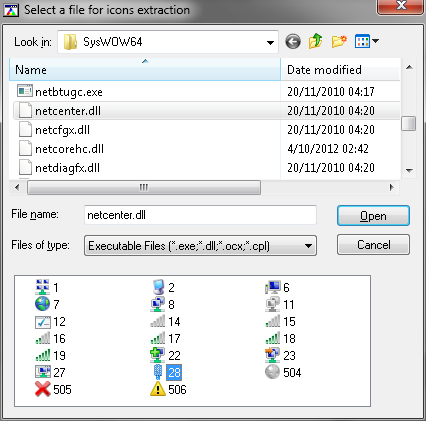
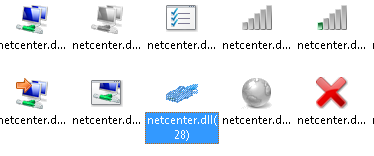
It appears in C:\Windows\SysWOW64 in netcenter.dll and netshell.dll but when you go to view it in iconsext it changes.

eg.

2013-05-12 18_29_23-Select a file for icons extraction.png

2013-05-12 18_29_43-IconsExtract_   C__Windows_SysWOW64_netcenter.dll.png

Ah, it's a multi-image icon, just extract it and step through the various images within it.
"I will not follow where the path may lead, but I will go where there is no path, and I will leave a trail." - Muriel Strode, 1903

pilgrim

  • Cogito ergo ?
  • Supporting Member
  • Joined in 2008
  • **
  • Posts: 316
Re: Trying to find icon location.
« Reply #5 on: May 12, 2013, 09:41 AM »
I found it in System32\netcentre.dll by looking in all DLL's in that folder starting with 'net'.

Quote
Ah, it's a multi-image icon, just extract it and step through the various images within it.

When I came up against this before I remember someone saying it was a composite image.
I use extraction on various files almost every day but I never even thought of it in this case.
Having extracted it I cannot see how that helps me copy that particular icon?

It took me an hour, three different programs and a visit to an online image editor to finish up with this:

[attach]
I spent 25 years training to be an eccentric then I woke up one morning and realised that I'd cracked it.
I've not had to try since.

I wonder what happens if I click on thi

Original address: https://www.donationcoder.com/forum/index.php?topic=34911.0