


1) Are there no rulers or any kind in SSC? Lot of fancy features, but missing one of the most basic?
Be nice if position of cross hairs (or any drawing / selection tool), clearly showed on H & V scale. Already has the cross hairs - could have the current x, y coordinates / measurements displayed at top / bottom of screen (like 32 px, 25 px), and / or SELECTED size (1920 x 1080 px) - as you're dragging / selecting AND after selecting an area.
The size of selected area would continued to display & separately, the new values of x & y cross hair positions as it's moved.
Assuming it has options to display rulers in px, cm / mm, in. Pretty basic drawing, selecting, cutting tool.
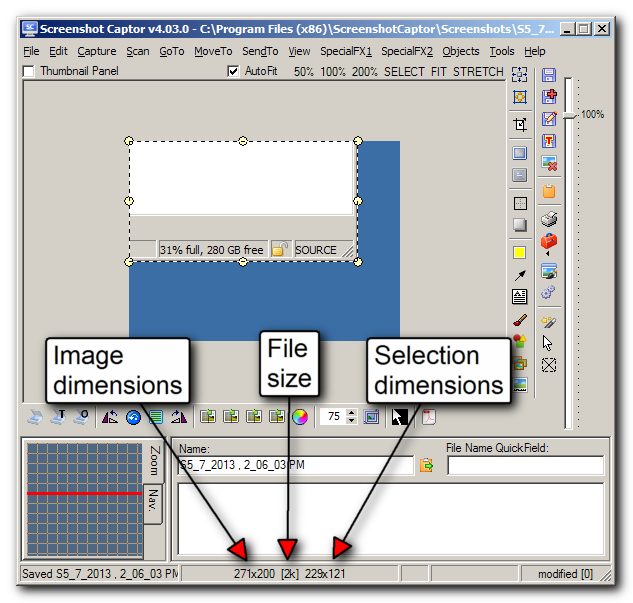
2) Are sizes & weight of fonts for the object size (or selected area), displayed at the bottom, R of screen controlled by SSC or Windows? The font is VERY lightweight & the the "toolbar" it's in is very short in height. It's pretty hard to read the values on a 1920 x 1080 screen. If it's not controlled by Windows, is there any way I can change it or hack a file?
3) Is the clipart from previous versions 3.x (that didn't make it into 4.x) available in a separate d/l to add to v4.3, or do we need to copy them into the new version from the old?
Thanks.
Be nice if position of cross hairs (or any drawing / selection tool), clearly showed on H & V scale. Already has the cross hairs - could have the current x, y coordinates / measurements displayed at top / bottom of screen (like 32 px, 25 px), and / or SELECTED size (1920 x 1080 px) - as you're dragging / selecting AND after selecting an area.
The size of selected area would continued to display & separately, the new values of x & y cross hair positions as it's moved.
Assuming it has options to display rulers in px, cm / mm, in. Pretty basic drawing, selecting, cutting tool.
2) Are sizes & weight of fonts for the object size (or selected area), displayed at the bottom, R of screen controlled by SSC or Windows? The font is VERY lightweight & the the "toolbar" it's in is very short in height. It's pretty hard to read the values on a 1920 x 1080 screen. If it's not controlled by Windows, is there any way I can change it or hack a file?
3) Is the clipart from previous versions 3.x (that didn't make it into 4.x) available in a separate d/l to add to v4.3, or do we need to copy them into the new version from the old?
Thanks.




 "Let me chew on this," or "Let me think this over." Or, as the Beverly Hillbillies would say, "Let me ponder this a spell."

