DonationCoder.com forum
 
Read-only archive. This is a static copy of the DonationCoder.com forum. Reading and searching work as before; logging in, posting and private messages do not.
Archive of 2026-10-21 · About this archive · Main site

Author Topic: IDEA: Folder Zipper  (Read 12,157 times)

magician62

  • Supporting Member
  • Joined in 2011
  • **
  • Posts: 180
IDEA: Folder Zipper
« on: April 29, 2013, 10:25 AM »
This may exist, but I have yet to find it. I had MyZippa, which did similar but in a different way.

Most archive programs give a right click option to compress a "selected_folder" to "selected_folder.format" where format may be zip rar etc.

For the purpose of this idea we will assume I want to use 7-Zip and zip files.

What I want to be able to do is either select a large number of folders and right-click create individual archives for each folder selected, or drop the folders onto a program that will process each folder and zip it to an archive of the same name in the source folder, or even a predefined destination folder. The second option seems the more logical as I guess configuration would be easier, but a combination of both would also be good.

Ie
folder1 -> folder1.zip
folder2 -> folder2.zip
folder3 -> folder3.zip


This is the next stage in dealling with files I have processed with "File Punter" so it may fit as an add-on for that, but more likely a stand alone
Why an I Magician62? Because Magician1 thru 61 were gone. :)

skwire

  • I eat Coding Snacks for breakfast...
  • Global Moderator
  • Joined in 2005
  • *****
  • Posts: 5,297
    • Participated in NANY Challenge Seventeen Times
    • Coding Snacks
    • Superboy Coder
    • Cody Award
    • Volunteers/Staff
    • Gathering Badge
Re: IDEA: Folder Zipper
« Reply #1 on: April 29, 2013, 02:12 PM »
This might work well as a fourth method for my SpinZip program you can find here:  http://skwire.dcmembers.com/fp/?page=spinzip

magician62

  • Supporting Member
  • Joined in 2011
  • **
  • Posts: 180
Re: IDEA: Folder Zipper
« Reply #2 on: April 29, 2013, 02:29 PM »
It does look like it could be a good candidate.

The one thing that needs to happen is that the files stay in the root directory of the archive. I had found some other programs that almost worked in the past, but put the folder into the archive.
The reason this need to happen, is I then change the suffix to CBZ so it can be read by a comic book reader, but if there is a folder, there is no image to display as the icon.

And before anyone asks. I am not actually using it for comic books, but old paperwork, receipts etc, and then loading into calibre for storage and categorisation :)


Additional thought. Maybe there would be a case to allow an option to change the file type to CBZ afterwards for those who need it, again another step eliminated
Why an I Magician62? Because Magician1 thru 61 were gone. :)
« Last Edit: April 29, 2013, 02:42 PM by magician62 »

magician62

  • Supporting Member
  • Joined in 2011
  • **
  • Posts: 180
Re: IDEA: Folder Zipper
« Reply #3 on: May 07, 2013, 07:29 PM »
Another option might be to allow selection based on file creation date between two dates

A question , as it doesn't yet fit my criteria, when including subdirectories, does it maintain structure or flat pack the files to one level ?
Why an I Magician62? Because Magician1 thru 61 were gone. :)

skwire

  • I eat Coding Snacks for breakfast...
  • Global Moderator
  • Joined in 2005
  • *****
  • Posts: 5,297
    • Participated in NANY Challenge Seventeen Times
    • Coding Snacks
    • Superboy Coder
    • Cody Award
    • Volunteers/Staff
    • Gathering Badge
Re: IDEA: Folder Zipper
« Reply #4 on: May 07, 2013, 10:03 PM »
Sorry for the lack of movement on this; I've been especially busy with my regular job lately.  I'll try to find some time to investigate adding your original request to SpinZip.

@Other devs:  If anybody else wants to take a crack at this request, by all means, do so.  =]

4wd

  • Pedantic Old Bastard
  • Supporting Member
  • Joined in 2006
  • **
  • Posts: 5,652
    • Coding Snacks
Re: IDEA: Folder Zipper
« Reply #5 on: May 08, 2013, 06:57 AM »
I know it's not a multi-megbyte monster with a nice GUI....but if you don't mind a simple batch command:

Code: (generic)
REM 7z2CBZ.cmd
@echo off
%~d1
cd %~dp1
for /d %%X in (%*) do (
cd "%%~nxX"
REM edit line below to include path to 7z.exe
C:\batchfiles\7z.exe a "..\%%~nxX.cbz" *.* -mx5 -tzip
cd ..
)

Put the batch file somewhere, edit it so that it's pointing to 7z.exe, then create a shortcut to it in %USERPROFILE%\SendTo, eg.

2013-05-08 16_42_53-C__Users_4wd_AppData_Roaming_Microsoft_Windows_SendTo.png

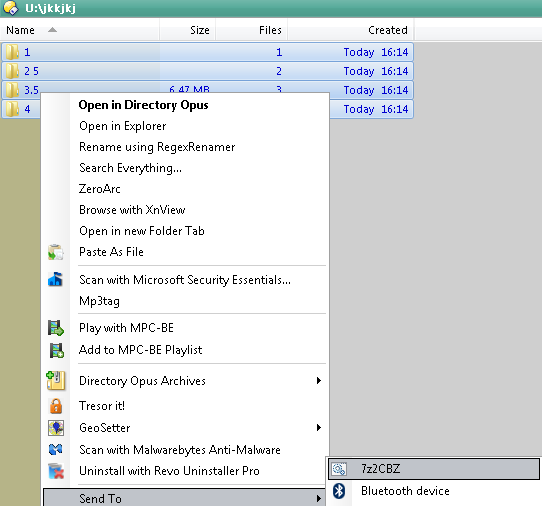
To use: select your folders in Explorer, DOpus, etc, right-click and select Send To -> 7z2CBZ

eg. From this:

2013-05-08 16_47_21-.png

You should end up with something like this:

2013-05-08 16_47_48-U__jkkjkj.png

Obligatory warning: There's no checking for any kind of error, eg. if you selected files instead directories.  That said, it works for me :)

A breakdown of what it does:
%~d1    Take the drive of the first argument and change to it
cd %~dp1    Take the path of the first argument and CD to it
for /d %%X in (%*) do (     For every argument passed to the batch file
cd "%%~nxX"    CD to the directory
C:\batchfiles\7z.exe a "..\%%~nxX.cbz" *.* -mx5 -tzip    Create the archive in the parent directory
cd ..    Change back to the parent directory


UPDATE: Got rid of the move command.
"I will not follow where the path may lead, but I will go where there is no path, and I will leave a trail." - Muriel Strode, 1903
« Last Edit: May 08, 2013, 07:07 AM by 4wd »

wr975

  • Charter Member
  • Joined in 2005
  • ***
  • Posts: 369
    • Coding Snacks
Re: IDEA: Folder Zipper
« Reply #6 on: May 08, 2013, 08:28 AM »
What I want to be able to do is either select a large number of folders and right-click create individual archives for each folder selected,

Try WinRAR: http://windows7themes.net/how-to-zip-multiple-files-into-individual-archives.html (for a single click solution: Create a profile and let WinRAR put it in your context menu)

c.gingerich

  • Supporting Member
  • Joined in 2011
  • **
  • Posts: 748
    • Participated in NANY Challenge Six Times
    • Coding Snacks
Re: IDEA: Folder Zipper
« Reply #7 on: May 08, 2013, 09:23 PM »
I have an app that can convert a folder to a ZIP file. I have not released it as it still needs some work, but I will get to it as soon as I can if it is something you are interested in.

magician62

  • Supporting Member
  • Joined in 2011
  • **
  • Posts: 180
Re: IDEA: Folder Zipper
« Reply #8 on: May 09, 2013, 05:25 AM »
wr975 - I have been using WinRAR since the stoneage, and never noticed that. Probably because I tend to go for right-click archive, so as a temporary solution it will work fine.

4wd - Many thanks, though as I get older, simpler is better so probably Jody incorporating into spinzip, woudl give me thhe other options too with a nice simple GUI for a nice simple me :)

c.gingerich - I think for myself , spinzip will possibly provide the best solution longterm, as I will not be the only one using it. wiffey also has to understand it, and we try to keep the same software on both machines, so we can each swap if neccesary :)
Why an I Magician62? Because Magician1 thru 61 were gone. :)

wr975

  • Charter Member
  • Joined in 2005
  • ***
  • Posts: 369
    • Coding Snacks
Re: IDEA: Folder Zipper
« Reply #9 on: May 14, 2013, 11:36 AM »
So, you're using WinRAR already? Good for you. I've attached a short screencast video showing you how to create a WinRAR profile + add it the context menu. After doing this, you can zip your files and folders into separate archive files with two mouse-clicks.

skwire

  • I eat Coding Snacks for breakfast...
  • Global Moderator
  • Joined in 2005
  • *****
  • Posts: 5,297
    • Participated in NANY Challenge Seventeen Times
    • Coding Snacks
    • Superboy Coder
    • Cody Award
    • Volunteers/Staff
    • Gathering Badge
Re: IDEA: Folder Zipper
« Reply #10 on: May 16, 2013, 02:25 PM »
So, you're using WinRAR already? Good for you. I've attached a short screencast video showing you how to create a WinRAR profile + add it the context menu. After doing this, you can zip your files and folders into separate archive files with two mouse-clicks.

@wr975: Nicely done!

@magician62: I'm probably not going to get to this for at least a couple of weeks.  And, with a solution like wr975's, I'm not sure it's even worth it.

Original address: https://www.donationcoder.com/forum/index.php?topic=34796.0