DonationCoder.com forum
 
Read-only archive. This is a static copy of the DonationCoder.com forum. Reading and searching work as before; logging in, posting and private messages do not.
Archive of 2026-10-21 · About this archive · Main site

Author Topic: Deleting Files Permanently From Thumbnail Panel  (Read 9,048 times)

bubbajunk

  • Participant
  • Joined in 2012
  • *
  • Posts: 53
Deleting Files Permanently From Thumbnail Panel
« on: April 08, 2013, 02:13 PM »
Deleting files from the thumbnail panel changed between v4.00 and v4.01. All through the beta and up to release v4.00, I was always able to delete files permanently (bypassing the recycle bin) from the thumbnail panel by first selecting the files and holding the {Shift}+{DEL} keys. This is the standard key combination for permanently deleting files using Windows Explorer. Using this key combination, the pop-up would confirm that I wanted to permanently delete the files. Just selecting the {DEL} key would confirm delete and send to the recycle bin.

Starting in v4.01, holding the {Shift}+{DEL} doesn't provide the option to delete files permanently. There seems to be no way to bypass the recycle bin as in prior versions. Can you restore this functionality if it wasn't intentionally removed?

tomos

  • Charter Member
  • Joined in 2006
  • ***
  • Posts: 11,970
    • Gathering Badge
    • Participated in NANY Challenge Once
Re: Deleting Files Permanently From Thumbnail Panel
« Reply #1 on: April 08, 2013, 03:02 PM »
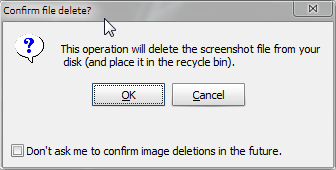
Confirmed in Windows 7 64bit

I get this with Shift+Del

[attachthumb=#]
Tom

app103

  • That scary taskbar girl
  • Global Moderator
  • Joined in 2006
  • *****
  • Posts: 5,888
    • Participated in NANY Challenge Six Times
    • Coding Snacks
    • Gathering Badge
    • Cody Award
    • Volunteers/Staff
Re: Deleting Files Permanently From Thumbnail Panel
« Reply #2 on: April 08, 2013, 03:04 PM »
What happens if you check the box on the dialog window? Nevermind.

mouser

  • First Author
  • Administrator
  • Joined in 2005
  • *****
  • Posts: 40,931
    • Gathering Badge
    • Plugin Coding Medal
    • Participated in NANY Challenge Seventeen Times
    • Cody Award
    • Coding Snacks
    • Volunteers/Staff
Re: Deleting Files Permanently From Thumbnail Panel
« Reply #3 on: April 12, 2013, 03:49 PM »
I see what happened --you are right this was a change introduced with 4.01, but not done on purpose.
I will endeavor to fix it.

mouser

  • First Author
  • Administrator
  • Joined in 2005
  • *****
  • Posts: 40,931
    • Gathering Badge
    • Plugin Coding Medal
    • Participated in NANY Challenge Seventeen Times
    • Cody Award
    • Coding Snacks
    • Volunteers/Staff
Re: Deleting Files Permanently From Thumbnail Panel
« Reply #4 on: April 13, 2013, 02:22 PM »
I've added support for using shift key to bypass recycle bin in ALL deletion operations (via delete key or through menus) -- it will be in next release.

mouser

  • First Author
  • Administrator
  • Joined in 2005
  • *****
  • Posts: 40,931
    • Gathering Badge
    • Plugin Coding Medal
    • Participated in NANY Challenge Seventeen Times
    • Cody Award
    • Coding Snacks
    • Volunteers/Staff

tomos

  • Charter Member
  • Joined in 2006
  • ***
  • Posts: 11,970
    • Gathering Badge
    • Participated in NANY Challenge Once
Re: Deleting Files Permanently From Thumbnail Panel
« Reply #6 on: April 14, 2013, 09:55 AM »
Afraid not :(

I still get the same dialogue as in my post above
(install version - V4.02.0)
Tom

mouser

  • First Author
  • Administrator
  • Joined in 2005
  • *****
  • Posts: 40,931
    • Gathering Badge
    • Plugin Coding Medal
    • Participated in NANY Challenge Seventeen Times
    • Cody Award
    • Coding Snacks
    • Volunteers/Staff
Re: Deleting Files Permanently From Thumbnail Panel
« Reply #7 on: April 14, 2013, 11:25 AM »
same dialog yes but does shift work?

cmpm

  • Charter Member
  • Joined in 2006
  • ***
  • Posts: 2,026
Re: Deleting Files Permanently From Thumbnail Panel
« Reply #8 on: April 14, 2013, 02:35 PM »
shift + delete bypasses the recycle bin and deletes permanently here

mouser

  • First Author
  • Administrator
  • Joined in 2005
  • *****
  • Posts: 40,931
    • Gathering Badge
    • Plugin Coding Medal
    • Participated in NANY Challenge Seventeen Times
    • Cody Award
    • Coding Snacks
    • Volunteers/Staff
Re: Deleting Files Permanently From Thumbnail Panel
« Reply #9 on: April 14, 2013, 02:36 PM »
Ah i see now that the dialog explicitly says they are going into the recycle bin even when they are not -- i will fix that now.

mouser

  • First Author
  • Administrator
  • Joined in 2005
  • *****
  • Posts: 40,931
    • Gathering Badge
    • Plugin Coding Medal
    • Participated in NANY Challenge Seventeen Times
    • Cody Award
    • Coding Snacks
    • Volunteers/Staff
Re: Deleting Files Permanently From Thumbnail Panel
« Reply #10 on: April 14, 2013, 02:47 PM »
Try the new beta -- the warning dialog should be clearer now.

cmpm

  • Charter Member
  • Joined in 2006
  • ***
  • Posts: 2,026
Re: Deleting Files Permanently From Thumbnail Panel
« Reply #11 on: April 14, 2013, 03:35 PM »
I can't find or see how to reenable the dialog without resetting everything to default via install. I've had it disabled for a while now.

Where is the 'beta'?

tomos

  • Charter Member
  • Joined in 2006
  • ***
  • Posts: 11,970
    • Gathering Badge
    • Participated in NANY Challenge Once
Re: Deleting Files Permanently From Thumbnail Panel
« Reply #12 on: April 14, 2013, 04:11 PM »
Dialogues are now correct :up:

sorry I never checked earlier where the file actually went -
I took the dialogue at it's word :-)
Tom

Original address: https://www.donationcoder.com/forum/index.php?topic=34581.0