DonationCoder.com forum
 
Read-only archive. This is a static copy of the DonationCoder.com forum. Reading and searching work as before; logging in, posting and private messages do not.
Archive of 2026-10-21 · About this archive · Main site

Author Topic: Virtual Folders  (Read 6,758 times)

e731997

  • Participant
  • Joined in 2013
  • *
  • Posts: 6
Virtual Folders
« on: April 05, 2013, 12:58 PM »
What is the Database Fieldname for Notes?
I have ((Lower(ClipText) LIKE '%string%') working but I want to also filter on the Notes field.

Is there a list of all Database Fieldnames?

Thanks.

mouser

  • First Author
  • Administrator
  • Joined in 2005
  • *****
  • Posts: 40,931
    • Gathering Badge
    • Plugin Coding Medal
    • Participated in NANY Challenge Seventeen Times
    • Cody Award
    • Coding Snacks
    • Volunteers/Staff
Re: Virtual Folders
« Reply #1 on: April 06, 2013, 05:51 PM »
Welcome to the site e731997. That's a hard name to pronounce!

The list of fields from the help file is:
  • Index
  • UserKeywords
  • ClipType
  • ParentId
  • ParentGroup
  • OtherGroups
  • Application
  • Title
  • Description <--- this is actually the NOTES field
  • ImageIndex
  • ExcerptText
  • ClipText
  • CreationDateTime
  • ModificationDateTime
  • ViewDateTime
  • MarkDateTime
  • DueDateTime
  • IsFavorite
  • UserFlag
  • UserCheckbox
  • UserRating
  • Protected

Let me know if you have any problem with the virtual folder filter.

e731997

  • Participant
  • Joined in 2013
  • *
  • Posts: 6
Re: Virtual Folders
« Reply #2 on: April 07, 2013, 01:49 AM »
Thanks Mouser!

It worked perfectly.

1. Is there any documentation on all the fields the 22 fields that you quoted?

2. In Virtual Folders there is an option of leaving the SQL checkbox unchecked. What feature does that provide?

3. How is "My Notes" intended to be used? I see that the SQL checkbox is unchecked.

Thanks


mouser

  • First Author
  • Administrator
  • Joined in 2005
  • *****
  • Posts: 40,931
    • Gathering Badge
    • Plugin Coding Medal
    • Participated in NANY Challenge Seventeen Times
    • Cody Award
    • Coding Snacks
    • Volunteers/Staff
Re: Virtual Folders
« Reply #3 on: April 07, 2013, 05:16 AM »
Quote
1. Is there any documentation on all the fields the 22 fields that you quoted?

I'm afraid not.. I really should try to write up more documentation on them.. The most important trick is to know how to show those columns so that you can see what they contain.  To show/hide columns click on the tiny button at the far left of the column header in the grid:
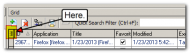
040713_0014_ver001.png

Quote
2. In Virtual Folders there is an option of leaving the SQL checkbox unchecked. What feature does that provide?

If you uncheck the "SQL" checkbox, then you just have a normal (non-virtual) group which contains the items dropped into it.

Quote
3. How is "My Notes" intended to be used? I see that the SQL checkbox is unchecked.

What exactly are we talking about when we say "My Notes"?

e731997

  • Participant
  • Joined in 2013
  • *
  • Posts: 6
Re: Virtual Folders
« Reply #4 on: April 07, 2013, 06:50 PM »
I see:

Clipboard
My Favorites
Quick Paste
Virtual Folders
My Notes  <---------------------
Recycle Bin

How is it used?

mouser

  • First Author
  • Administrator
  • Joined in 2005
  • *****
  • Posts: 40,931
    • Gathering Badge
    • Plugin Coding Medal
    • Participated in NANY Challenge Seventeen Times
    • Cody Award
    • Coding Snacks
    • Volunteers/Staff
Re: Virtual Folders
« Reply #5 on: April 07, 2013, 07:12 PM »
ha, ok i don't have that group -- i must have added it in more recent version.  it's just a group you can put stuff in if you want.  it has no special use.

e731997

  • Participant
  • Joined in 2013
  • *
  • Posts: 6
Re: Virtual Folders
« Reply #6 on: April 08, 2013, 01:10 AM »
How would I put stuff into it? All clipboard entries go into Clipboard old or new.

mouser

  • First Author
  • Administrator
  • Joined in 2005
  • *****
  • Posts: 40,931
    • Gathering Badge
    • Plugin Coding Medal
    • Participated in NANY Challenge Seventeen Times
    • Cody Award
    • Coding Snacks
    • Volunteers/Staff
Re: Virtual Folders
« Reply #7 on: April 10, 2013, 02:15 AM »
You would just drag+drop into it, or select it and click the AddNote button, etc.
It's basically just a container available for you if you want to put clips into it.

Original address: https://www.donationcoder.com/forum/index.php?topic=34553.0