DonationCoder.com forum
 
Read-only archive. This is a static copy of the DonationCoder.com forum. Reading and searching work as before; logging in, posting and private messages do not.
Archive of 2026-10-21 · About this archive · Main site

Author Topic: I have to Start Launch Bar commander twice!!  (Read 5,102 times)

hverne

  • Supporting Member
  • Joined in 2006
  • **
  • Posts: 7
I have to Start Launch Bar commander twice!!
« on: April 01, 2013, 08:06 PM »
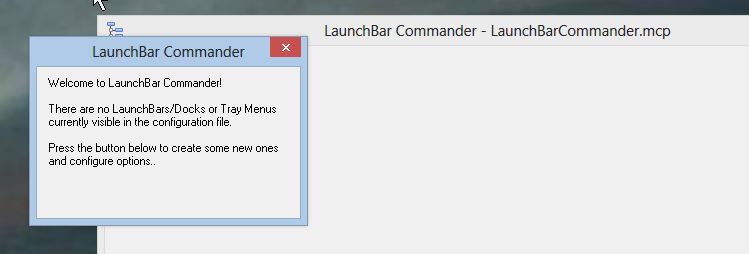
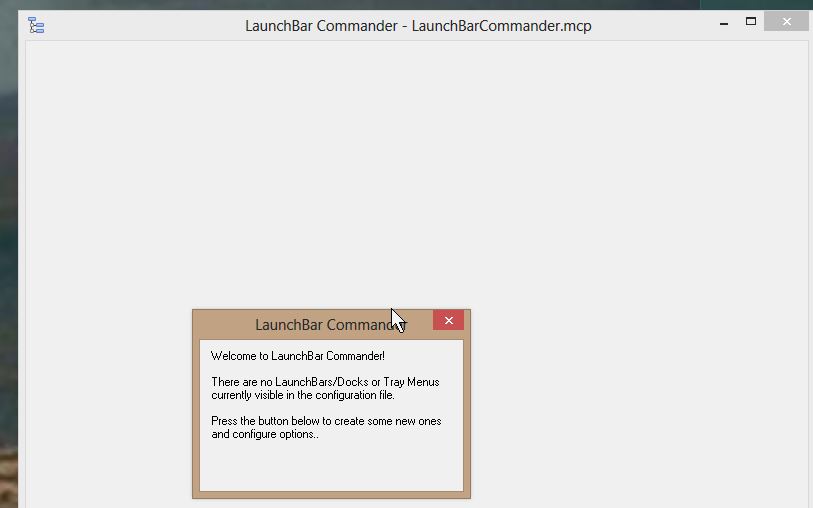
I am using Windows 8. When I launch LBC, V 1.133.01, (or let it launch itself), I get 2 windows, one saying welcome to LBC, the other blank, displaying LBC.MCP. If I close these and launch it again, all is well.
« Last Edit: April 01, 2013, 08:17 PM by hverne »

mouser

  • First Author
  • Administrator
  • Joined in 2005
  • *****
  • Posts: 40,931
    • Gathering Badge
    • Plugin Coding Medal
    • Participated in NANY Challenge Seventeen Times
    • Cody Award
    • Coding Snacks
    • Volunteers/Staff
Re: I have to Start Launch Bar commander twice!!
« Reply #1 on: April 30, 2013, 01:42 AM »
Did you figure this out yet? Something is quite confusing about this.  Can you clarify what behavior you are seeing when you launch LBC.  Don't launch it twice.

hverne

  • Supporting Member
  • Joined in 2006
  • **
  • Posts: 7
Re: I have to Start Launch Bar commander twice!!
« Reply #2 on: April 30, 2013, 02:28 AM »
J hope you can see attachment. 2 separate windows, I overlapped them just to make it easier to see.
If I launch it again, everything works fine

hverne

  • Supporting Member
  • Joined in 2006
  • **
  • Posts: 7
Re: I have to Start Launch Bar commander twice!!
« Reply #3 on: April 30, 2013, 02:42 AM »
More info--
The first time, in addition to the 2 dialogs I sent, I noticed that there was also a LBC icon on my task bar (which contained my full launch bar).
When I closed the other dialogs, it also closed, hence the 2nd start.

Original address: https://www.donationcoder.com/forum/index.php?topic=34510.0