DonationCoder.com forum
 
Read-only archive. This is a static copy of the DonationCoder.com forum. Reading and searching work as before; logging in, posting and private messages do not.
Archive of 2026-10-21 · About this archive · Main site

Last post Author Topic: RegaLink  (Read 92,327 times)

KynloStephen66515

  • Animated Giffer in Chief
  • Honorary Member
  • Joined in 2010
  • **
  • Posts: 3,772
    • Participated in NANY Challenge Three Times
    • Cody Award
    • Coding Snacks
    • Official Forum Clown
    • Volunteers/Staff
    • Writer
    • Hardware Hacker
    • DJ Badge - DJ
    • Linux User
Re: RegaLink
« Reply #25 on: April 02, 2013, 08:32 PM »
Stupid attachments got messed up.  Fixed the download link.

KynloStephen66515

  • Animated Giffer in Chief
  • Honorary Member
  • Joined in 2010
  • **
  • Posts: 3,772
    • Participated in NANY Challenge Three Times
    • Cody Award
    • Coding Snacks
    • Official Forum Clown
    • Volunteers/Staff
    • Writer
    • Hardware Hacker
    • DJ Badge - DJ
    • Linux User
Re: RegaLink
« Reply #26 on: April 03, 2013, 08:41 PM »
Update (Beta) v1.1.2

[Feature]

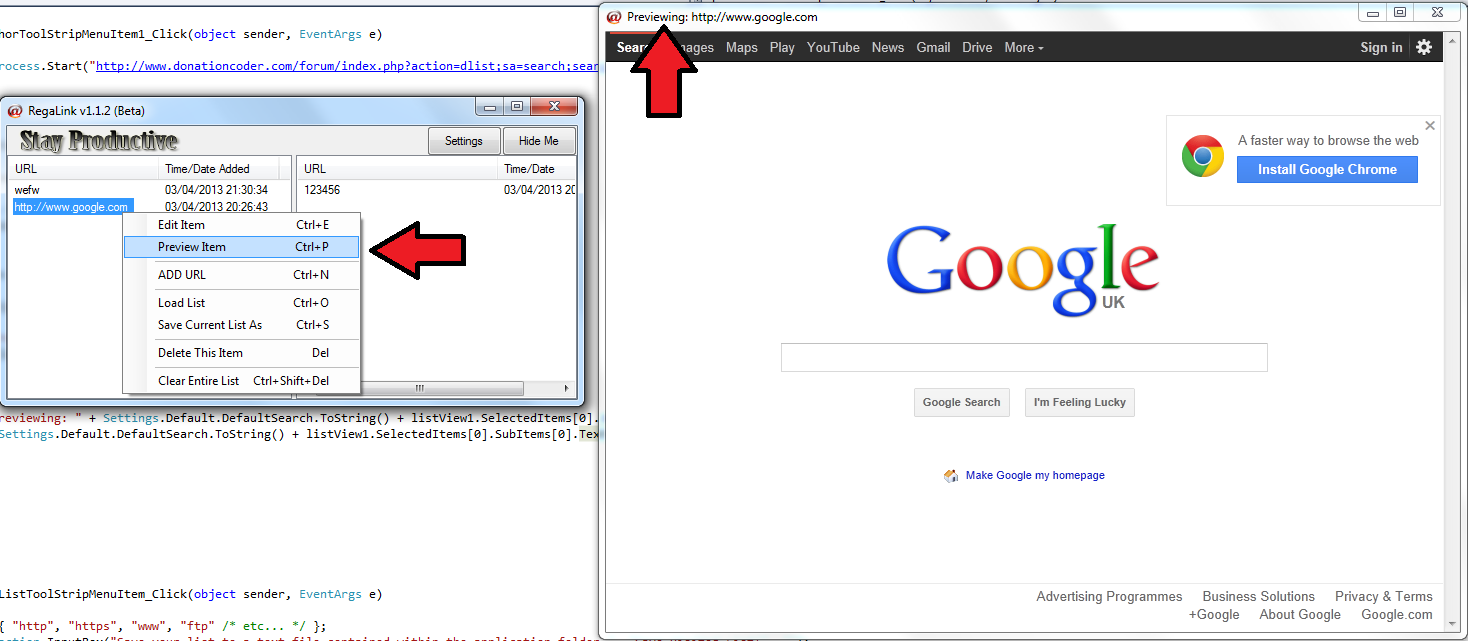
• Preview Links Within RegaLink without losing them from the list.
• Choose to save your visited list, as a separate file.

[attach=#]

KynloStephen66515

  • Animated Giffer in Chief
  • Honorary Member
  • Joined in 2010
  • **
  • Posts: 3,772
    • Participated in NANY Challenge Three Times
    • Cody Award
    • Coding Snacks
    • Official Forum Clown
    • Volunteers/Staff
    • Writer
    • Hardware Hacker
    • DJ Badge - DJ
    • Linux User
Re: RegaLink
« Reply #27 on: April 03, 2013, 08:43 PM »
You will also notice I got rid of the "Pending" and "Completed" graphics in this version.  I decided I hated them.

KynloStephen66515

  • Animated Giffer in Chief
  • Honorary Member
  • Joined in 2010
  • **
  • Posts: 3,772
    • Participated in NANY Challenge Three Times
    • Cody Award
    • Coding Snacks
    • Official Forum Clown
    • Volunteers/Staff
    • Writer
    • Hardware Hacker
    • DJ Badge - DJ
    • Linux User
Re: RegaLink
« Reply #28 on: April 03, 2013, 09:26 PM »
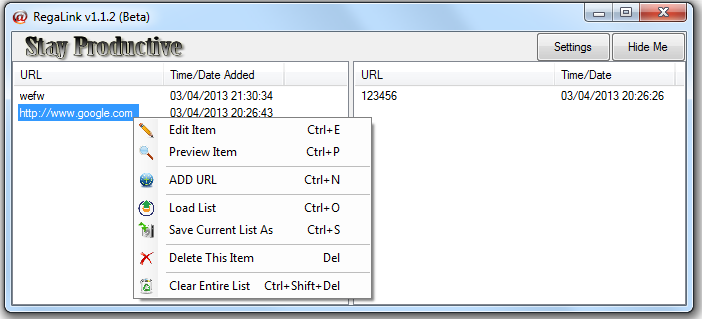
UI Improvement (Not in current version, or new Beta - Will be in next Beta)

RegaUI Improvement.png

PhilB66

  • Supporting Member
  • Joined in 2007
  • **
  • Posts: 1,522
Re: RegaLink
« Reply #29 on: April 04, 2013, 12:59 AM »
You will also notice I got rid of the "Pending" and "Completed" graphics in this version.  I decided I hated them.
Thank you. That was an eyesore.

KynloStephen66515

  • Animated Giffer in Chief
  • Honorary Member
  • Joined in 2010
  • **
  • Posts: 3,772
    • Participated in NANY Challenge Three Times
    • Cody Award
    • Coding Snacks
    • Official Forum Clown
    • Volunteers/Staff
    • Writer
    • Hardware Hacker
    • DJ Badge - DJ
    • Linux User
Re: RegaLink
« Reply #30 on: April 04, 2013, 01:10 AM »
You will also notice I got rid of the "Pending" and "Completed" graphics in this version.  I decided I hated them.
Thank you. That was an eyesore.

Ya know, up until last night, I didn't even notice they stretched when you maximized the window.  I noticed that and went straight into the code to remove them haha.

Is there anything (feature wise) you want adding Phil?

KynloStephen66515

  • Animated Giffer in Chief
  • Honorary Member
  • Joined in 2010
  • **
  • Posts: 3,772
    • Participated in NANY Challenge Three Times
    • Cody Award
    • Coding Snacks
    • Official Forum Clown
    • Volunteers/Staff
    • Writer
    • Hardware Hacker
    • DJ Badge - DJ
    • Linux User
Re: RegaLink
« Reply #31 on: April 04, 2013, 01:32 AM »
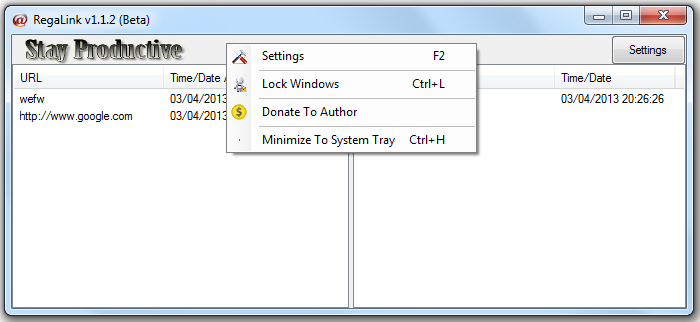
Hide button is now hidden, and replaced with a context menu item & shortcut key.

[attach=#]

PhilB66

  • Supporting Member
  • Joined in 2007
  • **
  • Posts: 1,522
Re: RegaLink
« Reply #32 on: April 06, 2013, 06:43 AM »
Is there anything (feature wise) you want adding Phil?
Wasn't able to test the latest creation yet, but I plan to use RegaLink to save custom queries and send to a search engine.

KynloStephen66515

  • Animated Giffer in Chief
  • Honorary Member
  • Joined in 2010
  • **
  • Posts: 3,772
    • Participated in NANY Challenge Three Times
    • Cody Award
    • Coding Snacks
    • Official Forum Clown
    • Volunteers/Staff
    • Writer
    • Hardware Hacker
    • DJ Badge - DJ
    • Linux User
Re: RegaLink
« Reply #33 on: April 06, 2013, 03:59 PM »
v1.1.2 is now released as full version.

No beta is currently available as I can't find any bugs or think of any new features! - C,mon people, Surely there must be a bug somewhere lol...

mouser

  • First Author
  • Administrator
  • Joined in 2005
  • *****
  • Posts: 40,931
    • Gathering Badge
    • Plugin Coding Medal
    • Participated in NANY Challenge Seventeen Times
    • Cody Award
    • Coding Snacks
    • Volunteers/Staff
Re: RegaLink
« Reply #34 on: April 06, 2013, 04:01 PM »
There should not be a context menu for minmize to system tray.  it should be an option and trigger via the normal minimize button.

PhilB66

  • Supporting Member
  • Joined in 2007
  • **
  • Posts: 1,522
Re: RegaLink
« Reply #35 on: April 09, 2013, 02:37 AM »
Uninstallation[/b][/color]
Delete the folder that contains the executable and text list.
and user.config in %AppData%  ;)

KynloStephen66515

  • Animated Giffer in Chief
  • Honorary Member
  • Joined in 2010
  • **
  • Posts: 3,772
    • Participated in NANY Challenge Three Times
    • Cody Award
    • Coding Snacks
    • Official Forum Clown
    • Volunteers/Staff
    • Writer
    • Hardware Hacker
    • DJ Badge - DJ
    • Linux User
Re: RegaLink
« Reply #36 on: April 09, 2013, 02:42 AM »
Ah, didn't realise that Phil...Will get it to save that info within the app. (In the next update) :)

Thanks!

Ath

  • Supporting Member
  • Joined in 2006
  • **
  • Posts: 3,649
    • Participated in NANY Challenge Eleven Times
    • Coding Snacks
    • Linux User
    • Hardware Hacker
Re: RegaLink
« Reply #37 on: April 09, 2013, 07:01 AM »
Ah, didn't realise that Phil...Will get it to save that info within the app. (In the next update) :)
No you shouldn't, unless you need/want/install RegaLink to be portable, only then it should save settings in the current directory.
/Ton
Ath's software collection, Quote: "A problem well stated is a problem half-solved." (Charles Kettering)

KynloStephen66515

  • Animated Giffer in Chief
  • Honorary Member
  • Joined in 2010
  • **
  • Posts: 3,772
    • Participated in NANY Challenge Three Times
    • Cody Award
    • Coding Snacks
    • Official Forum Clown
    • Volunteers/Staff
    • Writer
    • Hardware Hacker
    • DJ Badge - DJ
    • Linux User
Re: RegaLink
« Reply #38 on: April 09, 2013, 12:35 PM »
Ah, didn't realise that Phil...Will get it to save that info within the app. (In the next update) :)
No you shouldn't, unless you need/want/install RegaLink to be portable, only then it should save settings in the current directory.

I intended it to be fully portable :)

However...I don't seem to have a user.config file in %AppData% - kinda makes it difficult to know what is stored there :(

PhilB66

  • Supporting Member
  • Joined in 2007
  • **
  • Posts: 1,522
Re: RegaLink
« Reply #39 on: April 09, 2013, 02:17 PM »
You should have it. That's where the settings are stored.
On win7-64 it is at user\current\AppData\Local\RegaLink\RegaLink.exe_Url_wtefddecuu3bvefai21jfppcics1clnb\1.0.0.0\user.config

KynloStephen66515

  • Animated Giffer in Chief
  • Honorary Member
  • Joined in 2010
  • **
  • Posts: 3,772
    • Participated in NANY Challenge Three Times
    • Cody Award
    • Coding Snacks
    • Official Forum Clown
    • Volunteers/Staff
    • Writer
    • Hardware Hacker
    • DJ Badge - DJ
    • Linux User
Re: RegaLink
« Reply #40 on: April 09, 2013, 05:38 PM »
Oh Oh Oh!

I see it now!

Cheers!

Will sort this out :)

KynloStephen66515

  • Animated Giffer in Chief
  • Honorary Member
  • Joined in 2010
  • **
  • Posts: 3,772
    • Participated in NANY Challenge Three Times
    • Cody Award
    • Coding Snacks
    • Official Forum Clown
    • Volunteers/Staff
    • Writer
    • Hardware Hacker
    • DJ Badge - DJ
    • Linux User
Re: RegaLink
« Reply #41 on: April 27, 2013, 02:26 AM »
If anybody wants the source for this...I am now releasing it :)

[attach=#]

This is a Visual Studio C# 2010 Project File.

mouser

  • First Author
  • Administrator
  • Joined in 2005
  • *****
  • Posts: 40,931
    • Gathering Badge
    • Plugin Coding Medal
    • Participated in NANY Challenge Seventeen Times
    • Cody Award
    • Coding Snacks
    • Volunteers/Staff
Re: RegaLink
« Reply #42 on: April 27, 2013, 09:11 AM »
Cool. :up:

KynloStephen66515

  • Animated Giffer in Chief
  • Honorary Member
  • Joined in 2010
  • **
  • Posts: 3,772
    • Participated in NANY Challenge Three Times
    • Cody Award
    • Coding Snacks
    • Official Forum Clown
    • Volunteers/Staff
    • Writer
    • Hardware Hacker
    • DJ Badge - DJ
    • Linux User
Re: RegaLink
« Reply #43 on: April 27, 2013, 05:00 PM »
If you wanna see what you are in for...here is some of the code:

code
Code: (csharp)
#region usings
using System;
using System.Collections.Generic;
using System.ComponentModel;
using System.Data;
using System.Drawing;
using System.Linq;
using System.Text;
using System.Windows.Forms;
using System.Diagnostics;
using System.Threading;
using System.IO;
using RegaLink.Properties;
using Microsoft.VisualBasic;
using RegaLink;
using RegaLinnk;

#endregion
#region namespace
namespace RegaLink
{
    public partial class Form1 : Form
    {

        public Form1()
        {
            InitializeComponent();
        }

#endregion
        #region formload
        private void Form1_Load(object sender, EventArgs e)
        {
            

            BrowserForm browserForm = new BrowserForm();
            Settings.Default.DefaultSearch = Settings.Default.DefaultSearch;
            if (Settings.Default.WindowLocation != null)
            {
                this.Location = Settings.Default.WindowLocation;
            }


            if (Settings.Default.WindowSize != null)
            {
                this.Size = Settings.Default.WindowSize;
            }


            this.splitContainer1.SplitterDistance = Settings.Default.SplitterDis;

            FileStream yaNew = File.Open("URL.txt", FileMode.Open, FileAccess.Read);
            StreamReader yaRead = new StreamReader(yaNew);
            string yaView = yaRead.ReadToEnd();

            FileStream yaNew3 = File.Open("Visited.txt", FileMode.Open, FileAccess.Read);
            StreamReader yaRead3 = new StreamReader(yaNew3);
            string yaView3 = yaRead3.ReadToEnd();


            yaRead.Close();
            yaNew.Close();

            yaRead3.Close();
            yaNew3.Close();

            string[] sep1 = yaView3.Split(new[] { '|' });
            string[] sep = new string[1] { "\r\n" };
            String[] yaArray = yaView.Split(sep, StringSplitOptions.RemoveEmptyEntries);
            String[] yaArray3 = yaView3.Split(sep, StringSplitOptions.RemoveEmptyEntries);
            
            try
            {
                string[] lines = File.ReadAllLines("Visited.txt");

                foreach (string line in lines)
                {
                    string[] URLandDATE = line.Split('|');

                    ListViewItem ListFeeder = new ListViewItem(URLandDATE[0]);
                    for (int i = 1; i < URLandDATE.Length; i++)
                        ListFeeder.SubItems.Add(URLandDATE[i]);

                    listView3.Items.Add(ListFeeder);
                }

            }
            catch
            {

            }

            try
            {
                string[] lines1 = File.ReadAllLines("URL.txt");

                foreach (string line1 in lines1)
                {
                    string[] URLandDATE1 = line1.Split('|');

                    ListViewItem ListFeeder1 = new ListViewItem(URLandDATE1[0]);
                    for (int i = 1; i < URLandDATE1.Length; i++)
                        ListFeeder1.SubItems.Add(URLandDATE1[i]);

                    listView1.Items.Add(ListFeeder1);
                }

            }
            catch
            {

            }

        }
        #endregion
        #region Left Doubleclick
        private void list1_DoubleClick(object sender, EventArgs e)
        {
            string[] prefixes = { "http", "https", "www", "ftp" };

            if (prefixes.Any(prefix => listView1.SelectedItems[0].SubItems[0].Text.StartsWith(prefix)))
            {
                System.Diagnostics.Process.Start(listView1.SelectedItems[0].SubItems[0].Text);
            }
            else
            {
                System.Diagnostics.Process.Start(Settings.Default.DefaultSearch.ToString() + listView1.SelectedItems[0].SubItems[0].Text);

            }


            while (listView1.SelectedItems.Count > 0)
            {
                ListViewItem temp = listView1.SelectedItems[0];
                listView1.Items.Remove(temp);
                ListViewItem lvItem = listView3.Items.Insert(0, temp);
                lvItem.SubItems.Add(new ListViewItem.ListViewSubItem(lvItem, DateTime.Now.ToString()));
            }

            #region SaveFile2

            using (StreamWriter writer1 = new StreamWriter("URL.txt"))
            {
                StringBuilder line = new StringBuilder();
                foreach (ListViewItem item in listView1.Items)
                {
                    line.Clear();
                    for (int i = 0; i < item.SubItems.Count; i++)
                    {
                        if (i > 0)
                            line.Append("|");
                        line.Append(item.SubItems[i].Text);
                    }
                    writer1.WriteLine(line);
                }
            }

            using (StreamWriter writer = new StreamWriter("Visited.txt"))
            {
                StringBuilder line = new StringBuilder();
                foreach (ListViewItem item in listView3.Items)
                {
                    line.Clear();
                    for (int i = 0; i < item.SubItems.Count; i++)
                    {
                        if (i > 0)
                            line.Append("|");
                        line.Append(item.SubItems[i].Text);
                    }
                    writer.WriteLine(line);
                }
            }

            #endregion
        }
        #endregion


        #region Right Doubleclick
        private void list2_DoubleClick(object sender, EventArgs e)
        {
            while (listView3.SelectedItems.Count > 0)
            {
                ListViewItem temp = listView3.SelectedItems[0];
                listView3.Items.Remove(temp);
                ListViewItem lvItem = listView1.Items.Insert(0, temp);
                lvItem.SubItems.Add(new ListViewItem.ListViewSubItem(lvItem, DateTime.Now.ToString()));
            }

            
            #region SaveFile2
            using (StreamWriter writer1 = new StreamWriter("URL.txt"))
            {
                StringBuilder line = new StringBuilder();
                foreach (ListViewItem item in listView1.Items)
                {
                    line.Clear();
                    for (int i = 0; i < item.SubItems.Count; i++)
                    {
                        if (i > 0)
                            line.Append("|");
                        line.Append(item.SubItems[i].Text);
                    }
                    writer1.WriteLine(line);
                }
            }

            using (StreamWriter writer = new StreamWriter("Visited.txt"))
            {
                StringBuilder line = new StringBuilder();
                foreach (ListViewItem item in listView3.Items)
                {
                    line.Clear();
                    for (int i = 0; i < item.SubItems.Count; i++)
                    {
                        if (i > 0)
                            line.Append("|");
                        line.Append(item.SubItems[i].Text);
                    }
                    writer.WriteLine(line);
                }
            }

            #endregion


        }
            #endregion
        
        #region Context Menus Items
        private void listView1_ItemDrag(object sender, ItemDragEventArgs e)
        {
            listView1.DoDragDrop(listView1.SelectedItems, DragDropEffects.Move);
        }

        private void listView1_DragEnter(object sender, DragEventArgs e)
        {
            e.Effect = DragDropEffects.Copy;

            int len = e.Data.GetFormats().Length - 1;
            int i;
            for (i = 0; i <= len; i++)
            {
                if (e.Data.GetFormats()[i].Equals("System.Windows.Forms.ListView+SelectedListViewItemCollection"))
                {
                    e.Effect = DragDropEffects.Move;
                }
            }
        }

        private void listView1_DragDrop(object sender, DragEventArgs e)
        {
            string gelen = (string)e.Data.GetData(typeof(string));

            if (!string.IsNullOrEmpty(gelen))
                listView1.Items.Add(gelen);

            #region savefile
            using (StreamWriter sw = new StreamWriter("Visited.txt"))
            {
                foreach (ListViewItem item in listView2.Items)
                {
                    sw.WriteLine(item.Text);
                }
            }
            using (StreamWriter sw = new StreamWriter("Visited.txt"))
            {
                foreach (ListViewItem item in listView2.Items)
                {
                    sw.Write(item.Text);
                    for (int i = 1; i < item.SubItems.Count; i++)
                        sw.Write("," + item.SubItems[i].Text + "\r\n");
                    sw.Write("\r\n");
                }
            }


            using (StreamWriter sw = new StreamWriter("URL.txt"))
            {
                foreach (ListViewItem item in listView1.Items)
                {
                    sw.WriteLine(item.Text);
                }
            }
            using (StreamWriter sw = new StreamWriter("URL.txt"))
            {
                foreach (ListViewItem item in listView1.Items)
                {
                    sw.Write(item.Text);
                    for (int i = 1; i < item.SubItems.Count; i++)
                        sw.Write("," + item.SubItems[i].Text + "\r\n");
                    sw.Write("\r\n");
                }
            }
            #endregion
            if (listView1.SelectedItems.Count == 0)
            {
                return;
            }
            Point cp = listView1.PointToClient(new Point(e.X, e.Y));
            ListViewItem dragToItem = listView1.GetItemAt(cp.X, cp.Y);
            if (dragToItem == null)
            {
                return;
            }
            int dragIndex = dragToItem.Index;
            ListViewItem[] sel = new ListViewItem[listView1.SelectedItems.Count];
            //for (int i = 0; i <= listView1.SelectedItems.Count - 1; i++)
            for (int i = 0; i < listView1.SelectedItems.Count; i++)
            {
                sel[i] = listView1.SelectedItems[i];
            }
            for (int i = 0; i < sel.GetLength(0); i++)
            {
                ListViewItem dragItem = sel[i];
                int itemIndex = dragIndex;
                if (itemIndex == dragItem.Index)
                {
                    return;
                }
                if (dragItem.Index < itemIndex)
                    itemIndex++;
                else
                    itemIndex = dragIndex + i;
                ListViewItem insertItem = (ListViewItem)dragItem.Clone();
                listView1.Items.Insert(itemIndex, insertItem);
                listView1.Items.Remove(dragItem);
            }
        }


        private void deleteToolStripMenuItem_Click(object sender, EventArgs e)
        {
            while (listView1.SelectedItems.Count > 0)
            {
                ListViewItem temp = listView1.SelectedItems[0];
                listView1.Items.Remove(temp);
                notifyIcon1.BalloonTipText = "You successfully deleted an item!!";
                notifyIcon1.BalloonTipIcon = ToolTipIcon.Info;
                notifyIcon1.BalloonTipTitle = "Item Deleted!";
                notifyIcon1.ShowBalloonTip(500);
            }
        }

        private void clearEntireListToolStripMenuItem_Click(object sender, EventArgs e)
        {
            listView1.Items.Clear();
            notifyIcon1.BalloonTipText = "You successfully cleared the list of pending websites!";
            notifyIcon1.BalloonTipIcon = ToolTipIcon.Info;
            notifyIcon1.BalloonTipTitle = "Pending List Cleared!";
            notifyIcon1.ShowBalloonTip(500);
        }

        private void deleteThisItemToolStripMenuItem_Click(object sender, EventArgs e)
        {
            while (listView2.SelectedItems.Count > 0)
            {
                ListViewItem temp = listView2.SelectedItems[0];
                listView2.Items.Remove(temp);
                notifyIcon1.BalloonTipText = "You successfully deleted an item!!";
                notifyIcon1.BalloonTipIcon = ToolTipIcon.Info;
                notifyIcon1.BalloonTipTitle = "Item Deleted!";
                notifyIcon1.ShowBalloonTip(500);
            }


        }
        #endregion
        #region Clear Items
        private void clearListToolStripMenuItem_Click(object sender, EventArgs e)
        {
            listView2.Items.Clear();
            notifyIcon1.BalloonTipText = "You successfully cleared the list of visited websites!";
            notifyIcon1.BalloonTipIcon = ToolTipIcon.Info;
            notifyIcon1.BalloonTipTitle = "Visited List Cleared!";
            notifyIcon1.ShowBalloonTip(500);
        }

        #endregion
        #region Form Closed
        private void Form1_FormClosed(object sender, FormClosedEventArgs e)
        {

            Properties.Settings.Default.Save();
        }
        #endregion
        #region Form Closing
        private void Form1_FormClosing(object sender, FormClosingEventArgs e)
        {
            Settings.Default.DefaultSearch = Settings.Default.DefaultSearch;

            Settings.Default.WindowLocation = this.Location;

            if (this.WindowState == FormWindowState.Normal)
            {
                Settings.Default.WindowSize = this.Size;
            }
            else
            {
                Settings.Default.WindowSize = this.RestoreBounds.Size;
            }

            Settings.Default.SplitterDis = this.splitContainer1.SplitterDistance;

            Settings.Default.Save();


            #region SaveFile2
            using (StreamWriter writer1 = new StreamWriter("URL.txt"))
            {
                StringBuilder line = new StringBuilder();
                foreach (ListViewItem item in listView1.Items)
                {
                    line.Clear();
                    for (int i = 0; i < item.SubItems.Count; i++)
                    {
                        if (i > 0)
                            line.Append("|");
                        line.Append(item.SubItems[i].Text);
                    }
                    writer1.WriteLine(line);
                }
            }

            using (StreamWriter writer = new StreamWriter("Visited.txt"))
            {
                StringBuilder line = new StringBuilder();
                foreach (ListViewItem item in listView3.Items)
                {
                    line.Clear();
                    for (int i = 0; i < item.SubItems.Count; i++)
                    {
                        if (i > 0)
                            line.Append("|");
                        line.Append(item.SubItems[i].Text);
                    }
                    writer.WriteLine(line);
                }
            }


            #endregion

        }
        #endregion
        #region Show Window

        private void restoreThisWindowToolStripMenuItem_Click(object sender, EventArgs e)
        {
            Show();
        }
        #endregion
        #region Hide Window
        private void button2_Click(object sender, EventArgs e)
        {

            Hide();
            notifyIcon1.BalloonTipText = "I ran away, but don't worry! If you right click me, I am sure I will come back out to play!";
            notifyIcon1.BalloonTipIcon = ToolTipIcon.Info;
            notifyIcon1.BalloonTipTitle = "Hi There!!";
            notifyIcon1.ShowBalloonTip(500);
        }
        #endregion

        private void aDDURLToolStripMenuItem_Click(object sender, EventArgs e)
        {
            string[] prefixes = { "http", "https", "www", "ftp" };
            string input = Interaction.InputBox("Enter URL to add to the pending list.", "Add URL To Pending List", "");
            if (input.Length == 0)
            {
                MessageBox.Show("You forgot to add anything!");
            }
            else
            {

                ListViewItem lvItem = listView1.Items.Insert(0, input);
                lvItem.SubItems.Add(new ListViewItem.ListViewSubItem(lvItem, DateTime.Now.ToString()));
            }
        }


        private void button3_Click(object sender, EventArgs e)
        {
            Process.Start("URL.txt");
        }

        private void restoreToolStripMenuItem_Click(object sender, EventArgs e)
        {
            this.splitContainer1.SplitterDistance = 285;
        }

        private void saveCurrentListAsToolStripMenuItem_Click(object sender, EventArgs e)
        {
            string[] prefixes = { "http", "https", "www", "ftp" };
            string input = Interaction.InputBox("Save your list to a text file contained within the application folder.", "Save pending list!", "");
            if (input.Length == 0)
            {
                MessageBox.Show("Oops...You forgot to specify a file name!");
            }
            else
            {
                using (StreamWriter writer1 = new StreamWriter(input + ".txt"))
                {
                    StringBuilder line = new StringBuilder();
                    foreach (ListViewItem item in listView1.Items)
                    {
                        line.Clear();
                        for (int i = 0; i < item.SubItems.Count; i++)
                        {
                            if (i > 0)
                                line.Append("|");
                            line.Append(item.SubItems[i].Text);
                        }
                        writer1.WriteLine(line);
                        notifyIcon1.BalloonTipText = input + ".txt" + " has been saved to the same folder as I am located!";
                        notifyIcon1.BalloonTipIcon = ToolTipIcon.Info;
                        notifyIcon1.BalloonTipTitle = "RegaLink Polite Notice";
                        notifyIcon1.ShowBalloonTip(500);
                    }
                }
            }
        }

        private void loadListToolStripMenuItem_Click(object sender, EventArgs e)
        {

            openFileDialog1.InitialDirectory = "";
            openFileDialog1.Filter = "URL List (.txt)|*.txt";
            openFileDialog1.Title = "Select a URL List file";
            if (openFileDialog1.ShowDialog() == System.Windows.Forms.DialogResult.OK)
            {
                System.IO.StreamReader sr = new
                System.IO.StreamReader(openFileDialog1.FileName);


                listView1.Items.Add(sr.ReadToEnd());

                sr.Close();
                Application.Restart();
            }


        }

        private void button1_Click_1(object sender, EventArgs e)
        {
            if (listView1.Enabled == true)
            {
                listView1.Enabled = false;
                listView3.Enabled = false;
                button1.Text = "UnLock";
            }
            else
            {
                listView1.Enabled = true;
                listView3.Enabled = true;
                button1.Text = "Lock";
            }
        }

        private void editItemToolStripMenuItem_Click(object sender, EventArgs e)
        {
            if (listView1.SelectedItems.Count > 0)
            {
                string input = Interaction.InputBox("You are currently editing the item named:  " + this.listView1.SelectedItems[0].Text.ToString() + " | Please enter a new URL or Search Term below and click OK", "Edit Selected Item", "");
                string[] prefixes = { "http", "https", "www", "ftp" };
                if (input.Length == 0)
                {
                    MessageBox.Show("You forgot to add anything!");
                }
                else
                {
                    this.listView1.SelectedItems[0].Text = input;
                }
            }
            else
            {

            }

            using (StreamWriter writer1 = new StreamWriter("URL.txt"))
            {
                StringBuilder line = new StringBuilder();
                foreach (ListViewItem item in listView1.Items)
                {
                    line.Clear();
                    for (int i = 0; i < item.SubItems.Count; i++)
                    {
                        if (i > 0)
                            line.Append("|");
                        line.Append(item.SubItems[i].Text);
                    }
                    writer1.WriteLine(line);
                }
            }

        }

        private void button4_Click(object sender, EventArgs e)
        {
            SettingsDialog sd = new SettingsDialog();
            sd.ShowDialog();
        }

        private void quitToolStripMenuItem_Click(object sender, EventArgs e)
        {
            Properties.Settings.Default.Save();
            Application.Exit();
        }

        private void toolStripMenuItem5_Click(object sender, EventArgs e)
        {
            for (int i = 0; i < listView3.Items.Count; i++)
            {
                if (listView3.Items[i].Selected)
                {
                    listView3.Items[i].Remove();
                    i--;
                    notifyIcon1.BalloonTipText = "You successfully deleted an item!!";
                    notifyIcon1.BalloonTipIcon = ToolTipIcon.Info;
                    notifyIcon1.BalloonTipTitle = "Item Deleted!";
                    notifyIcon1.ShowBalloonTip(500);
                }
            }

        }

        private void toolStripMenuItem6_Click(object sender, EventArgs e)
        {
            listView3.Items.Clear();
            notifyIcon1.BalloonTipText = "You successfully cleared the list of visited websites!";
            notifyIcon1.BalloonTipIcon = ToolTipIcon.Info;
            notifyIcon1.BalloonTipTitle = "List Cleared!";
            notifyIcon1.ShowBalloonTip(500);
        }


        private void settingsToolStripMenuItem1_Click(object sender, EventArgs e)
        {
            SettingsDialog sd = new SettingsDialog();
            sd.ShowDialog();
        }

        private void lockWindowsToolStripMenuItem1_Click(object sender, EventArgs e)
        {
            if (listView1.Enabled == true)
            {
                listView1.Enabled = false;
                listView3.Enabled = false;
                lockWindowsToolStripMenuItem1.Text = "Unlock Windows";
            }
            else
            {
                listView1.Enabled = true;
                listView3.Enabled = true;
                lockWindowsToolStripMenuItem1.Text = "Lock Windows";
            }
        }

        private void donateToAuthorToolStripMenuItem1_Click(object sender, EventArgs e)
        {
            System.Diagnostics.Process.Start("http://www.donationcoder.com/forum/index.php?action=dlist;sa=search;search=254145;fields=uid");
        }


        private void previewItemToolStripMenuItem_Click(object sender, EventArgs e)
        {
            if (listView1.SelectedItems.Count > 0)
            {
                Preview pv = new Preview();
                pv.Navigate(listView1.SelectedItems[0].Text);
                pv.Show();

                string[] prefixes = { "http", "https", "www", "ftp"  };

                if (prefixes.Any(prefix => listView1.SelectedItems[0].SubItems[0].Text.StartsWith(prefix)))
                {
                    pv.Text = "Previewing: " + listView1.SelectedItems[0].SubItems[0].Text;
                    pv.Navigate(listView1.SelectedItems[0].SubItems[0].Text);
                }
                else
                {
                    pv.Text = "Previewing: " + Settings.Default.DefaultSearch.ToString() + listView1.SelectedItems[0].SubItems[0].Text;
                    pv.Navigate(Settings.Default.DefaultSearch.ToString() + listView1.SelectedItems[0].SubItems[0].Text);

                }
            }
            else
            {

            }
        }

        private void saveCurrentListToolStripMenuItem_Click(object sender, EventArgs e)
        {
            string[] prefixes = { "http", "https", "www", "ftp" };
            string input = Interaction.InputBox("Save your list to a text file contained within the application folder.", "Save Visited List!", "");
            if (input.Length == 0)
            {
                MessageBox.Show("Oops...You forgot to specify a file name!");
            }
            else
            {
                using (StreamWriter writer1 = new StreamWriter(input + ".txt"))
                {
                    StringBuilder line = new StringBuilder();
                    foreach (ListViewItem item in listView3.Items)
                    {
                        line.Clear();
                        for (int i = 0; i < item.SubItems.Count; i++)
                        {
                            if (i > 0)
                                line.Append("|");
                            line.Append(item.SubItems[i].Text);
                        }
                        writer1.WriteLine(line);
                        notifyIcon1.BalloonTipText = input + ".txt" + " has been saved to the same folder as I am located!";
                        notifyIcon1.BalloonTipIcon = ToolTipIcon.Info;
                        notifyIcon1.BalloonTipTitle = "RegaLink Polite Notice";
                        notifyIcon1.ShowBalloonTip(500);
                    }
                }
            }

        }

        private void minimizeToSystemTrayToolStripMenuItem_Click(object sender, EventArgs e)
        {
            Hide();
            notifyIcon1.BalloonTipText = "I ran away, but don't worry! If you right click me, I am sure I will come back out to play!";
            notifyIcon1.BalloonTipIcon = ToolTipIcon.Info;
            notifyIcon1.BalloonTipTitle = "Hi There!!";
            notifyIcon1.ShowBalloonTip(500);
        }

        private void testToolStripMenuItem_Click(object sender, EventArgs e)
        {
            RegaLinnk.Main.OpenMainForm();
        }

        private void renameWindowToolStripMenuItem_Click(object sender, EventArgs e)
        {
            string input = Interaction.InputBox("Change The Window Title", "Edit Mode", "");
            if (input.Length == 0)
            {
                MessageBox.Show("Oops...You forgot to specify a window name!");
            }
            else
            {
                this.Text = input;
            }
        }


        #region End
    }
}
        #endregion

KynloStephen66515

  • Animated Giffer in Chief
  • Honorary Member
  • Joined in 2010
  • **
  • Posts: 3,772
    • Participated in NANY Challenge Three Times
    • Cody Award
    • Coding Snacks
    • Official Forum Clown
    • Volunteers/Staff
    • Writer
    • Hardware Hacker
    • DJ Badge - DJ
    • Linux User
Re: RegaLink
« Reply #44 on: April 27, 2013, 05:06 PM »
I should also mention, this is released as-is...there is no real commenting in the code...so...unless you understand it...it might be a little screwed to look at...I am not the tidiest coder on the planet...so stuff is in no logical order lol

cci8j

  • Supporting Member
  • Joined in 2008
  • **
  • Posts: 11
Re: RegaLink
« Reply #45 on: May 07, 2013, 03:47 PM »
I'm interested in RegaLink and I have some additional features to request. Perhaps you can accommodate them, but regardless, thanks for your efforts so far.

Before I dive into the requests, I'd like to share with you a similar product I use quite a bit, and one that I intend to use in conjunction with RegaLink: GTTech's freeware AcqURL. AcqURL is a small, now-free product that I've used successfully for a number of years, and actually like quite a bit, although on reflection there's a bunch of parts to the application that I don't particularly make use of.

More about AcqURL, and downloadable here: CNet URL

Originally, I thought that I was searching for an AcqURL replacement, but I think the two tools can co-exist quite well, so I'll try to live that way-- in fact, RegaLink may prolong the mileage I get from AcqURL, a bonus for me.

Things I like about AcqURL:

* Different tabs by topic

* Ability to add separating "headings" for organization

* Supports Windows shortcuts as a launchable item: this is quite useful and I'd encourage you to consider it for RegaLink. It is certainly the case that there are activities that are worth doing and "tracking as done," which is what RegaLink helps with.

* Color control

* Favicon detection for URLs

Problems I have with AcqURL, and ones that I think RegaLink can assist with:

* Fixed number of entries per tab (move many URLs to RegaLink lists)

So, in RegaLink, these are the features I'd like:

1. Specify URL.txt filename on the command-line. Critical-- since the program allows multiple instances to be active (yay!), it would be really great to be able to launch each one with a different URL.txt file.

2. Capitalize (not ALL CAPS) for the word "Add" on the right-mouseclick menu.

3. I believe that URL.txt files may be programmatically generated by processes; as such, these would be nice additions:

3a. Allow for a "heading" of some sort in URL.txt. When read, the list on screen has some heading displayed.

3b. Allow for a "separator" of some sort in URL.txt. When read, the list on screen has some separator displayed.

3c. Allow for a "comment" indicator in URL.txt Simply skip the line when reading in.

4. Header graphic control: if specified on the command-line, RegaLink will use a JPG file above the current multi-panel display. If the specified graphic is not found, isn't the right size, or otherwise strange, it'll use an internal graphic. This would go a long way toward customization and personalization, and even allows for integration with other programs.

5. Color control for font, background, borders, whatever. Either ad hoc via command-line, or from a family of color choices, or even a config file? A config file might be a convenient place to park options.

6. Font size flexibility: you'll be old someday too.

7. Change the time format to (something like) 14 May 10:25 AM: My thinking here is that year values won't really ever be needed, and quite probably seconds. A human-optimized date format

Again, a cool little app, please continue to add fertilizer, I think this can grow quite nicely with some attention. Additionally, we do want to see you in the pilot's seat again, right?  8)

« Last Edit: July 11, 2013, 01:09 AM by cci8j »

mouser

  • First Author
  • Administrator
  • Joined in 2005
  • *****
  • Posts: 40,931
    • Gathering Badge
    • Plugin Coding Medal
    • Participated in NANY Challenge Seventeen Times
    • Cody Award
    • Coding Snacks
    • Volunteers/Staff
Re: RegaLink
« Reply #46 on: May 10, 2013, 11:13 AM »
Welcome to the site cci8j!

I like some of your suggestions.. It's a pity that stephen (the author) has been away from the forum lately.  I hope he'll get to the requests.

KynloStephen66515

  • Animated Giffer in Chief
  • Honorary Member
  • Joined in 2010
  • **
  • Posts: 3,772
    • Participated in NANY Challenge Three Times
    • Cody Award
    • Coding Snacks
    • Official Forum Clown
    • Volunteers/Staff
    • Writer
    • Hardware Hacker
    • DJ Badge - DJ
    • Linux User
Re: RegaLink
« Reply #47 on: June 12, 2013, 10:57 AM »
OK!

Let's get this done :P

Firstly...the favicon thing...I will leave till last...had some issues with that before (couldn't figure out for the life of me how to get it to load without becoming immensely unstable lol

CMD Line stuff can be added pretty easily, so will do that later today.

ADD URL is now Add URL :)

Date and Time format = Done

Font Size = Done

Colour Control = Done


Will release when I have added the features I mentioned here :)

cci8j

  • Supporting Member
  • Joined in 2008
  • **
  • Posts: 11
Re: RegaLink
« Reply #48 on: July 11, 2013, 01:04 AM »
While Stephen recuperates, I was curious if anyone else has ideas for RegaLink?

I should mention that the FavIcon note refers to AcqURL's interface-- it's not actually a feature request, so please don't fuss on that account.

It's worth noting to anyone that's familiar with that tool, that I think RegaLink and AcqURL could actually work quite well together, so I plan to integrate them into my "daily use" regimen, and that also yoking RegaLink to processes that can create files of URLs programmatically will also be very cool-- even more powerful if a way emerges to put RegaLink in service of opening files in the local visible filesystems.

So, for example, if you wanted to check diagnostics on your system(s), you might have RegaLink look at the current collection of logfiles, and it would represent something of a checklist of places you wanted to be sure to visit, and a reference to places you'd already gotten.

Anyway, I'm happy to champion and cheerlead the cause, but was curious if anyone else has downloaded the current version and used it?

Cheers!

-cci8j

KynloStephen66515

  • Animated Giffer in Chief
  • Honorary Member
  • Joined in 2010
  • **
  • Posts: 3,772
    • Participated in NANY Challenge Three Times
    • Cody Award
    • Coding Snacks
    • Official Forum Clown
    • Volunteers/Staff
    • Writer
    • Hardware Hacker
    • DJ Badge - DJ
    • Linux User
Re: RegaLink
« Reply #49 on: July 11, 2013, 11:45 PM »
Hey cci8j,

Just to let you know, I am actually fully recovered now, however, I must ask for a little more patience due to me moving 350 miles from my current location.  Once I am settled in there, I can finally sit down and do some serious coding (I miss it like crazy) :)

Thanks for your continued support and loyalty!

-Stephen

Original address: https://www.donationcoder.com/forum/index.php?topic=34461.0