DonationCoder.com forum
 
Read-only archive. This is a static copy of the DonationCoder.com forum. Reading and searching work as before; logging in, posting and private messages do not.
Archive of 2026-10-21 · About this archive · Main site

Author Topic: Font size in options screen  (Read 5,273 times)

Unreadable

  • Participant
  • Joined in 2013
  • *
  • Posts: 3
Font size in options screen
« on: March 25, 2013, 10:48 PM »
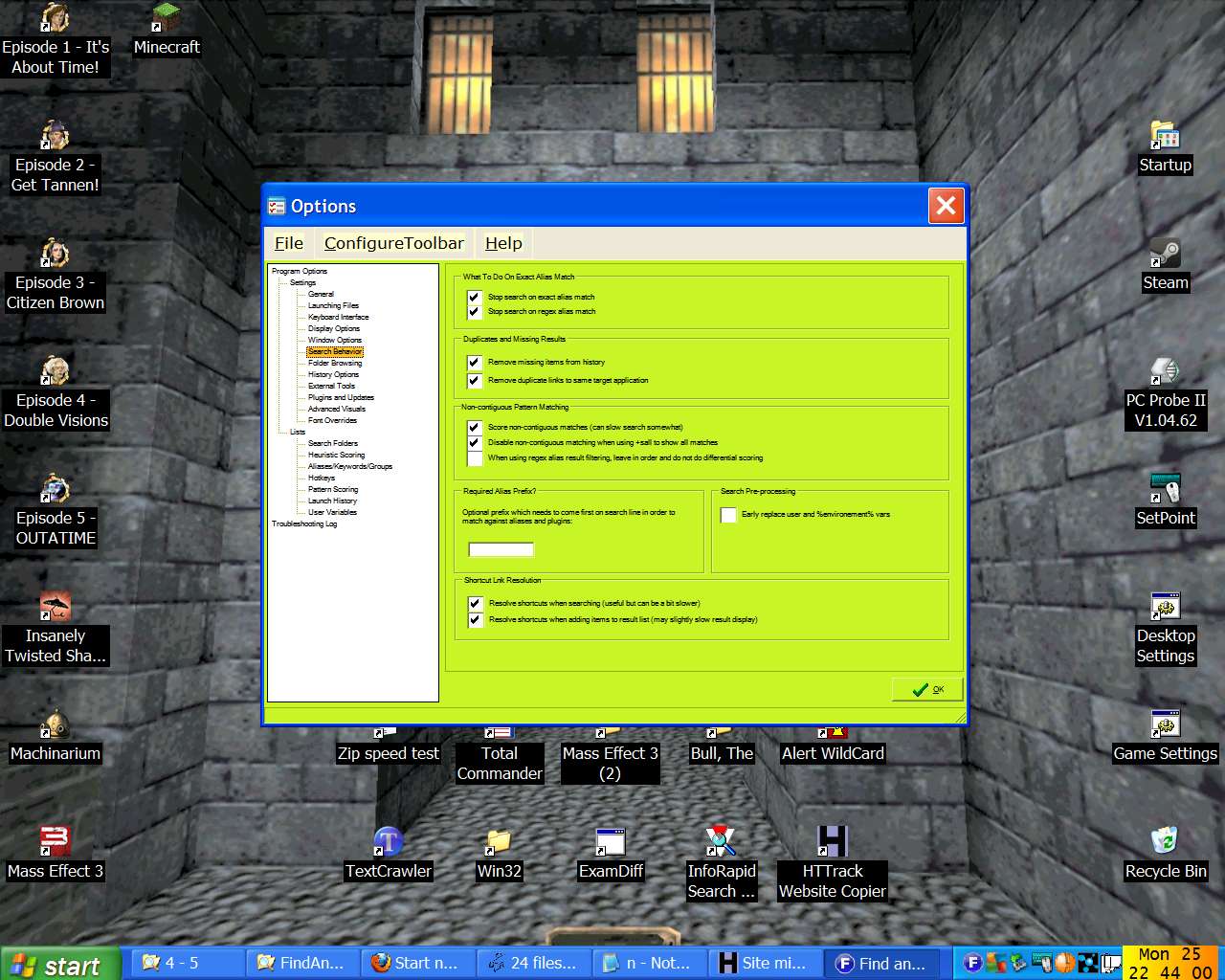
Font size in the options screen is unreadably small. I have tried some skins and they do not alter this aspect of the program. I would like to try FARR as I have heard good things, but I cannot if I cannot read the options.

I have enclosed a screenshot of it on my 1280x1024 19inch monitor. Is there any reason why the text is so tiny? And can I do anything about it?
Unreadable

  • Participant
  • Joined in 2013
  • *
  • Posts: 3
Re: Font size in options screen
« Reply #1 on: March 26, 2013, 05:16 PM »
Could someone confirm whether the options screen has tiny text as in the picture on their system, so I can know if it is meant to be like that or there is something wrong at my end? TIA.

mouser

  • First Author
  • Administrator
  • Joined in 2005
  • *****
  • Posts: 40,931
    • Gathering Badge
    • Plugin Coding Medal
    • Participated in NANY Challenge Seventeen Times
    • Cody Award
    • Coding Snacks
    • Volunteers/Staff
Re: Font size in options screen
« Reply #2 on: March 26, 2013, 05:40 PM »
Hi Unreadable, and welcome to the site.
Sorry for delay in replying -- i've been busy working on another update to another program.

The font should NOT look like that, but I know the cause has to do with your windows desktop being set to "large fonts" which the program is trying to compensate for.  Large font settings create all kind of havok, but it still shouldn't look so bad.

If you give me a few days I will try to have a new version to test that may help.

Unreadable

  • Participant
  • Joined in 2013
  • *
  • Posts: 3
Re: Font size in options screen
« Reply #3 on: March 26, 2013, 05:57 PM »
Thanks. Yes I do have large font settings but glad to hear that this will be addressed.

Am using Agent Ransack which is good at what it does but I need something that also indexes file contents for quick later retrieval.

mouser

  • First Author
  • Administrator
  • Joined in 2005
  • *****
  • Posts: 40,931
    • Gathering Badge
    • Plugin Coding Medal
    • Participated in NANY Challenge Seventeen Times
    • Cody Award
    • Coding Snacks
    • Volunteers/Staff
Re: Font size in options screen
« Reply #4 on: March 26, 2013, 06:16 PM »
Quote
Am using Agent Ransack which is good at what it does but I need something that also indexes file contents for quick later retrieval.

FARR does *not* index files let alone their contents, so you're not going to find it useful for that purpose.

Original address: https://www.donationcoder.com/forum/index.php?topic=34448.0