DonationCoder.com forum
 
Read-only archive. This is a static copy of the DonationCoder.com forum. Reading and searching work as before; logging in, posting and private messages do not.
Archive of 2026-10-21 · About this archive · Main site

Author Topic: Using Windows 7 as WiFi Access Point Simply  (Read 6,464 times)

ewemoa

  • Honorary Member
  • Joined in 2008
  • **
  • Posts: 2,922
    • Plugin Coding Medal
    • Participated in NANY Challenge Three Times
Using Windows 7 as WiFi Access Point Simply
« on: March 19, 2013, 02:16 PM »
Was looking for a simple way to do this without much tweaking and came across:

 Virtual Router Plus

In brief testing of version 2.3.0 (via .zip on project site, not .7z available via "other" site), it seemed to work fine.

No installation appears to be necessary and there appears to be WPA/WPA2 support.  One thing that seemed a bit unfortunate was that the password field appears unobscured.

Anyone have experience with this or have some other recommendation?

40hz

  • Supporting Member
  • Joined in 2007
  • **
  • Posts: 11,861
Re: Using Windows 7 as WiFi Access Point Simply
« Reply #1 on: March 19, 2013, 02:38 PM »
I used its latest incarnation (Virtual Wifi Hotspot) about a week ago in a situation where we needed a quick and dirty AP and only had a spare Win 8 laptop to do it with. (Its stated support for Win8 was the main reason we gave it a try.) Worked like a charm for us. Can't say much more than that.

Also can't speak for the password issue. We didn't bother worrying much about security since it was just a temporary thing for a short group get together in a private space. Hmm...now that I think about it, I didn't even notice that. Oops! :redface:
« Last Edit: March 19, 2013, 07:06 PM by 40hz »

ewemoa

  • Honorary Member
  • Joined in 2008
  • **
  • Posts: 2,922
    • Plugin Coding Medal
    • Participated in NANY Challenge Three Times
Re: Using Windows 7 as WiFi Access Point Simply
« Reply #2 on: March 19, 2013, 10:46 PM »
Thanks for the feedback.

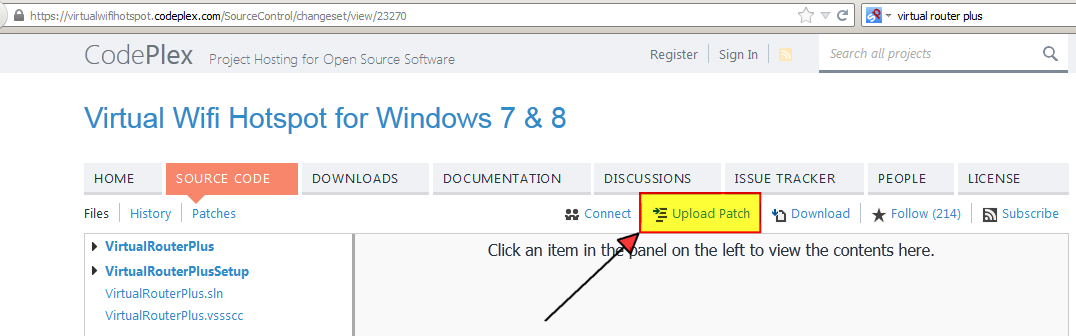
It seems to be written in C# -- may be if it's easy Renegade can contribute support for obscuring the password field ;)

VirtualRouterPlusSourceCodeView.png

KynloStephen66515

  • Animated Giffer in Chief
  • Honorary Member
  • Joined in 2010
  • **
  • Posts: 3,772
    • Participated in NANY Challenge Three Times
    • Cody Award
    • Coding Snacks
    • Official Forum Clown
    • Volunteers/Staff
    • Writer
    • Hardware Hacker
    • DJ Badge - DJ
    • Linux User
Re: Using Windows 7 as WiFi Access Point Simply
« Reply #3 on: April 19, 2013, 12:39 AM »
If anybody can get the damn solution to load without a trillion errors, all it needs is:

this.passwordTextBox.PasswordChar = "*";

that needs to go in mainForm_Load

Seriously...that is it lol.

KynloStephen66515

  • Animated Giffer in Chief
  • Honorary Member
  • Joined in 2010
  • **
  • Posts: 3,772
    • Participated in NANY Challenge Three Times
    • Cody Award
    • Coding Snacks
    • Official Forum Clown
    • Volunteers/Staff
    • Writer
    • Hardware Hacker
    • DJ Badge - DJ
    • Linux User
Re: Using Windows 7 as WiFi Access Point Simply
« Reply #4 on: April 19, 2013, 12:42 AM »
MainForm.cs
// Copyright (c) 2013 Runxia Electronics Co. Ltd

// Some of the code are integrated from original Virtual Router Project
/*
* Virtual Router v1.0 - http://virtualrouter.codeplex.com
* Wifi Hot Spot for Windows 7 and 2008 R2
* Copyright (c) 2011 Chris Pietschmann (http://pietschsoft.com)
* Licensed under the Microsoft Public License (Ms-PL)
* http://virtualrouter.codeplex.com/license
*/

using System;
using System.Collections.Generic;
using System.ComponentModel;
using System.Data;
using System.Diagnostics;
using System.Drawing;
using System.Linq;
using System.Text;
using System.Threading;
using System.Windows.Forms;
using VirtualRouterPlus.Properties;

namespace VirtualRouterPlus
{
   public partial class MainForm : Form
   {
       WlanManager wlanManager = new WlanManager();
       IcsManager icsManager = new IcsManager();

       bool isStarted;

       public MainForm()
       {
           InitializeComponent();
       }

       private void MainForm_Load(object sender, EventArgs e)
       {
            //Added by Stephen66515
    this.passwordTextBox.PasswordChar = "*";

           AutoUpdater.BackgroundUpdate();

           Text = Resource.ApplicationName;
           ssidLabel.Text = Resource.LabelSSID;
           passwordLabel.Text = Resource.LabelPassword;
           connectionLabel.Text = Resource.LabelSharedConnection;
           helpButton.Text = Resource.Help;
           startButton.Text = Resource.StartVirtualRouterPlus;

           if (Settings.Default.FirstLaunch)
           {
               Process.Start(Resource.FirstLaunchUrl);
               Settings.Default.FirstLaunch = false;
               Settings.Default.Save();
           }

           wlanManager.HostedNetworkAvailable += wlanManager_HostedNetworkAvailable;
           wlanManager.StationJoin += wlanManager_StationJoin;

           RefreshConnection();

           ssidTextBox.Text = Settings.Default.SSID;
           passwordTextBox.Text = Settings.Default.Password;
           foreach (IcsConnection connection in connectionComboBox.Items)
           {
               if (connection.Name == Settings.Default.Connection)
               {
                   connectionComboBox.SelectedItem = connection;
                   break;
               }
           }
       }

       void wlanManager_StationJoin(object sender, EventArgs e)
       {
           
       }

       void wlanManager_HostedNetworkAvailable(object sender, EventArgs e)
       {
           
       }

       private void MainForm_FormClosing(object sender, FormClosingEventArgs e)
       {
           Settings.Default.SSID = ssidTextBox.Text;
           Settings.Default.Password = passwordTextBox.Text;
           Settings.Default.Connection = connectionComboBox.Text;
           Settings.Default.Save();

           Stop();
       }

       private void startButton_Click(object sender, EventArgs e)
       {
           startButton.Enabled = false;
           ssidTextBox.Enabled = false;
           passwordTextBox.Enabled = false;
           connectionComboBox.Enabled = false;
           refreshConnectionButton.Enabled = false;
           startButton.Text = Resource.Working;

           if (isStarted)
           {
               if (Stop())
               {
                   isStarted = false;
                   notifyIcon.ShowBalloonTip(5000, Resource.Success, Resource.VirtualRouterPlusStopped, ToolTipIcon.Info);
               }
               else
               {
                   MessageBox.Show(Resource.VirtualRouterPlusStopError, Resource.Error, MessageBoxButtons.OK, MessageBoxIcon.Error);
               }
           }
           else
           {
               if (!ValidateFields())
                   return;

               if (Start(ssidTextBox.Text, passwordTextBox.Text, (IcsConnection)connectionComboBox.SelectedItem, 16))
               {
                   isStarted = true;
                   WindowState = FormWindowState.Minimized;
                   notifyIcon.ShowBalloonTip(5000, Resource.Success, Resource.VirtualRouterPlusStarted, ToolTipIcon.Info);
               }
               else
               {
                   MessageBox.Show(Resource.VirtualRouterPlusStartError, Resource.Error, MessageBoxButtons.OK, MessageBoxIcon.Error);
               }
           }

           notifyIcon.Icon = isStarted ? Resources.VirtualRouterPlusStarted : Resources.VirtualRouterPlusStopped;
           startButton.Text = isStarted ? Resource.StopVirtualRouterPlus : Resource.StartVirtualRouterPlus;
           
           ssidTextBox.Enabled = !isStarted;
           passwordTextBox.Enabled = !isStarted;
           connectionComboBox.Enabled = !isStarted;
           refreshConnectionButton.Enabled = !isStarted;
           startButton.Enabled = true;
       }

       private bool Start(string ssid, string password, IcsConnection connection, int maxClients)
       {
           try
           {
               Stop();

               wlanManager.SetConnectionSettings(ssid, 32);
               wlanManager.SetSecondaryKey(password);

               wlanManager.StartHostedNetwork();

               var privateConnectionGuid = wlanManager.HostedNetworkInterfaceGuid;

               icsManager.EnableIcs(connection.Guid, privateConnectionGuid);
               
               return true;
           }
           catch
           {
               return false;
           }
       }

       private bool Stop()
       {
           try
           {
               if (this.icsManager.SharingInstalled)
               {
                   this.icsManager.DisableIcsOnAll();
               }

               this.wlanManager.StopHostedNetwork();

               return true;
           }
           catch
           {
               return false;
           }
       }

       private bool ValidateFields()
       {
           if (ssidTextBox.Text.Length <= 0)
           {
               errorProvider.SetError(ssidTextBox, Resource.SSIDRequiredError);
               return false;
           }

           if (ssidTextBox.Text.Length > 32)
           {
               errorProvider.SetError(ssidTextBox, Resource.SSIDTooLongError);
               return false;
           }

           if (passwordTextBox.Text.Length < 8)
           {
               errorProvider.SetError(ssidTextBox, Resource.PasswordTooShortError);
               return false;
           }

           if (passwordTextBox.Text.Length > 64)
           {
               errorProvider.SetError(ssidTextBox, Resource.PasswordTooLongError);
               return false;
           }

           return true;
       }

       private void refreshConnectionButton_Click(object sender, EventArgs e)
       {
           RefreshConnection();
       }

       private void RefreshConnection()
       {
           connectionComboBox.Items.Clear();

           foreach (var connection in icsManager.Connections)
           {
               if (connection.IsConnected && connection.IsSupported)
               {
                   connectionComboBox.Items.Add(connection);
               }
           }

           if (connectionComboBox.Items.Count > 0)
               connectionComboBox.SelectedIndex = 0;
       }

       private void MainForm_SizeChanged(object sender, EventArgs e)
       {
           if (WindowState == FormWindowState.Minimized)
           {
               Hide();
           }
       }

       private void notifyIcon_MouseClick(object sender, MouseEventArgs e)
       {
           Show();
           WindowState = FormWindowState.Normal;
       }

       private void helpButton_Click(object sender, EventArgs e)
       {
           Process.Start(Resource.HelpUrl);
       }
   }
}

ewemoa

  • Honorary Member
  • Joined in 2008
  • **
  • Posts: 2,922
    • Plugin Coding Medal
    • Participated in NANY Challenge Three Times
Re: Using Windows 7 as WiFi Access Point Simply
« Reply #5 on: April 19, 2013, 04:57 AM »
Thanks Stephen66515 :)

May be someone can upload a patch.

Original address: https://www.donationcoder.com/forum/index.php?topic=34368.0