DonationCoder.com forum
 
Read-only archive. This is a static copy of the DonationCoder.com forum. Reading and searching work as before; logging in, posting and private messages do not.
Archive of 2026-10-21 · About this archive · Main site

Author Topic: Google Chrome + DoCo  (Read 7,249 times)

KynloStephen66515

  • Animated Giffer in Chief
  • Honorary Member
  • Joined in 2010
  • **
  • Posts: 3,772
    • Participated in NANY Challenge Three Times
    • Cody Award
    • Coding Snacks
    • Official Forum Clown
    • Volunteers/Staff
    • Writer
    • Hardware Hacker
    • DJ Badge - DJ
    • Linux User
Google Chrome + DoCo
« on: March 10, 2013, 03:32 AM »
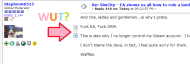
Strange things happening...
WUT.png

This is on EVERY post.

Latest version of Chrome (I fell out with Opera, as many of you know)...But...Somehow...It makes strange things happen on DC
KynloStephen66515

  • Animated Giffer in Chief
  • Honorary Member
  • Joined in 2010
  • **
  • Posts: 3,772
    • Participated in NANY Challenge Three Times
    • Cody Award
    • Coding Snacks
    • Official Forum Clown
    • Volunteers/Staff
    • Writer
    • Hardware Hacker
    • DJ Badge - DJ
    • Linux User
Re: Google Chrome + DoCo
« Reply #1 on: March 10, 2013, 03:34 AM »
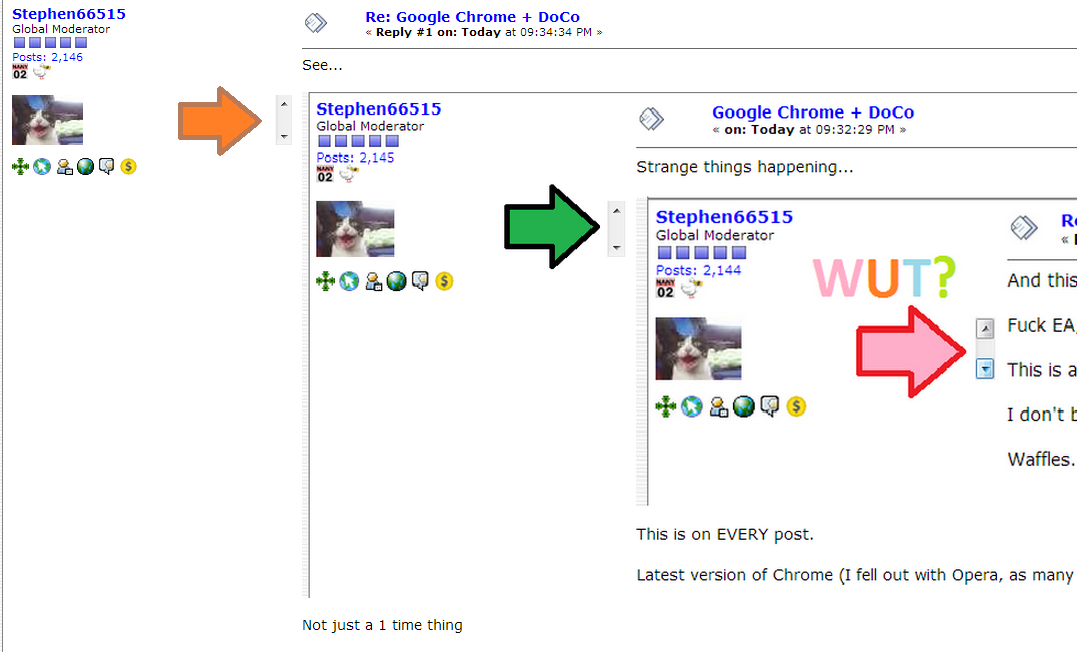
See...

wut2.png

Not just a 1 time thing

KynloStephen66515

  • Animated Giffer in Chief
  • Honorary Member
  • Joined in 2010
  • **
  • Posts: 3,772
    • Participated in NANY Challenge Three Times
    • Cody Award
    • Coding Snacks
    • Official Forum Clown
    • Volunteers/Staff
    • Writer
    • Hardware Hacker
    • DJ Badge - DJ
    • Linux User
Re: Google Chrome + DoCo
« Reply #2 on: March 10, 2013, 03:35 AM »
wut3.png

We must go deeper?

wraith808

  • Supporting Member
  • Joined in 2006
  • **
  • Posts: 11,205
    • Participated in NANY Challenge Fourteen Times
    • Coding Snacks
    • Writer
    • Hardware Hacker
Re: Google Chrome + DoCo
« Reply #3 on: March 10, 2013, 05:26 AM »
I don't have that problem- been running chrome on DoCo for a while.  So it's something else other than just the browser.

4wd

  • Pedantic Old Bastard
  • Supporting Member
  • Joined in 2006
  • **
  • Posts: 5,652
    • Coding Snacks
Re: Google Chrome + DoCo
« Reply #4 on: March 10, 2013, 06:10 AM »
I don't have that problem-

Don't worry about it, he's been hitting the bottle again.

He'll wake up tomorrow and deny he ever made those posts....it's happened before.

Or it could be as simple as he's enlarged the text by tapping the Control Numpad + key  ;)

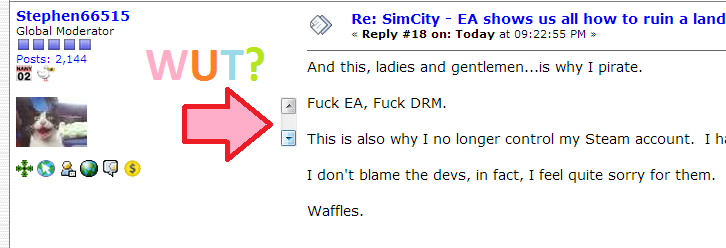
Anyone can do it, here's Dragon:

2013-03-10 17_11_18-SimCity - EA shows us all how to ruin a landmark game with DRM. - DonationCoder..png

I'll also point out that Pale Moon doesn't perform this aberration.
"I will not follow where the path may lead, but I will go where there is no path, and I will leave a trail." - Muriel Strode, 1903

tomos

  • Charter Member
  • Joined in 2006
  • ***
  • Posts: 11,970
    • Gathering Badge
    • Participated in NANY Challenge Once
Re: Google Chrome + DoCo
« Reply #5 on: March 10, 2013, 01:57 PM »

It looks like it's related to your avatar
(exactly the same height/level)
Tom

yksyks

  • Supporting Member
  • Joined in 2006
  • **
  • Posts: 476
Re: Google Chrome + DoCo
« Reply #6 on: March 10, 2013, 06:29 PM »
Confirmed here, appears "randomly" on most posts, but only when the page zoom is different from 100 %. Must be a Chrome bug. Opera works fine.

KynloStephen66515

  • Animated Giffer in Chief
  • Honorary Member
  • Joined in 2010
  • **
  • Posts: 3,772
    • Participated in NANY Challenge Three Times
    • Cody Award
    • Coding Snacks
    • Official Forum Clown
    • Volunteers/Staff
    • Writer
    • Hardware Hacker
    • DJ Badge - DJ
    • Linux User
Re: Google Chrome + DoCo
« Reply #7 on: March 10, 2013, 07:45 PM »
Oh, didn't realize I was on 110% zoom...strange it does that by default o.0 - ~Fixed now I am back on 100%...very odd indeed.

Deozaan

  • Charter Member
  • Joined in 2006
  • ***
  • Posts: 9,827
    • Participated in NANY Challenge Eight Times
    • Cody Award
Re: Google Chrome + DoCo
« Reply #8 on: March 11, 2013, 02:45 AM »
Or it could be as simple as he's enlarged the text by tapping the Control Numpad + key  ;)

Or Ctrl-+ (not on the numpad). Or holding Ctrl while scrolling the mouse wheel.

Original address: https://www.donationcoder.com/forum/index.php?topic=34268.0