DonationCoder.com forum
 
Read-only archive. This is a static copy of the DonationCoder.com forum. Reading and searching work as before; logging in, posting and private messages do not.
Archive of 2026-10-21 · About this archive · Main site

Author Topic: Disatisfied with default skins, decided to make my own in autohotkey  (Read 8,237 times)

Expletive

  • Participant
  • Joined in 2013
  • *
  • Posts: 7


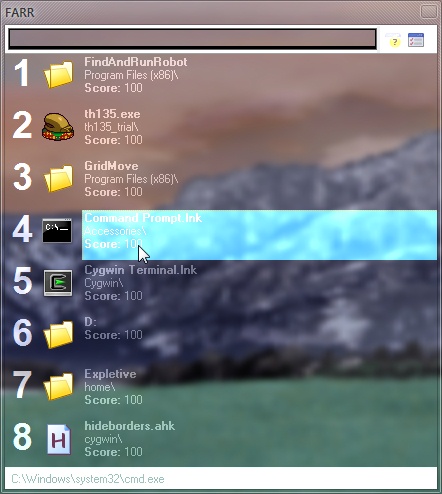
This is with search and text fields set to clBlack and not using a .skn

I did this because I found aero_lib.ahk and I am currently on a quest to glass everything I possibly can.

IainB

  • @Slartibartfarst
  • Supporting Member
  • Joined in 2008
  • **
  • Posts: 7,544
Re: Disatisfied with default skins, decided to make my own in autohotkey
« Reply #1 on: February 18, 2013, 09:31 PM »
Hmm. I have to say that I like it, and that it does look pretty, but to a student of ergonomics and graphical design it might not seem too hot ergonomically/visually.
Why are you "currently on a quest to glass everything I possibly can"?
I'm not sure that it would necessarily be correct to call this "glassing" everything an improvement though.    :-\

mouser

  • First Author
  • Administrator
  • Joined in 2005
  • *****
  • Posts: 40,931
    • Gathering Badge
    • Plugin Coding Medal
    • Participated in NANY Challenge Seventeen Times
    • Cody Award
    • Coding Snacks
    • Volunteers/Staff
Re: Disatisfied with default skins, decided to make my own in autohotkey
« Reply #2 on: February 18, 2013, 09:35 PM »
It makes my eyes burn but I appreciate your ingenuity  :D

40hz

  • Supporting Member
  • Joined in 2007
  • **
  • Posts: 11,861
Re: Disatisfied with default skins, decided to make my own in autohotkey
« Reply #3 on: February 18, 2013, 10:07 PM »
Interesting... assuming the image is still there - I can't see it. ;D

Oops! Skip it. I refreshed the page and it appeared. Funny it didn't load first time.

It looks pretty. But it's also hard for me to read. So guess I'd call that: "pretty hard to read." ;)
« Last Edit: February 18, 2013, 10:12 PM by 40hz »

Josh

  • Charter Honorary Member
  • Joined in 2005
  • ***
  • Posts: 3,411
    • Gathering Badge
    • Official Forum Clown
    • Coding Snacks
    • Plugin Coding Medal
    • Volunteers/Staff
    • Military Service Badge - US Army
    • Furry Fandom Badge - Furry Fandom
    • Linux User
Re: Disatisfied with default skins, decided to make my own in autohotkey
« Reply #4 on: February 18, 2013, 10:30 PM »
Care to share this? I would love to use it!
Strength in Knowledge

Expletive

  • Participant
  • Joined in 2013
  • *
  • Posts: 7
Re: Disatisfied with default skins, decided to make my own in autohotkey
« Reply #5 on: February 19, 2013, 12:30 AM »
This isn't quite done. I still want to figure out how to make the elements that aren't transparent actually transparent, and also how to change the font color, but I guess I can post it anyway. Maybe someone here can help me figure it out. For reference, I want to make the status bar at the bottom, the text entry field when empty and the toolbar around it transparent like the results portion. I also want to change the test color to something more universally readable against a wider variety of background colors.

Anyway, heres the autohotkey script:

Code: (autohotkey)
#include aero_lib.ahk
#IfWinActive ahk_Class TMainForm
;Toggle Aero transparency
F9::
WinGet, handle, ID
	
	If t := !t {
		Aero_BlurWindow(handle)
		WinSet, Redraw
	}else{
		Aero_BlurWindow(handle, 0)
		WinSet, Redraw
	}
return

IainB

  • @Slartibartfarst
  • Supporting Member
  • Joined in 2008
  • **
  • Posts: 7,544
Re: Disatisfied with default skins, decided to make my own in autohotkey
« Reply #6 on: February 19, 2013, 07:19 AM »
@Expletive: Thanks. Oh dear, something else to play with now!    ;)

Original address: https://www.donationcoder.com/forum/index.php?topic=34079.0