DonationCoder.com forum
 
Read-only archive. This is a static copy of the DonationCoder.com forum. Reading and searching work as before; logging in, posting and private messages do not.
Archive of 2026-10-21 · About this archive · Main site

Author Topic: DONE: Delete folders within directory but not the files within the folder  (Read 33,538 times)

FrothyAss

  • Participant
  • Joined in 2013
  • *
  • Posts: 4
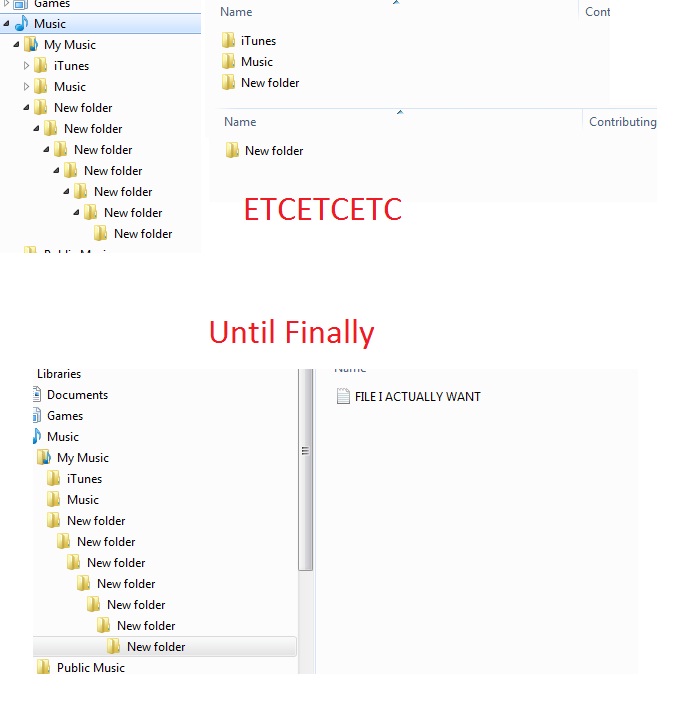
You know how some people package .zips/folders with even more useless folders within folders when all you want are the files within it without having to sift through seemingly endless amounts of folders? Yeah, I am tired of it, and would not mind a solution!

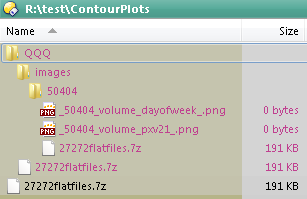
For example: [attach]
« Last Edit: February 11, 2013, 04:12 AM by FrothyAss »

IainB

  • @Slartibartfarst
  • Supporting Member
  • Joined in 2008
  • **
  • Posts: 7,544
You don't need to delete any folders.
You can:
(a) search for the file (and or its contents) that you want, and/or
(b) get a flat-file view of all the files in a set of nested folders.

All easily done in a decent Windows Explorer alternative - e.g., putting the flat file into a "scrap pane" in xplorer² (there's a free version).

By the way, I've seen PCs and file servers with exactly the sorts of deeply nested folders per your "dramatization" - including ones sparsely populated with documents.    :o

FrothyAss

  • Participant
  • Joined in 2013
  • *
  • Posts: 4
Searching does not rid the extra folders!

I also do not wish to have another file explorer, although I do like Total Commander.

I am looking for long term solutions to extra folders, besides the hassle of creating a new folder and moving files out of 'files nests' into the new folder. Its more for a perfectionist sort of mindset, having to go through unnecessary, or even possessing extra folders just bugs and flickers with my mind!

Mostly for organizational reasons, and preparations for torrents to be uploaded. I may be over-complicating the whole process, and please mind my greed, but that's the beauty of it all.

x16wda

  • what am I doing in this handbasket?
  • Supporting Member
  • Joined in 2007
  • **
  • Posts: 888
    • Participated in NANY Challenge Once
Just to clarify, what do you think should happen when there are filename collisions?  Say in your example there is a "read.me" in every folder, as well as that one desired file way down deep - what should happen to all those read.mes?
vi vi vi - editor of the beast

FrothyAss

  • Participant
  • Joined in 2013
  • *
  • Posts: 4
Just to clarify, what do you think should happen when there are filename collisions?  Say in your example there is a "read.me" in every folder, as well as that one desired file way down deep - what should happen to all those read.mes?

Well, for my intended use, it would be for audio files, but i suppose an auto-rename feature (read.me, read(1).me, read(2).me) or renaming prompt could prevent issues, unless it is an app or program that requires the .me file 'AS IS' so perhaps a 'do not delete folder/continue anyways' prompt if conflict such as this occurs.

Target

  • Honorary Member
  • Joined in 2006
  • **
  • Posts: 1,840
    • Coding Snacks
you should be able to find a solution in the coding snacks section.

others may be able to point you to specific threads, or search the forum as this functionality (or very near) has been requested several times :Thmbsup:
Alcohol is photoshop, bottled
Askhole - someone who ask for advice, then ignores it
"Look wise, say nothing, and grunt. Speech was given to conceal thought" - Sir William Osler

skwire

  • I eat Coding Snacks for breakfast...
  • Global Moderator
  • Joined in 2005
  • *****
  • Posts: 5,297
    • Participated in NANY Challenge Seventeen Times
    • Coding Snacks
    • Superboy Coder
    • Cody Award
    • Volunteers/Staff
    • Gathering Badge
Since you're already using Windows Explorer, you can simply use the find/search functionality to do what you want.  Press F3, enter *.* and do a quick search.  Then, just highlight all the found files and drag them into your top-level folder.

4wd

  • Pedantic Old Bastard
  • Supporting Member
  • Joined in 2006
  • **
  • Posts: 5,652
    • Coding Snacks
Since you're already using Windows Explorer, you can simply use the find/search functionality to do what you want.  Press F3, enter *.* and do a quick search.  Then, just highlight all the found files and drag them into your top-level folder.

Are you saying I just wasted my time creating Move Everything Recursively, Delete Empty ?

MERDE!    ;D

Code: (autoit)
#Region ;**** Directives created by AutoIt3Wrapper_GUI ****
#AutoIt3Wrapper_Icon=1360654278_56056.ico
#AutoIt3Wrapper_UseUpx=n
#EndRegion ;**** Directives created by AutoIt3Wrapper_GUI ****
#cs ----------------------------------------------------------------------------

 AutoIt Version: 3.3.8.0
 Author:         4wd

 Script Function:
	Move Everything Recursively, Delete Empty (MERDE)

Icon from: http://www.iconfinder.com/icondetails/56056/32/crap_poo_shit_turd_icon

#ce ----------------------------------------------------------------------------

; Script Start - Add your code below here

#include <RecFileListToArray.au3>
#include <Array.au3>

If $CmdLine[0] = 0 Then Exit
$srce = $CmdLine[1]

$files = _RecFileListToArray($srce, '*', 1, 1, 1, 2)
If Not IsArray($files) Then
	MsgBox(48, 'MERDE!', 'No files found!', 10)
	Exit
EndIf

_Valmorphanize($files, $srce)

$folders = _RecFileListToArray($srce, '*', 2, 1, 1, 2)
If Not IsArray($folders) Then Exit
_PruneEmpty($folders)


Func _Valmorphanize($temp, $path)
	For $i = 1 To $temp[0]
		If $path <> StringLeft($temp[$i], StringInStr($temp[$i], "\", 0, -1) - 1) Then
			$newdest = _AutoRename($path & '\' & StringRight($temp[$i], StringLen($temp[$i]) - StringInStr($temp[$i], "\", 0, -1)))
			FileMove($temp[$i], $newdest)
		EndIf
	Next
EndFunc


Func _PruneEmpty($temp)
	For $i = 1 To $temp[0]
		If DirGetSize($temp[$i]) = 0 Then DirRemove($temp[$i], 1)
	Next
EndFunc


; Function courtesy of KaFu:
; http://www.autoitscript.com/forum/topic/125602-filename-exists-auto-rename-making-too-many-duplicates/#entry871942
Func _AutoRename($sFilename)
	$sFilename_Buffer = $sFilename
	$i = 1
	While FileExists($sFilename)
		If $i = 1 Then
			$sFilename = StringLeft($sFilename_Buffer, StringInStr($sFilename_Buffer, "\", 0, -1)) & "Copy of " & StringRight($sFilename_Buffer, StringLen($sFilename_Buffer) - StringInStr($sFilename_Buffer, "\", 0, -1))
		Else
			$sFilename = StringLeft($sFilename_Buffer, StringInStr($sFilename_Buffer, "\", 0, -1)) & "Copy of (" & $i & ") " & StringRight($sFilename_Buffer, StringLen($sFilename_Buffer) - StringInStr($sFilename_Buffer, "\", 0, -1))
		EndIf
		$i += 1
	WEnd
	Return $sFilename
EndFunc

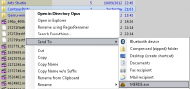
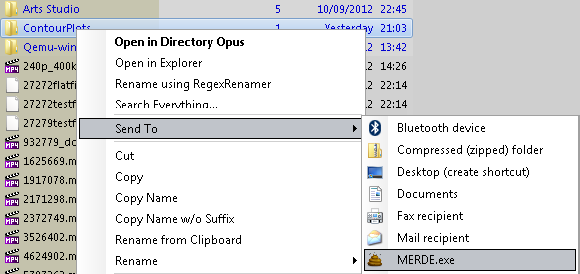
Put the executable in the %UserProfile%\SendTo directory and then you can just right-click->Send To MERDE.exe on the directory you want to turn to merde  :)

eg.

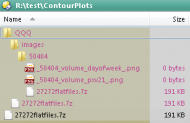
From this:

2013-02-12 12_46_47-R__test_ContourPlots.png

Do this:

2013-02-12 12_43_21-R__test.png

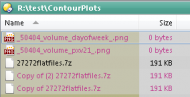
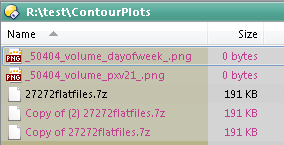
To get this:

2013-02-12 12_43_54-R__test_ContourPlots.png
"I will not follow where the path may lead, but I will go where there is no path, and I will leave a trail." - Muriel Strode, 1903
« Last Edit: February 12, 2013, 05:37 AM by 4wd »

FrothyAss

  • Participant
  • Joined in 2013
  • *
  • Posts: 4
Thank you! Works perfectly, 4wd! Exactly what I needed.

For those with a problem with it (none yet, I am aware), put the unzipped files into a folder altogether, move the folder to desired location, and make a shortcut of the executable (MERDE.exe). Move the shortcut to SendTo folder, link below for how to get there.

For Windows 7 users, http://mintywhite.com/windows-7/7customization/customize-windows-seven-7-send-to-menu-how-to/

How do I move this topic to "Finished Programs"?

skwire

  • I eat Coding Snacks for breakfast...
  • Global Moderator
  • Joined in 2005
  • *****
  • Posts: 5,297
    • Participated in NANY Challenge Seventeen Times
    • Coding Snacks
    • Superboy Coder
    • Cody Award
    • Volunteers/Staff
    • Gathering Badge
Thank you! Works perfectly, 4wd! Exactly what I needed.

Nicely done, 4wd.   :Thmbsup:

For those with a problem with it (none yet, I am aware), put the unzipped files into a folder altogether, move the folder to desired location, and make a shortcut of the executable (MERDE.exe). Move the shortcut to SendTo folder, link below for how to get there.

May I suggest SendToSendTo?  =]  http://whyeye.org/projects/sendtosendto/

How do I move this topic to "Finished Programs"?

I take care of that.   :)

Elancore

  • Participant
  • Joined in 2013
  • *
  • Posts: 11
I used to have this problem before :)

Check this:
http://mike.geek-republic.com/software/suction/

4wd

  • Pedantic Old Bastard
  • Supporting Member
  • Joined in 2006
  • **
  • Posts: 5,652
    • Coding Snacks
Thank you! Works perfectly, 4wd! Exactly what I needed.

Nicely done, 4wd.   :Thmbsup:

Thanks skwire - I realised after I did it that all he wanted to do was flatten the directory structure.  ;D
"I will not follow where the path may lead, but I will go where there is no path, and I will leave a trail." - Muriel Strode, 1903

IainB

  • @Slartibartfarst
  • Supporting Member
  • Joined in 2008
  • **
  • Posts: 7,544
Posted across from another thread:
@nkormanik: Thanks for the info. - Moo0 RightClicker Pro 1.48 (Free to Try) looks rather nifty and seems to do some things for the right-click menu that I had not come across before.

@TucknDar: FileMenu Tools (Freeware) looks very interesting. In particular, I noticed that it includes this function:
  • Unpack Folder: Moves all the elements in the selected folders to the parent folder, and deletes these empty folders.

That could be useful as an alternative solution here: DONE: Delete folders within directory but not the files within the folder

Original address: https://www.donationcoder.com/forum/index.php?topic=33988.0