DonationCoder.com forum
 
Read-only archive. This is a static copy of the DonationCoder.com forum. Reading and searching work as before; logging in, posting and private messages do not.
Archive of 2026-10-21 · About this archive · Main site

Author Topic: Why does Mozilla claim that my version 18 is a version 11? (solved)  (Read 7,322 times)

Curt

  • Supporting Member
  • Joined in 2006
  • **
  • Posts: 7,565
former titel: Mozilla Add-ons: "Not available for Firefox 11". But it's Waterfox 18!
Re-edited for clearer meaning:

Why does Mozilla claim that my version 18 is a version 11?

------------------------------------------------------------
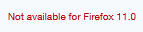
For several months the Mozilla Add-ons site has been telling me that "this addon is not available for Firefox 11", and I have no clue of what is causing it - except that I am running Waterfox version 18, instead of the standard Firefox. I also had the same problem when it was Waterfox 16, (I didn't try version 17).

[attachimg=#]

One might think it could have to do with some add-on/extension, but the problem is still there when I surf in safe mode!

Does any of you Waterfox users have the same problem?

Any idea on how to set this right (except from installing the normal Firefox)?
:tellme:


« Last Edit: January 30, 2013, 09:36 AM by Curt »

Paul Keith

  • Member
  • Joined in 2008
  • **
  • Posts: 1,989
I have not used Waterfox but try these other methods but the most common method for FF add-ons as mentioned here is to disable add-on compatibility. Simplest being installing nightly testers tool: http://www.reddit.com/r/Enhancement/comments/qzn8v/is_there_an_easy_way_to_modify_the_xpi_to_use_in/

There's also this:

Quote
Go to about:config then search for extensions.checkCompatibility and set it to false.

RES works perf

and this:

Quote
    Rename XPI to ZIP
    Extract
    Edit one of the files to change compatibility settings (I think its one of the few in the root folder from memory)
    Rezip
    Rename to XPI
    Load

Find an addon that is compatible, and look at their files to figure it out if you're still having trouble. It's been a while since I was working with XPI files, but I used to have to do this in order to make the addon we were developing work with Firefox beta browsers.
<reserve space for the day DC can auto-generate your signature from your personal PopUp Wisdom quotes>

Curt

  • Supporting Member
  • Joined in 2006
  • **
  • Posts: 7,565
The Nightly Tester Tool is fine  :up:  and has been enabled for maybe a year (and Compatibility Check disabled).

But you're right, I should both have spoken more clearly and told some more, before posting. Also, I should point out that when Firefox is in "safe mode", all addons are disabled - meaning that I #imagine# that the addons not are responsible for the problem. But of course I don't know.

the problem is still there when I surf in safe mode!
[attachimg=#]
Quote from: Compatibility Report
- Add to Amazon Wish List Button 1.10
Firefox 3.0 - 18.*

- Add to Search Bar 2.0
Firefox 3.0 - 18.*

- Add-on Compatibility Reporter 2.0
Firefox 16.0 - 19.*

- Auto Context 1.5.0.3
Firefox 2.0 - 3.7a1pre  "Incompatible" but works in version 18

- Bulk Image Downloader 4.39.0.0
Firefox 0.8 - 12.0.* "Incompatible" but works in version 18

- CoLT 2.5.9
Firefox 3.6 - 18.*

- Download Statusbar 0.9.10
Firefox 3.6 - 12.* "Incompatible" but works in version 18

- DownloadHelper 4.9.13
Firefox 3.0 - 20.0a1

- Downloads Context Menu 1.5
Firefox 3.0 - 18.*

- Exit Button Firefox 0.4.2
Firefox 1.0 - 18.*

- Extension List Dumper 1.15.2
Firefox 1.5 - 18.*

- Flagfox 4.2.5
Firefox 3.6 - 20.0a2

- Google Reverse Image Search 0.6
Firefox 3.0 - 18.*

- Greasemonkey 1.7.1
Firefox 14.0 - 19.*

- IE View 1.5.1
Firefox 3.6 - 18.*

- InFormEnter 0.6.3
Firefox 1.0 - 18.*

- Interclue 1.6.3
Firefox 3.0 - 16.* "Incompatible" but works in version 18

- Linkification 1.3.9
Firefox 1.0 - 4.0.* "Incompatible" but works in version 18

- NextPlease 0.9.2
Firefox 3.0 - 18.*

- Nightly Tester Tools 3.3
Firefox 3.6 - 19.*

- One Click Popup Dictionary 1.2
Firefox 4.0 - 18.*

- Open In RegEdit 0.1.2.4
Firefox 2.0 - 3.6.*  "Incompatible" but works in version 18

- QuoteURLText 1.0.9b
Firefox 1.5 - 15.*  "Incompatible" but works in version 18

- Readability 2.4
Firefox 4.0 - 18.*

- Restart Firefox 0.5
Firefox 1.5 - 18.*

- Save File to 2.3.6
Firefox 7.0 - 19.*

- Save Session 1.3.1.6
Firefox 2.0 - 18.*

- Stylish 1.3.1
Firefox 4.0 - 20.0a1

- Tab Mix Plus 0.4.0.4
Firefox 4.0 - 18.*

- Textarea Cache 0.8.8
Firefox 3.6 - 18.*

- Undo Bookmarks Menu 1.7
Firefox 3.5 - 18.*

- VTzilla 1.5
Firefox 1.5 - 18.*

- WikiLook 2.7.0
Firefox 2.0 - 4.0.* "Incompatible" but works in version 18

- RightToClick 2.9.4 (Disabled)
Firefox 4.0 - 18.*

Tuxman

  • OMG not him again!
  • Supporting Member
  • Joined in 2006
  • **
  • Posts: 2,522
    • Participated in NANY Challenge Seven Times
I have a similar problem with Pale Moon. Can't use newest Firebug because it heavily relies on "new" Firefox versions. Bah.
I bet when Cheetahs race and one of them cheats, the other one goes "Man, you're such a Cheetah!" and they laugh & eat a zebra or whatever.

Curt

  • Supporting Member
  • Joined in 2006
  • **
  • Posts: 7,565
Re: Why does Mozilla claim that my version 18 is a version 11?
« Reply #4 on: January 29, 2013, 07:38 PM »
I have renamed the thread for clearer meaning:

Quote from: Curt
Why does Mozilla claim that my version 18 is a version 11?
:tellme:

4wd

  • Pedantic Old Bastard
  • Supporting Member
  • Joined in 2006
  • **
  • Posts: 5,652
    • Coding Snacks
Re: Why does Mozilla claim that my version 18 is a version 11?
« Reply #5 on: January 30, 2013, 12:58 AM »
Try changing the userAgentw that's sent forward either permanently:

Changing User Agent in Firefox

or on a per site basis:

UAControl

Note that these methods won't interfere with reporting the correct userAgent if it's via JavaScript but it might allow you to install later versions from Mozilla' addon site.

eg. To emulate Firefox 18 try a userAgent string of: Mozilla/5.0 (Windows NT 6.1; rv:18.0) Gecko/20130108 Firefox/18.0.1

For current v20 alpha try: Mozilla/5.0 (Windows NT 6.1; rv:20.0) Gecko/20130108 Firefox/20.0a1

Get the Firefox release dates from here: Rapid/Release Calendar

To check what your browser reports, go to Analyze My Browser, click on the Browser tab and scroll down to Navigator.

Download the current version of Firefox Portable, see what it reports then substitute that string in.

eg. To get Firebug 1.11.1 installed:
1) Change the userAgent to: Mozilla/5.0 (Windows NT 6.1; rv:20.0) Gecko/20130108 Firefox/20.0a1
2) Right click and choose Save As... on the button, don't just click it.  This will download v1.11.1, (if you don't change the userAgent you get 1.7.3).
3) Open the xpi with a zip program and edit the install.rdf file, new values for minVersion and maxVersion:

Code: (generic)
    <!-- Firefox -->
    <em:targetApplication>
      <Description>
        <em:id>{ec8030f7-c20a-464f-9b0e-13a3a9e97384}</em:id>
        <em:minVersion>15.0</em:minVersion>
        <em:maxVersion>21.0a1</em:maxVersion>
      </Description>
    </em:targetApplication>

4) Resave the install.rdf back into the archive (xpi).
5) Drop it on Pale Moon' window, it should install - it did here.
"I will not follow where the path may lead, but I will go where there is no path, and I will leave a trail." - Muriel Strode, 1903
« Last Edit: January 30, 2013, 01:27 AM by 4wd »

Curt

  • Supporting Member
  • Joined in 2006
  • **
  • Posts: 7,565
Re: Why does Mozilla claim that my version 18 is a version 11?
« Reply #6 on: January 30, 2013, 08:47 AM »
Thank you, 4wd!

or on a per site basis:
UAControl
Note that these methods won't interfere with reporting the correct userAgent if it's via JavaScript but it might allow you to install later versions from Mozilla' addon site.
eg. To emulate Firefox 18 try a userAgent string of: Mozilla/5.0 (Windows NT 6.1; rv:18.0) Gecko/20130108 Firefox/18.0.1

-unfortunately this short way didn't change anything on addons.mozilla.org
So later on I will try going the longer way...

Edit:
The longer way now being http://support.mozilla.org/en-US/kb/websites-say-firefox-outdated-or-incompatible
« Last Edit: January 30, 2013, 08:53 AM by Curt »

Curt

  • Supporting Member
  • Joined in 2006
  • **
  • Posts: 7,565
Re: Why does Mozilla claim that my version 18 is a version 11?
« Reply #7 on: January 30, 2013, 09:17 AM »
hmm... I clicked "copy Build ID" and got this:

Quote
Mozilla/5.0 (Windows NT 6.1; Win64; x64; rv:11.0; .NET CLR 4.0.30319; ffco7) Gecko/20120313 Firefox/11.0 ID:20130119203203

so I went to about.config and found a similar line, right-clicked it and pressed "Reset", and Mozilla is now recognizing my version 18  Job done! :-*  

As they say, it is easy, if you do it right.

Thanks to all of you! :Thmbsup:

4wd

  • Pedantic Old Bastard
  • Supporting Member
  • Joined in 2006
  • **
  • Posts: 5,652
    • Coding Snacks
Re: Why does Mozilla claim that my version 18 is a version 11? (solved)
« Reply #8 on: January 30, 2013, 12:32 PM »
You can also go:

Pale Moon/Firefox/Waterfox->Help->Troubleshooting Information

Which will tell you what your *real* userAgent should be.
"I will not follow where the path may lead, but I will go where there is no path, and I will leave a trail." - Muriel Strode, 1903

Original address: https://www.donationcoder.com/forum/index.php?topic=33858.0