DonationCoder.com forum
 
Read-only archive. This is a static copy of the DonationCoder.com forum. Reading and searching work as before; logging in, posting and private messages do not.
Archive of 2026-10-21 · About this archive · Main site

Author Topic: Java debugging in Eclipse  (Read 9,431 times)

Josh

  • Charter Honorary Member
  • Joined in 2005
  • ***
  • Posts: 3,411
    • Gathering Badge
    • Official Forum Clown
    • Coding Snacks
    • Plugin Coding Medal
    • Volunteers/Staff
    • Military Service Badge - US Army
    • Furry Fandom Badge - Furry Fandom
    • Linux User
Java debugging in Eclipse
« on: January 01, 2013, 05:01 PM »
OK, crazy question, but is there some trick to debugging a project in Eclipse? Ideally, I would like to start my code in debug mode and step through it without the need for breakpoints. Right now, when I set a breakpoint, some applications generate "Class Not Found Exceptions" and others generate "Thread.exit() not found" at the close of the application, despite running fine when executed normally, with appropriate results.

Is there some trick to debugging in Eclipse?
Strength in Knowledge

ewemoa

  • Honorary Member
  • Joined in 2008
  • **
  • Posts: 2,922
    • Plugin Coding Medal
    • Participated in NANY Challenge Three Times
Re: Java debugging in Eclipse
« Reply #1 on: January 02, 2013, 12:28 AM »
Don't have a good answer for you, but I'd like to know what's going on.

Here is what came up from a search:

  http://www.popcornfarmer.com/gamedev/2009/01/eclipse-debug-error/
  http://www.eclipse.org/forums/index.php?t=msg&th=174522&start=0
  http://stackoverflow.com/questions/4525334/debug-in-eclipse-classnotfoundexception

Perhaps you already found those, but FWIW.


On a side note, came across the following tutorial on debugging in Java:

  http://www.vogella.com/articles/EclipseDebugging/article.html

Again, may be you're familiar with it, but FWIW.

ewemoa

  • Honorary Member
  • Joined in 2008
  • **
  • Posts: 2,922
    • Plugin Coding Medal
    • Participated in NANY Challenge Three Times
Re: Java debugging in Eclipse
« Reply #2 on: January 02, 2013, 12:35 AM »
BTW, I tried creating the Hello World program mentioned in:

 Getting Started with Eclipse

and managed to run it under Eclipse's (3.8.0) debugger with no problems -- with a breakpoint set at the line "System.out.println("Hello World");".

Does that work for you?

Josh

  • Charter Honorary Member
  • Joined in 2005
  • ***
  • Posts: 3,411
    • Gathering Badge
    • Official Forum Clown
    • Coding Snacks
    • Plugin Coding Medal
    • Volunteers/Staff
    • Military Service Badge - US Army
    • Furry Fandom Badge - Furry Fandom
    • Linux User
Re: Java debugging in Eclipse
« Reply #3 on: January 06, 2013, 01:39 AM »
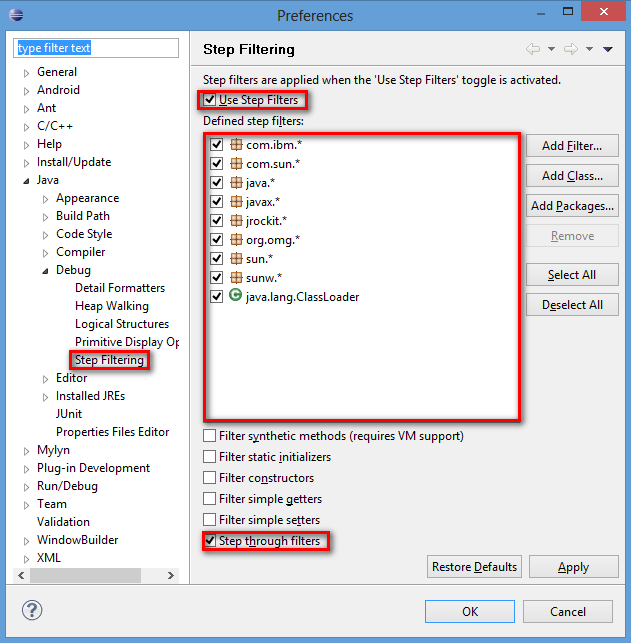
ewemoa, thanks for the replies. I have solved my issue with debugging. Apparently, for debugging to work as I want it to, I have to enable step filters and filter out all java libraries from the debug process. By default, source files are not included for Java and as such, results in the error messages I was encountering. There was never a problem with my code, just that eclipse could not find the source for the JDK.

Below is a screenshot of the settings that need to be enabled to get rid of these error messages.

2013-01-05_203729.png
Strength in Knowledge

ewemoa

  • Honorary Member
  • Joined in 2008
  • **
  • Posts: 2,922
    • Plugin Coding Medal
    • Participated in NANY Challenge Three Times
Re: Java debugging in Eclipse
« Reply #4 on: January 06, 2013, 02:17 AM »
Glad to hear you got things working :)

Thanks a lot for the update :up:

Tuxman

  • OMG not him again!
  • Supporting Member
  • Joined in 2006
  • **
  • Posts: 2,522
    • Participated in NANY Challenge Seven Times
Re: Java debugging in Eclipse
« Reply #5 on: January 06, 2013, 03:00 AM »
Why do people still use eclipse instead of the superior IntelliJ platform?
I bet when Cheetahs race and one of them cheats, the other one goes "Man, you're such a Cheetah!" and they laugh & eat a zebra or whatever.

barney

  • Charter Member
  • Joined in 2006
  • ***
  • Posts: 1,294
Re: Java debugging in Eclipse
« Reply #6 on: January 06, 2013, 03:12 AM »
Why do people still use eclipse instead of the superior IntelliJ platform?

Maybe it's the $200 US price tag.  That's a bit steep when there are freebies available to do much the same thing, doncha thimk?  Yeah, it's free for open source development, according to JetBrains, but just how do they define open source?  I've seen some pretty iffy offers from JetBrains, and their support, at least in my experience, has been less than stellar.
Make a good day ... barn

Tuxman

  • OMG not him again!
  • Supporting Member
  • Joined in 2006
  • **
  • Posts: 2,522
    • Participated in NANY Challenge Seven Times
Re: Java debugging in Eclipse
« Reply #7 on: January 06, 2013, 03:13 AM »
I never needed support for eclipse, so I can't really tell much about the difference here.
I bet when Cheetahs race and one of them cheats, the other one goes "Man, you're such a Cheetah!" and they laugh & eat a zebra or whatever.

Josh

  • Charter Honorary Member
  • Joined in 2005
  • ***
  • Posts: 3,411
    • Gathering Badge
    • Official Forum Clown
    • Coding Snacks
    • Plugin Coding Medal
    • Volunteers/Staff
    • Military Service Badge - US Army
    • Furry Fandom Badge - Furry Fandom
    • Linux User
Re: Java debugging in Eclipse
« Reply #8 on: January 06, 2013, 03:19 AM »
Honestly, I am contemplating a move to Oracle's JDevelop. It is far superior in terms of usability. I am holding off until the release of 12c with mobile support built in. Right now, you have to install ADT and a few other things to get mobile support, and even then it is kind-of clunky.
Strength in Knowledge

Tuxman

  • OMG not him again!
  • Supporting Member
  • Joined in 2006
  • **
  • Posts: 2,522
    • Participated in NANY Challenge Seven Times
Re: Java debugging in Eclipse
« Reply #9 on: January 06, 2013, 03:21 AM »
IDEs mostly written in slow Java make me puke. Generally. (I wonder what IntelliJ is built upon.)
Never seen a good application starting with a capital J.

edit:
JDeveloper, not JDevelop, right?
I bet when Cheetahs race and one of them cheats, the other one goes "Man, you're such a Cheetah!" and they laugh & eat a zebra or whatever.

Josh

  • Charter Honorary Member
  • Joined in 2005
  • ***
  • Posts: 3,411
    • Gathering Badge
    • Official Forum Clown
    • Coding Snacks
    • Plugin Coding Medal
    • Volunteers/Staff
    • Military Service Badge - US Army
    • Furry Fandom Badge - Furry Fandom
    • Linux User
Re: Java debugging in Eclipse
« Reply #10 on: January 06, 2013, 03:42 AM »
IDEs mostly written in slow Java make me puke. Generally. (I wonder what IntelliJ is built upon.)
Never seen a good application starting with a capital J.

edit:
JDeveloper, not JDevelop, right?

Po-tat-o, Po-tot-o
Strength in Knowledge

Tuxman

  • OMG not him again!
  • Supporting Member
  • Joined in 2006
  • **
  • Posts: 2,522
    • Participated in NANY Challenge Seven Times
Re: Java debugging in Eclipse
« Reply #11 on: January 06, 2013, 03:44 AM »
Could you elaborate on that?
I bet when Cheetahs race and one of them cheats, the other one goes "Man, you're such a Cheetah!" and they laugh & eat a zebra or whatever.

Original address: https://www.donationcoder.com/forum/index.php?topic=33504.0