DonationCoder.com forum
 
Read-only archive. This is a static copy of the DonationCoder.com forum. Reading and searching work as before; logging in, posting and private messages do not.
Archive of 2026-10-21 · About this archive · Main site

Author Topic: Automatic resize before save  (Read 6,861 times)

jcurtis

  • Participant
  • Joined in 2012
  • *
  • Posts: 3
Automatic resize before save
« on: November 28, 2012, 06:12 AM »
Hello!

I am wondering if there is a way to automatically resize a region screen capture such as with a post capture command line?
I am using the automatic save for the region capture and it would be excellent if the images were resized prior to the automatic save...is it possible?

Thanks!

mouser

  • First Author
  • Administrator
  • Joined in 2005
  • *****
  • Posts: 40,931
    • Gathering Badge
    • Plugin Coding Medal
    • Participated in NANY Challenge Seventeen Times
    • Cody Award
    • Coding Snacks
    • Volunteers/Staff
Re: Automatic resize before save
« Reply #1 on: November 28, 2012, 07:41 PM »
Quote
such as with a post capture command line?
yep, you have the right idea.  you just need to find a command-line resizer (or general purpose tool) that will do what you want.

ImageMagick is free and can certainly do the job.

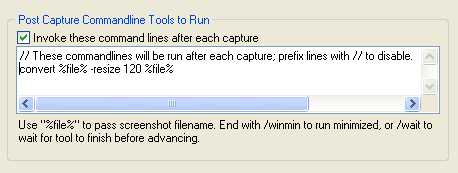
You would then configure it here:
Screenshot - 11_28_2012 , 1_40_35 PM - cap 00086.png

Do share your solution with us when you get it working  :up:

jcurtis

  • Participant
  • Joined in 2012
  • *
  • Posts: 3
Re: Automatic resize before save
« Reply #2 on: November 29, 2012, 03:28 AM »
Awesome thankyou! I have installed Image Magick and have the resize command working straight from the command line but I'm having trouble getting it to work in Screenshot Captor. I've tried a few variations but can't get it to work - I've attached an example. This line is working from cmd, obviously with %file% swapped out for the file name. Any ideas what i'm doing wrong?

Thanks again!

mouser

  • First Author
  • Administrator
  • Joined in 2005
  • *****
  • Posts: 40,931
    • Gathering Badge
    • Plugin Coding Medal
    • Participated in NANY Challenge Seventeen Times
    • Cody Award
    • Coding Snacks
    • Volunteers/Staff
Re: Automatic resize before save
« Reply #3 on: November 29, 2012, 03:34 AM »
you have the right idea
try putting the %file% parts in double quotes, and a full path to the icovert exe.

like c:\imagemagick\icovert.exe "%file%" -resize 120 "%file%"

jcurtis

  • Participant
  • Joined in 2012
  • *
  • Posts: 3
Re: Automatic resize before save
« Reply #4 on: November 29, 2012, 03:49 AM »
;D Excellent its working now! Thank you!!

mouser

  • First Author
  • Administrator
  • Joined in 2005
  • *****
  • Posts: 40,931
    • Gathering Badge
    • Plugin Coding Medal
    • Participated in NANY Challenge Seventeen Times
    • Cody Award
    • Coding Snacks
    • Volunteers/Staff
Re: Automatic resize before save
« Reply #5 on: November 29, 2012, 05:02 AM »
great :)  :up:

mouser

  • First Author
  • Administrator
  • Joined in 2005
  • *****
  • Posts: 40,931
    • Gathering Badge
    • Plugin Coding Medal
    • Participated in NANY Challenge Seventeen Times
    • Cody Award
    • Coding Snacks
    • Volunteers/Staff
Re: Automatic resize before save
« Reply #6 on: November 29, 2012, 05:05 AM »
ps. for those who don't resize quite so often, SC has a "Create Thumbnail" action inside the File menu, which can be quickly triggered from the toolbar to use previous settings, which can be used to perform fairly quick resizing-like actions (it doesn't actually resize the current image, it saves a copy of the current image at the designated size).

Original address: https://www.donationcoder.com/forum/index.php?topic=33043.0