DonationCoder.com forum
 
Read-only archive. This is a static copy of the DonationCoder.com forum. Reading and searching work as before; logging in, posting and private messages do not.
Archive of 2026-10-21 · About this archive · Main site

Author Topic: External DVD Writer  (Read 12,737 times)

CleverCat

  • Cat's Are Fun!
  • Supporting Member
  • Joined in 2006
  • **
  • Posts: 1,164
External DVD Writer
« on: November 25, 2012, 08:42 AM »
Hi - I'm seriously thinking of getting this:

Link to Kalahari.com

My current LiteOn Writer is refusing to eject the tray! Tried uninstalling Driver and rebooting but no go. It got stuck after a decoding error during a burn and although Mum managed to force open with paper clip to retrieve disc it now is well and truly stuck!  >:(

Any 'caveats' for an external usb writer? I don't use my drive much so speed is not a top priority!

Thanks

CC
If you need help - JUST ASK!

4wd

  • Pedantic Old Bastard
  • Supporting Member
  • Joined in 2006
  • **
  • Posts: 5,652
    • Coding Snacks
Re: External DVD Writer
« Reply #1 on: November 25, 2012, 10:20 AM »
Don't you have a currently non-used internal IDE DVD writer still in your machine?

You could reconnect it back up - depending on whether it was working or not when it was disconnected - might get you a few more burns before having to expend some money.
"I will not follow where the path may lead, but I will go where there is no path, and I will leave a trail." - Muriel Strode, 1903

mouser

  • First Author
  • Administrator
  • Joined in 2005
  • *****
  • Posts: 40,931
    • Gathering Badge
    • Plugin Coding Medal
    • Participated in NANY Challenge Seventeen Times
    • Cody Award
    • Coding Snacks
    • Volunteers/Staff
Re: External DVD Writer
« Reply #2 on: November 25, 2012, 10:27 AM »
Quote
Any 'caveats' for an external usb writer?

all the ones i've seen require TWO (2) usb ports to work reliably.

Ath

  • Supporting Member
  • Joined in 2006
  • **
  • Posts: 3,649
    • Participated in NANY Challenge Eleven Times
    • Coding Snacks
    • Linux User
    • Hardware Hacker
Re: External DVD Writer
« Reply #3 on: November 25, 2012, 11:15 AM »
As mouser said, but in other words: Get an external power supply for use with the writer. (Or at least a writer with an external power connector, so you can add the psu later)
/Ton
Ath's software collection, Quote: "A problem well stated is a problem half-solved." (Charles Kettering)

4wd

  • Pedantic Old Bastard
  • Supporting Member
  • Joined in 2006
  • **
  • Posts: 5,652
    • Coding Snacks
Re: External DVD Writer
« Reply #4 on: November 25, 2012, 11:55 AM »
Quote
Any 'caveats' for an external usb writer?

all the ones i've seen require TWO (2) usb ports to work reliably.

The ones I've seen, (in recent years), quote 1.5A on the drive - that's the output from three (3) USB2.0 ports.

All good external writers come with a PSU, eg. Sony.
"I will not follow where the path may lead, but I will go where there is no path, and I will leave a trail." - Muriel Strode, 1903

x16wda

  • what am I doing in this handbasket?
  • Supporting Member
  • Joined in 2007
  • **
  • Posts: 888
    • Participated in NANY Challenge Once
Re: External DVD Writer
« Reply #5 on: November 25, 2012, 03:47 PM »
How pretty must it be?  Just pull out an old internal writer and hook it to one of those ubiquitous usb/ide/sata converters.  When the converter's power dongle chokes (anywhere from a day to a year later) yank out the power supply from your old desktop and short the green and black wires together.  My Frankenwriter has served me well.  :P
vi vi vi - editor of the beast

Target

  • Honorary Member
  • Joined in 2006
  • **
  • Posts: 1,840
    • Coding Snacks
Re: External DVD Writer
« Reply #6 on: November 25, 2012, 11:39 PM »
not sure whether this might be useful or not, but we used to have a machine with a drive that refused to eject - I wrote a small AHK script that looped the unlock and eject commands until it complied

Code
driveget, tmp_, list, cdrom
loop
{
    drive, unlock, %tmp_%
    drive, eject
    sleep, 500
    driveget, tmp1, statusCD
    if tmp1 contains not ready, open
        break
}

note that I jotted this down from memory and YMMV from mine so it might or might not be 100% correct...
Alcohol is photoshop, bottled
Askhole - someone who ask for advice, then ignores it
"Look wise, say nothing, and grunt. Speech was given to conceal thought" - Sir William Osler

mwb1100

  • Supporting Member
  • Joined in 2006
  • **
  • Posts: 1,645
Re: External DVD Writer
« Reply #7 on: November 26, 2012, 05:33 AM »
yank out the power supply from your old desktop and short the green and black wires together.

But now my computer won't boot!  ;D

(seems like a lot of trouble to avoid spending $20 or so on a new internal DVD writer).

CleverCat

  • Cat's Are Fun!
  • Supporting Member
  • Joined in 2006
  • **
  • Posts: 1,164
Re: External DVD Writer
« Reply #8 on: November 26, 2012, 06:54 AM »
And first prize goes to................

Target  ;D

Script worked like charm and gave the drive a kick in the proverbial backside!  :Thmbsup: Now it works without the script  8)

Still got to test the burning as it all started when a music track got corrupted during a burn - I'll be giving it a good burning workout using a CD RW so as not to waste any more discs.

Will keep u posted!  :Thmbsup:
If you need help - JUST ASK!

CleverCat

  • Cat's Are Fun!
  • Supporting Member
  • Joined in 2006
  • **
  • Posts: 1,164
Re: External DVD Writer
« Reply #9 on: November 26, 2012, 06:56 AM »
Don't you have a currently non-used internal IDE DVD writer still in your machine?

You could reconnect it back up - depending on whether it was working or not when it was disconnected - might get you a few more burns before having to expend some money.

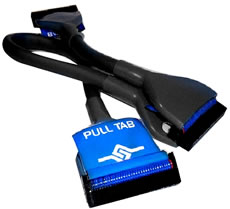
Yes but it's Ribbon Cable doesn't reach the IDE connection! Can I replace with something like this? A rounded cable?

If you need help - JUST ASK!

4wd

  • Pedantic Old Bastard
  • Supporting Member
  • Joined in 2006
  • **
  • Posts: 5,652
    • Coding Snacks
Re: External DVD Writer
« Reply #10 on: November 26, 2012, 09:47 AM »
You'll have to move the writer closer to the free IDE connector on the existing ribbon cable - depends whether you, (or your mum), can be bothered.

Spacing on IDE cables seems to be pretty standard, so if it doesn't reach both devices with the existing flat ribbon cable, a rounded version won't make any difference.

You only have one IDE port on the motherboard, so both the existing Maxtor HDD and old IDE DVD need to be plugged into the same cable, (as it was previously).

If you want to go this route, grab another picture of the inside as it is now and we'll suggest device positioning to get everything going, (might be time to vacuum it out again anyway ;) ).
"I will not follow where the path may lead, but I will go where there is no path, and I will leave a trail." - Muriel Strode, 1903

CleverCat

  • Cat's Are Fun!
  • Supporting Member
  • Joined in 2006
  • **
  • Posts: 1,164
Re: External DVD Writer
« Reply #11 on: November 26, 2012, 10:01 AM »
There have been interesting developments here! After testing it is starting to look like is was the Media Monkey burning engine that was playing up! After an update  :o

I have burned a disc using Win 7 and WMP and am currently playing it and so far so good - no decoding errors!

You have good recall 4wd - even I forgot those details!  :-[ Mum has to dive into case soon to disconnect SATA drive while I install Ubuntu on IDE so will see what we can do then...

Will keep u posted after disc finished playing... :D
If you need help - JUST ASK!

Target

  • Honorary Member
  • Joined in 2006
  • **
  • Posts: 1,840
    • Coding Snacks
Re: External DVD Writer
« Reply #12 on: November 26, 2012, 08:18 PM »
There have been interesting developments here! After testing it is starting to look like is was the Media Monkey burning engine that was playing up! After an update  :o

I have burned a disc using Win 7 and WMP and am currently playing it and so far so good - no decoding errors!

there's probably (?) nothing wrong with your drive

some (most?) disc handling app's have an option to lock the tray when they're doing something (ripping, writing) which is probably where this went wrong.  If the app fails the lock command may not be released and you'll probably have to use the paper clip to release the tray (possibly even after a reboot).

I have had success using another program to unlock the tray when this happens (eg imgburn, or diskcheck, or freac, or ahk...)
Alcohol is photoshop, bottled
Askhole - someone who ask for advice, then ignores it
"Look wise, say nothing, and grunt. Speech was given to conceal thought" - Sir William Osler

CleverCat

  • Cat's Are Fun!
  • Supporting Member
  • Joined in 2006
  • **
  • Posts: 1,164
Re: External DVD Writer
« Reply #13 on: November 27, 2012, 09:52 AM »
My local PC shop is interested in your ahk script - can I send them a copy along with the ahk program?

Disc I burned with plain old windows is fine so am going to roll back MM to previous version and test.

:D


If you need help - JUST ASK!

Target

  • Honorary Member
  • Joined in 2006
  • **
  • Posts: 1,840
    • Coding Snacks
Re: External DVD Writer
« Reply #14 on: November 27, 2012, 08:27 PM »
My local PC shop is interested in your ahk script - can I send them a copy along with the ahk program?

knock yourself out  :Thmbsup:

hmmm, then again, maybe I should hold out for a lucrative licensing deal :huh:
Alcohol is photoshop, bottled
Askhole - someone who ask for advice, then ignores it
"Look wise, say nothing, and grunt. Speech was given to conceal thought" - Sir William Osler

CleverCat

  • Cat's Are Fun!
  • Supporting Member
  • Joined in 2006
  • **
  • Posts: 1,164
Re: External DVD Writer
« Reply #15 on: December 03, 2012, 07:29 AM »
They said the script could save them many trips to 'fix' warranty products!  ;D

BTW - it seems Media Monkey's cda burning is fried as mp3 works fine! So if I need to burn a cda for my friends who are still lingering in the 20th Century, I'll just use Windows.... :o

I'll be reporting the Bug.... :down:
If you need help - JUST ASK!

Original address: https://www.donationcoder.com/forum/index.php?topic=32994.0