


I am currently dealing with some issues with CrashPlan, the combined online and local backup service I reviewed and selected last year for my personal backup needs: http://www.donationcoder.com/forum/index.php?topic=26224.0
One of the problems I am seeing is really high memory use, 1.5-2GB for the backup process (running as a service) at peak. It starts out lower but climbs over the course of a day or two to about that level, then hangs there, presumably as a result of performing more complex operations on the large data set, e.g. encryption, deduplication, versioning, etc.
Now until recently I've been reasonably happy with CrashPlan, but my confidence has definitely been shaken lately. I'm not seeking actual recommendations for other options just yet, but I'm starting the research process. A big part of that is trying to determine whether what I am experiencing is anywhere close to normal *considering my data backup needs*. It may simply be that I'm asking too much of the system and need to get more reasonable, hehe. So what I would love is to hear from other people who are doing fairly large backups to *online* systems, ideally with the following features/characteristics (or close to):
The info I'm looking for is 1: What software are you using, 2: How often/on what schedule does it run, 3: How much data are you backing up, both in terms of number of files, and total size, 4: How much memory does the process (or processes) use at peak and on average, 5: How much CPU does the backup process use when actively backing up.
Hearing from other CrashPlan users with similar circumstances to myself would certainly be useful. It's very possible that the combination of data size, number of files, and features such as deduplication and file versioning simply make such high memory use somewhat inevitable (or a much slower backup by paging out to disk a lot more). If so, then it's time for me to think about getting rid of some features like possibly versioning (or try reducing length of version history perhaps). But I won't know until I can get some reference points as to whether this seems normal under the circumstances. Trying a bunch of different backup systems myself seems somewhat unfeasible as most would make me pay for uploading more than a fraction of my data, and online backup is a critical component of this.
Any info you can provide on your experiences would be great. Thanks!
- Oshyan
One of the problems I am seeing is really high memory use, 1.5-2GB for the backup process (running as a service) at peak. It starts out lower but climbs over the course of a day or two to about that level, then hangs there, presumably as a result of performing more complex operations on the large data set, e.g. encryption, deduplication, versioning, etc.
Now until recently I've been reasonably happy with CrashPlan, but my confidence has definitely been shaken lately. I'm not seeking actual recommendations for other options just yet, but I'm starting the research process. A big part of that is trying to determine whether what I am experiencing is anywhere close to normal *considering my data backup needs*. It may simply be that I'm asking too much of the system and need to get more reasonable, hehe. So what I would love is to hear from other people who are doing fairly large backups to *online* systems, ideally with the following features/characteristics (or close to):
- Data set at least 1TB, preferably around 2TB (my full data set is 1.9TB at present)
- Number of files at least 1 million, ideally 1.5 million or more (I have 1.5 million files backed up at present)
- Combined local and online backup (online backup is an important component; if you're only doing local, your info may be valuable, but it makes it not a direct comparison with CrashPlan)
- Encryption (being done locally)
- Deduplication being done on the backup set(s)
- Continuous backup/file system monitoring (this is not a critical requirement as I do not absolutely need the feature, but this is the way CrashPlan runs, so it would make it most directly comparable
- File versioning
The info I'm looking for is 1: What software are you using, 2: How often/on what schedule does it run, 3: How much data are you backing up, both in terms of number of files, and total size, 4: How much memory does the process (or processes) use at peak and on average, 5: How much CPU does the backup process use when actively backing up.
Hearing from other CrashPlan users with similar circumstances to myself would certainly be useful. It's very possible that the combination of data size, number of files, and features such as deduplication and file versioning simply make such high memory use somewhat inevitable (or a much slower backup by paging out to disk a lot more). If so, then it's time for me to think about getting rid of some features like possibly versioning (or try reducing length of version history perhaps). But I won't know until I can get some reference points as to whether this seems normal under the circumstances. Trying a bunch of different backup systems myself seems somewhat unfeasible as most would make me pay for uploading more than a fraction of my data, and online backup is a critical component of this.
Any info you can provide on your experiences would be great. Thanks!
- Oshyan




 .
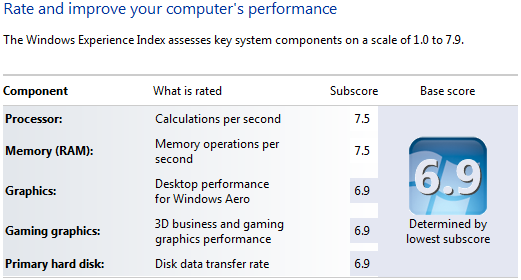
. And have 16GB of RAM. Most of the time I can "spare" 2GB for my backup process, it just seems like I shouldn't have to. However...


 - carpe noctem


