This has been posted in the hope that it might be of help/use to others in fixing what looks like it could be a relatively common problem.
Description of problem:
The PC is an HP ENVY 14 laptop running Win7-64 Home Premium.
For a while now, I have been getting some odd startup error messages on this laptop - nothing serious or fatal - and today I got another one: the HP Support program popped up a message window saying that it had an update task that required a restart. So I restarted.
After restarting, it asked for a restart!
After restarting again, it still asked for a restart.
I figured that the Task Scheduler might have the details on the task, and decided to take a look as the task clearly wasn't working as it should.
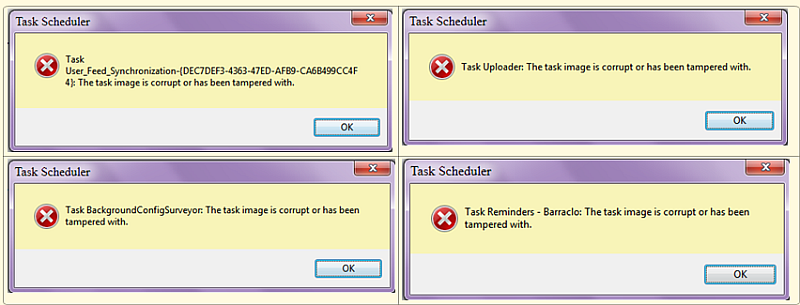
I have to admit that I haven't really looked in the Task Scheduler in ages, and when it started up I was a bit alarmed to see that it had 4 errors that popped up one after the other. I closed the Task Scheduler and started it up again, and the same thing happened. I repeated this a third time - same result. So here were a bunch of consistent errors that indicated that the Task Scheduler was probably unable to work properly and that it could have been this way for some time, without my knowing.
The errors:
[attach]
Description of problem:
The PC is an HP ENVY 14 laptop running Win7-64 Home Premium.
For a while now, I have been getting some odd startup error messages on this laptop - nothing serious or fatal - and today I got another one: the HP Support program popped up a message window saying that it had an update task that required a restart. So I restarted.
After restarting, it asked for a restart!
After restarting again, it still asked for a restart.
I figured that the Task Scheduler might have the details on the task, and decided to take a look as the task clearly wasn't working as it should.
I have to admit that I haven't really looked in the Task Scheduler in ages, and when it started up I was a bit alarmed to see that it had 4 errors that popped up one after the other. I closed the Task Scheduler and started it up again, and the same thing happened. I repeated this a third time - same result. So here were a bunch of consistent errors that indicated that the Task Scheduler was probably unable to work properly and that it could have been this way for some time, without my knowing.
The errors:
[attach]