DonationCoder.com forum
 
Read-only archive. This is a static copy of the DonationCoder.com forum. Reading and searching work as before; logging in, posting and private messages do not.
Archive of 2026-10-21 · About this archive · Main site

Author Topic: Where can I download BitLocker to Go?  (Read 34,115 times)

BCHOWDHURY

  • Supporting Member
  • Joined in 2008
  • **
  • Posts: 87
Where can I download BitLocker to Go?
« on: October 23, 2012, 02:48 PM »
I have been trying to find a download link for BitLocker to Go but failed to find one till now. Can any forum member of any help?

Josh

  • Charter Honorary Member
  • Joined in 2005
  • ***
  • Posts: 3,411
    • Gathering Badge
    • Official Forum Clown
    • Coding Snacks
    • Plugin Coding Medal
    • Volunteers/Staff
    • Military Service Badge - US Army
    • Furry Fandom Badge - Furry Fandom
    • Linux User
Re: Where can I download BitLocker to Go?
« Reply #1 on: October 23, 2012, 03:12 PM »
Bitlocker 2 go is not a tool you can download. Bitlocker2go is built into any version of Windows since 7 in the pro edition or higher. To use it, you simply launch the bitlocker console and encrypt the USB flash drive. The remote computer must be running Windows 7 or newer to utilize the drive.
Strength in Knowledge

Curt

  • Supporting Member
  • Joined in 2006
  • **
  • Posts: 7,565
Re: Where can I download BitLocker to Go?
« Reply #2 on: October 23, 2012, 03:24 PM »
are you still running XP? BitLocker Drive Encryption was introduced with Vista Premium Ultimate, and 'To Go' came with Win 7. You may want to check out Bitlocker Reader: http://www.microsoft.com/en-us/download/details.aspx?id=24303
For mobile PCs: http://www.microsoft.com/en-us/download/details.aspx?id=12950
-------------

Quote
A Trusted Platform Module (TPM) is a microchip that is built into a computer. It is used to store cryptographic information, such as encryption keys. Information stored on the TPM can be more secure from external software attacks and physical theft.

BitLocker uses the TPM to help protect the Windows operating system and user data and helps to ensure that a computer is not tampered with, even if it is left unattended, lost, or stolen.

BitLocker can also be used without a TPM. To use BitLocker on a computer without a TPM, you must change the default behavior of the BitLocker setup wizard by using Group Policy, or configure BitLocker by using a script. When BitLocker is used without a TPM, the required encryption keys are stored on a USB flash drive that must be presented to unlock the data stored on a volume.
« Last Edit: October 23, 2012, 09:51 PM by Curt »

40hz

  • Supporting Member
  • Joined in 2007
  • **
  • Posts: 11,861
Re: Where can I download BitLocker to Go?
« Reply #3 on: October 23, 2012, 03:26 PM »
IIRC you need the Enterprise or Ultimate editions of Win7 to get Bitlocker.

It will be included with Pro and up starting with Win8

Curt

  • Supporting Member
  • Joined in 2006
  • **
  • Posts: 7,565
Re: Where can I download BitLocker to Go?
« Reply #4 on: October 23, 2012, 03:36 PM »
For mobile PCs: http://www.microsoft.com/en-us/download/details.aspx?id=12950
Quote from: Microsoft
Supported operating systems: Windows Vista, Windows XP

Stoic Joker

  • Honorary Member
  • Joined in 2008
  • **
  • Posts: 6,652
    • Cody Award
    • Participated in NANY Challenge Five Times
Re: Where can I download BitLocker to Go?
« Reply #5 on: October 23, 2012, 04:15 PM »
MS BitLocker To Go Reader for XP and Vista.

BCHOWDHURY

  • Supporting Member
  • Joined in 2008
  • **
  • Posts: 87
Re: Where can I download BitLocker to Go?
« Reply #6 on: October 23, 2012, 05:15 PM »
Thanks for the replies.

tomos

  • Charter Member
  • Joined in 2006
  • ***
  • Posts: 11,970
    • Gathering Badge
    • Participated in NANY Challenge Once
Re: Where can I download BitLocker to Go?
« Reply #7 on: November 01, 2012, 10:47 AM »
Vaguely related query so thought I'd post here:

For Bitlocker to work you need:
> BitLocker requires Trusted Platform Module (TPM) 1.2
Windows 7 system requirements (MS)

I was planning on buying a small laptop and installing 7 Ultimate on it (but havent any particular model in mind yet).

Just wondering could this 'TPM' be a problem or is it standard?
Tom

Curt

  • Supporting Member
  • Joined in 2006
  • **
  • Posts: 7,565
Re: Where can I download BitLocker to Go?
« Reply #8 on: November 01, 2012, 01:32 PM »
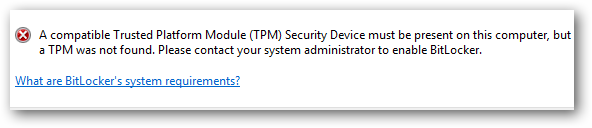
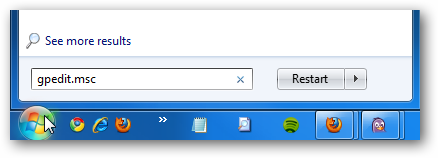
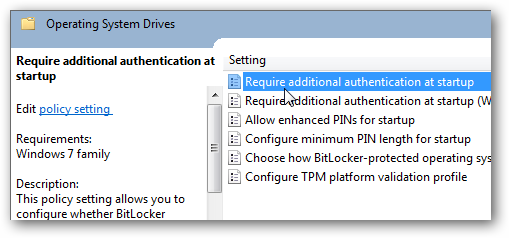
#Maybe# all new computers have it,

but if not:


1bit.png

2bit.png

3bit.png


Read all about it at http://www.howtogeek.com/howto/6229/how-to-use-bitlocker-on-drives-without-tpm/

-------------
-------------
http://windows.microsoft.com/en-US/windows7/Set-up-your-hard-disk-for-BitLocker-Drive-Encryption

f0dder

  • [Well, THAT escalated quickly!]
  • Charter Honorary Member
  • Joined in 2005
  • ***
  • Posts: 9,153
    • Participated in NANY Challenge Once
Re: Where can I download BitLocker to Go?
« Reply #9 on: November 01, 2012, 04:18 PM »
Personally, I'd go for TrueCrypt instead, unless you have some very specific reasons for going with BitLocker.
- carpe noctem

tomos

  • Charter Member
  • Joined in 2006
  • ***
  • Posts: 11,970
    • Gathering Badge
    • Participated in NANY Challenge Once
Re: Where can I download BitLocker to Go?
« Reply #10 on: November 01, 2012, 04:25 PM »
Personally, I'd go for TrueCrypt instead, unless you have some very specific reasons for going with BitLocker.

no I dont - thanks for the recommendation f0dder - makes things simpler ;-)
Tom

Original address: https://www.donationcoder.com/forum/index.php?topic=32631.0