DonationCoder.com forum
 
Read-only archive. This is a static copy of the DonationCoder.com forum. Reading and searching work as before; logging in, posting and private messages do not.
Archive of 2026-10-21 · About this archive · Main site

Author Topic: Photo Scanner  (Read 8,712 times)

Trundicho

  • Participant
  • Joined in 2012
  • *
  • Posts: 3
Photo Scanner
« on: October 21, 2012, 08:39 AM »
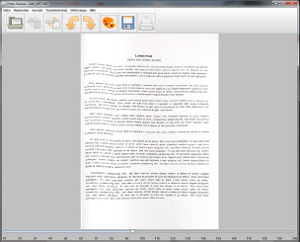
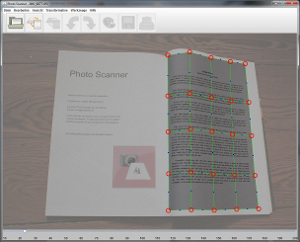
Photo Scanner is a software to transform your handshot images IE. into Din A4 PDF documents.

Web page for detailed information and Download

The idea to this software came as I switched to Windows 7 and the driver support for my good old hardware scanner ran out. Since then I decided to scan with my cellphone, because the 5Megapixels had a perfect quality in scan results. The problems were the lightning and the perspective - so I began to write the Photo Scanner to correct these problems in post. I no longer had to worry about the perspective as long as the document was fully visible and the light doesn't matter that much.

I am developing this tool in my sparetime so anyone is welcome to write mini-review  ;)

I am opened for any comments and suggestions.

[attach=#][attach=#]

Update:
Version 2.2.2 Released on 11.10.2012
-Translation of the image by simple mouse dragging
-Dutch translation - thanks to Ath!
-Bugfix on markerpositions on right and bottom side
« Last Edit: November 11, 2012, 01:26 PM by Trundicho »

tomos

  • Charter Member
  • Joined in 2006
  • ***
  • Posts: 11,970
    • Gathering Badge
    • Participated in NANY Challenge Once
Re: Photo Scanner 2.2.1
« Reply #1 on: October 21, 2012, 11:59 AM »
Sounds very interesting Trundicho

(I'll try and test it this week)
Tom

Ath

  • Supporting Member
  • Joined in 2006
  • **
  • Posts: 3,649
    • Participated in NANY Challenge Eleven Times
    • Coding Snacks
    • Linux User
    • Hardware Hacker
Re: Photo Scanner 2.2.1
« Reply #2 on: October 21, 2012, 12:30 PM »
Great tool :Thmbsup:

I am opened for any comments and suggestions.
Can I suggest I create a Dutch translation for you? If yes, please send (PM) instructions 8)
/Ton
Ath's software collection, Quote: "A problem well stated is a problem half-solved." (Charles Kettering)

Trundicho

  • Participant
  • Joined in 2012
  • *
  • Posts: 3
Re: Photo Scanner 2.2.1
« Reply #3 on: October 21, 2012, 04:38 PM »
Hi Ath,

Great I will send you the instructions and the single file to edit :Thmbsup:

vlastimil

  • Honorary Member
  • Joined in 2006
  • **
  • Posts: 308
    • Participated in NANY Challenge Three Times
Re: Photo Scanner 2.2.1
« Reply #4 on: October 22, 2012, 02:09 PM »
That tool looks very nice. Coincidentally, I have run into similar problems lately while cropping photographed pictures. Simple perspective removal was not good enough in some case, because the crappy, tiny lens of some digital cameras (and I suppose every smartphone) actually turn straight lines into curves  :(.

Here is a provocative suggestion: What if you dropped the interior control handles and only had 4 handles in the corners and 2 addition handles on each edge? That would make the set up from user perspective much simpler. The actual algorithm would surely get much more complicated, but it may be worth the trouble. (I presume, you are using a Bezier transform or something similar now.) If the application made the assumption that the region the user designated is physically rectangular, I believe the would be a way to figure out a good transformation automatically. It will be quite hard to program, but the best things are never easy.

Trundicho

  • Participant
  • Joined in 2012
  • *
  • Posts: 3
Re: Photo Scanner 2.2.1
« Reply #5 on: October 22, 2012, 06:55 PM »
Hi vlastimil,

yes this is a good idea. The basics for this problem are already possible: In the "Tools" menu you can refine the raster and get more handles. The problem is that there is simply no automatic interpolation yet. If you want to correct a curve, you have to refine many handles and drag them manually - I don't suppose it because it is time consuming. I'm working on interpolation and more usability updates like zooming or rotating the raster etc. The usabilty for lens correction is not yet given. It should be possible to do lens correction and even the book fold should be correctable.
« Last Edit: October 22, 2012, 08:26 PM by Trundicho »

Original address: https://www.donationcoder.com/forum/index.php?topic=32613.0