DonationCoder.com forum
 
Read-only archive. This is a static copy of the DonationCoder.com forum. Reading and searching work as before; logging in, posting and private messages do not.
Archive of 2026-10-21 · About this archive · Main site

Author Topic: ASAP Utilities for Excel  (Read 13,389 times)

Curt

  • Supporting Member
  • Joined in 2006
  • **
  • Posts: 7,565
ASAP Utilities for Excel
« on: October 04, 2012, 04:53 PM »
Just saw this on gizmo's:

http://www.techsupportalert.com/content/49-excel-add-still-available-free-and-its-better-ever.htm

Quote
This $49 Excel Add-In Is Still Available Free. And It's Better Than Ever.
Updated 3. October 2012 - 3:17 by rob.schifreen

More than a year ago, I wrote about a great collection of add-in utilities for Excel.  Since then, the program has continued to improve.  It now has more than 200,000 users in 90 countries, and boasts more than 300 new features which it adds to all versions of Excel from 2000 to 2010.  The most recent update to the system was just last week.

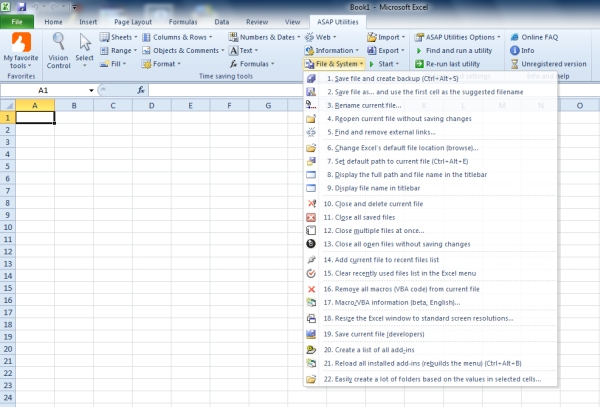
The program is called the ASAP Utilities.  As you can see from the screen shot below, all of its features are handily grouped together on a ribbon menu, and the dropdown shows just how feature-packed this program is.

If you use Excel, at whatever level, give this program a try.  It really does promise to make your life a whole lot easier.  It's an 8 MB download from http://www.asap-utilities.com/ and VirusTotal reports it as free of malware and viruses.  

ASAP Utilities costs $49 if you use it for commercial purposes.  But for home, student and charity use, it's free ot charge.

http://www.techsupportalert.com/content/49-excel-add-still-available-free-and-its-better-ever.htm
[attachimg=#]

x16wda

  • what am I doing in this handbasket?
  • Supporting Member
  • Joined in 2007
  • **
  • Posts: 888
    • Participated in NANY Challenge Once
Re: ASAP Utilities for Excel
« Reply #1 on: October 04, 2012, 11:42 PM »
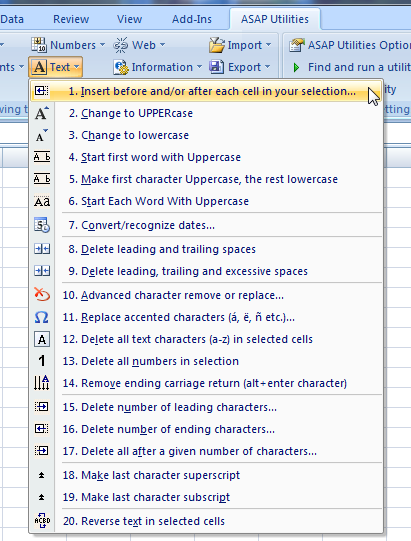
This stuff is the bomb.  It makes a lot of awkward stuff easy.  Listen, it costs nothing for non-commercial use, you owe it to yourself to give it a try if you use Excel and you value your time.  I started by using a bunch of the text functions for formatting:

[attach]
vi vi vi - editor of the beast
« Last Edit: October 04, 2012, 11:53 PM by x16wda »

cranioscopical

  • Friend of the Site
  • Supporting Member
  • Joined in 2006
  • **
  • Posts: 4,776
    • Cody Award
    • Official Forum Clown
    • rotten turkey sandwich - Rotten Turkey Sandwich
Re: ASAP Utilities for Excel
« Reply #2 on: October 04, 2012, 11:52 PM »
Thanks for the alert, Curt!
Chris

nudone

  • Cody's Creator
  • Columnist
  • Joined in 2005
  • ***
  • Posts: 4,119
    • Cody Award
Re: ASAP Utilities for Excel
« Reply #3 on: October 05, 2012, 10:03 AM »
One small issue - doesn't work with 64bit Excel.

Is there any reason to install 64bit Office (which I have done). Seems general opinion is that there's no point as this is the kind of problem that occurs, i.e. plugins tend to be 32bit only.

Ath

  • Supporting Member
  • Joined in 2006
  • **
  • Posts: 3,649
    • Participated in NANY Challenge Eleven Times
    • Coding Snacks
    • Linux User
    • Hardware Hacker
Re: ASAP Utilities for Excel
« Reply #4 on: October 05, 2012, 10:12 AM »
Only reason to use 64 bit Office is if you need the extra memory capacity, and the only part of MS Office capable of using that, afaik, is Excel.
This is related info: http://blogs.technet.com/b/office2010/archive/2010/02/23/understanding-64-bit-office.aspx Aha, also Project knows how to use the memory.
And this too: http://office.microsoft.com/en-us/word-help/choose-the-32-bit-or-64-bit-version-of-office-HA010369476.aspx
/Ton
Ath's software collection, Quote: "A problem well stated is a problem half-solved." (Charles Kettering)

TaoPhoenix

  • 0 - 60 ... then back to 0 again!
  • Supporting Member
  • Joined in 2011
  • **
  • Posts: 4,642
    • Participated in NANY Challenge Three Times
Re: ASAP Utilities for Excel
« Reply #5 on: October 05, 2012, 10:46 AM »
I tried those out on my last job, but the kinds of things I was doing never really needed most of those utilities. But it's a neat concept.
Use attachthumb=# to show an attached image as an expandable thumbnail, or attach=# to show full size. (With Brackets)

nudone

  • Cody's Creator
  • Columnist
  • Joined in 2005
  • ***
  • Posts: 4,119
    • Cody Award
Re: ASAP Utilities for Excel
« Reply #6 on: October 05, 2012, 10:55 AM »
Thanks for the links, Ath. Looks like I don't need Office 64bit at all.

kfitting

  • Charter Member
  • Joined in 2005
  • ***
  • Posts: 593
Re: ASAP Utilities for Excel
« Reply #7 on: October 05, 2012, 11:24 AM »
One big "problem" (depends on what you do, obviously) is that there is no windows common controls for 64-bit.  So if any vba addin uses listview or treeview they will not work on 64bit excel.  I use listviews a lot in VBA...

Shades

  • Member
  • Joined in 2006
  • **
  • Posts: 2,954
Re: ASAP Utilities for Excel
« Reply #8 on: October 06, 2012, 08:21 PM »
The download page from Microsoft (for Office 2010) states all kinds of reasons to not use 64-bit Office, unless you absolutely have to. Actually, that page does not even mention there is a 64-bit version (or 32-bit for that matter). At least this was true when I last checked a month or two ago.
The easy path is usually downhill...

Original address: https://www.donationcoder.com/forum/index.php?topic=32437.0