


| Originally posted: | 2012-10-04 |
| Last updated | 2013-06-20 |
Basic Info
| App Name | PDF-XChange Viewer |
| Thumbs-Up Rating |  |
| App URL | http://www.tracker-software.com/product/pdf-xchange-viewer |
| App Version Reviewed | $FREE Version v2.5.211 (17 Jun 2013) |
| Test System Specs | MS Win 7-64 Home Premium |
| Supported OSes | Compatible with Win 64-bit/32-bit. |
| Support Methods | Download and Support via the above link. Help file: PDF-XChange Viewer Help File (English) |
| Upgrade Policy | There is a paid PRO version upgrade. |
| Trial Version Available? | $FREE - as reviewed in this review. |
| Pricing Scheme | PRO version US$37.50 (also has free trial period). There are extended maintenance/upgrade periods costing approx. $6 for 2 years, and $10 for 3 years. |
Intro and Overview:
PDF-XChange Viewer generally seems to get good mention in DCF discussions, over the last few years.
After I had made a post about Nuance PDF Reader being Annoyware/Adware (carries a forced/unwanted payload), there were two rather interesting comments - one from @cyberdiva and one from @Tinman:
Several years ago, I switched to the free version of PDF-XChange Viewer, which had been highly recommended to me. I've been very happy with it ever since. I see that Gizmo's Best Freeware site lists PDF-XChange Viewer as its top pick:I've been using PDFXchangeViewer for years now. It has an excellent GUI, lots of options, bells & whistles. I used to use Foxit before I discovered PDFXchange...
http://www.techsupportalert.com/best-free-non-adobe-pdf-reader.htm.
As a result of those comments and checking out the TechSupport review - Best Free Non-Adobe PDF Reader - which reviewed an earlier version (v2.5.205.0) - I decided to install/trial the FREE PDF-XChange Viewer.
I primarily wanted to use it as a reader to replace Adobe Reader (for various reasons), and it seems to be a good replacement, with a few features that I found make it preferable to Adobe Reader.
The Included FREE features (modified from source - here) are:
- OCR options included (English, French, German, Spanish) - OCR your image based/scanned PDF's to make them fully text searchable PDF files !!!!
- Add Comments and Annotations to any PDF file (subject to security settings) - unlike the Adobe Viewer which requires the PDF creation tool to be 'certified' by Adobe !
- Add & apply Custom Stamps from any Image or PDF File and even your Windows Clip board !
- Measurement Tools incl. perimeter and area
- Mark-up pages with text and objects
- Type directly on any PDF page, not just Adobe enabled forms documents - in Typewriter mode.
- Export PDF pages or entire files to any one of the supported Image formats including BMP, JPEG, TIFF, PNG and many more ...
- Extract text from a PDF page/File
- Make your navigation of large or complex PDF files both simple and enjoyable with the extended functionality of our 'Loupe' and the 'Pan' Window tools
- PDF Security Support including 40/128 bit RC4 and 128/256 bit AES Encryption Password and Permissions Add/Edit
- Data Execution Prevention (DEP) - stops the execution of nefarious scripts from Virus's/trojans etc.
- Fill and Save Adobe Forms to disk, email or 'post' - including XFA and dynamic forms (new in V2.5) !
- Full Javascript Engine included
- Store/Restore of last opened files (last session)
- Updated JPEG2000 Compression support - improving speed.
- Plug-Ins for both MS IE or Firefox Browser's included
- Integrate seamlessly with your favorite translation software to translate text on the 'fly' - including : ABBYY Lingvo 12, Translate It!, Lingoes.
- Auto-Highlights Fillable Form Fields
- Integrated Shell Extensions for PDF thumbnails and document preview in Windows Explorer
- Document Search. Probably the fastest PDF document search engine available today !
- Set default viewing preferences for PDF files
Who this software is designed for:
The software seems to be aimed primarily at the Adobe Reader alternative market, so it has a fair amount of competition.
For example, I had tried Nuance PDF Reader and Foxit, but found them both wanting, so had expunged them from my laptop system before installing PDF-XChange Viewer.
In my case, I have expunged the seemingly invasive Adobe Acrobat from my system, and PDF-XChange Viewer has become the default PDF reader.
The Good:
- Reading: I primarily wanted PDF-XChange Viewer for reading PDF document files. It does an excellent job of that.
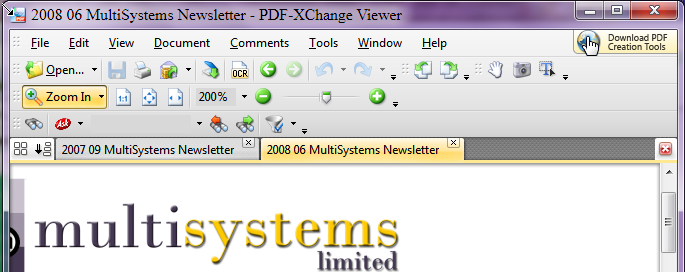
- Tabbed: Its tabbed reader is a delight to have/use - see 1st. image below. (I don't know why Adobe doesn't do that.)
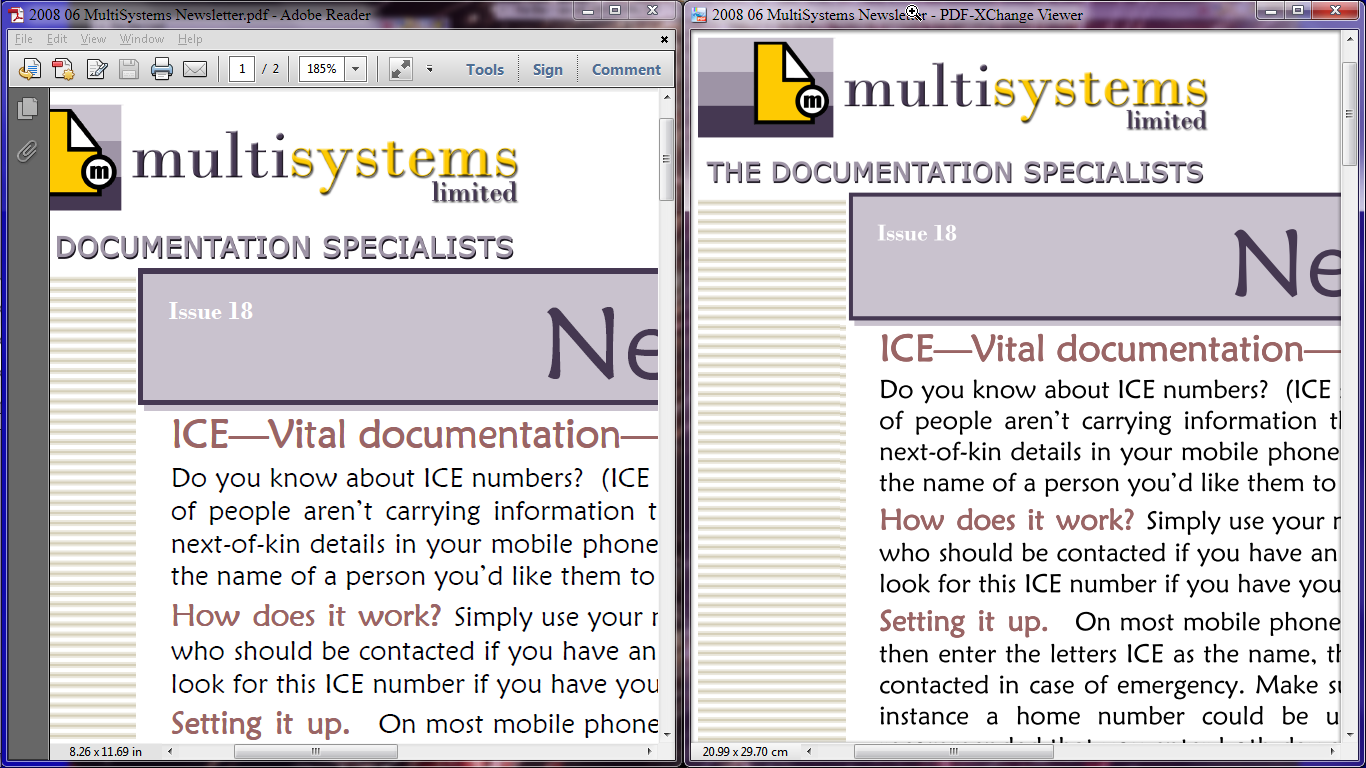
- View: It has a good, uncluttered bordered fullscreen (F11) view, similar to Adobe Reader - see 2nd. image below.
- Resolution:It seems to have clearer font resolution than Adobe Reader - see side-by-side comparison in 2nd. image below. To make the Font size comparable, Adobe was set at 185% zoom and PDF-XChange Viewer was set at 200% zoom. ClearType was ON and had been tuned. This is just a one-off comparison. Maybe the same comparison but using different documents might produce different results.
- OCR: It does a very good job (high accuracy) of OCRing PDF documents that are not text-copyable/searchable, thus making them text-copyable/searchable. OCR languages are English, French, German, Spanish.
[attach]


 (Wn7 64bit)


.png)


