DonationCoder.com forum
 
Read-only archive. This is a static copy of the DonationCoder.com forum. Reading and searching work as before; logging in, posting and private messages do not.
Archive of 2026-10-21 · About this archive · Main site

Author Topic: DONE: Difficult Finder  (Read 16,695 times)

Contro

  • Supporting Member
  • Joined in 2007
  • **
  • Posts: 3,947
DONE: Difficult Finder
« on: September 24, 2012, 09:23 PM »
Difficult Finder

Open a folder in a path predefined.
Open a folder inside a folder proposing his name after invoking the script by a definable hotkey.

I would like a snack for :

1. Using a hotkey run a script that open a window to propose the name of a subfolder
2. All the subfolders are from a given path . By example : Y:\GABINETE\PROYECTOS\
3. If the subfolder exists open the folder. If not simply return.

By example

I wish to open the subfolder 206

That is
Y:\GABINETE\PROYECTOS\206

P.D. I have a more difficult situation . I want to open all the subfolders from a list of paths is exists.
By example : I wish to open the subfolder 206 proposing its name in a window invoked by a hotkey.
Then open in these paths if exist :
Y:\Example\Path1\
Y:\engineer\path2\
......
y:\conta\


That is. Open if exist :
Y:\example\path1\206\
Y:\engineer\path2\206
......
y:\conta\206

I would like a fast script.

Thanks

« Last Edit: September 25, 2012, 12:42 AM by Contro »

Ruffnekk

  • Uhm yeah...
  • Honorary Member
  • Joined in 2006
  • **
  • Posts: 332
    • Programming School - Stage 1 Medal
    • Programming School - Deluxe Bonus Medal
    • Participated in NANY Challenge Once
    • Linux User
Re: DONE: Difficult Finder
« Reply #1 on: December 03, 2012, 12:05 PM »
Are you still looking for a solution to this problem?
Regards,
RuffNekk

Programming is an art form that fights back.

Contro

  • Supporting Member
  • Joined in 2007
  • **
  • Posts: 3,947
Re: DONE: Difficult Finder
« Reply #2 on: December 04, 2012, 01:41 AM »
:)
Yes I would like.
I have not solved.
Best Regards

4wd

  • Pedantic Old Bastard
  • Supporting Member
  • Joined in 2006
  • **
  • Posts: 5,652
    • Coding Snacks
Re: DONE: Difficult Finder
« Reply #3 on: December 04, 2012, 03:10 AM »
MultiOpen.au3 - No error checking, no error messages, absolutely nothing happens if the path doesn't exist, doesn't run in the background, doesn't make coffee.

Code: (autoit)
#Region ;**** Directives created by AutoIt3Wrapper_GUI ****
#AutoIt3Wrapper_UseUpx=n
#EndRegion ;**** Directives created by AutoIt3Wrapper_GUI ****
#include 'RFLTA.au3'

Local $output
Local $inifile = StringLeft(@ScriptName, StringLen(@ScriptName) - 4) & '.ini'

If Not FileExists($inifile) Then Exit

Local $subdir = InputBox('MultiOpen', 'Sub-directory to open:' & @CRLF & @CRLF & 'Wildcards * and ? can be used.', '*')
If @error = 1 Then Exit
If $subdir = '' Then $subdir = '*'

Local $paths = IniReadSection($inifile, 'Paths')

If Not IsArray($paths) Then Exit

For $i = 1 To $paths[0][0]
	If $subdir <> '*' Then
		Local $sDirs = _RecFileListToArray($paths[$i][1], $subdir, 2, 0, 0, 1)
		If IsArray($sDirs) Then
			For $j = 1 To $sDirs[0]
				ShellExecute($paths[$i][1] & '\' & $sDirs[$j])
			Next
		EndIf
	Else
		ShellExecute($paths[$i][1])
	EndIf
Next

MultiOpen.ini example:

Code: (generic)
[Paths]
path1=R:\test
path2=c:
path3=r:\test\contro
path4=d:\temp

Run it by double-clicking on the icon or set up a hotkey in your favourite launcher or Windows - there's no need to have it running in the background.

EDIT: Fixed .ini file and now respects Cancel button. :/
EDIT2: Added wildcards.
"I will not follow where the path may lead, but I will go where there is no path, and I will leave a trail." - Muriel Strode, 1903
« Last Edit: December 06, 2012, 05:43 AM by 4wd »

Contro

  • Supporting Member
  • Joined in 2007
  • **
  • Posts: 3,947
Re: DONE: Difficult Finder
« Reply #4 on: December 04, 2012, 03:13 AM »
Running to coffee

Ouwwww. Running to try
;D

4wd

  • Pedantic Old Bastard
  • Supporting Member
  • Joined in 2006
  • **
  • Posts: 5,652
    • Coding Snacks
Re: DONE: Difficult Finder
« Reply #5 on: December 05, 2012, 12:12 AM »
No change to code but I removed the trailing \ on one of the entries in the ini.

ie. No trailing \ on paths.
"I will not follow where the path may lead, but I will go where there is no path, and I will leave a trail." - Muriel Strode, 1903

Contro

  • Supporting Member
  • Joined in 2007
  • **
  • Posts: 3,947
Re: DONE: Difficult Finder
« Reply #6 on: December 05, 2012, 01:39 AM »
Okis
Running to try

Contro

  • Supporting Member
  • Joined in 2007
  • **
  • Posts: 3,947
Re: DONE: Difficult Finder
« Reply #7 on: December 05, 2012, 01:41 AM »
What do you mean ?
Until the moment I don't know exactly what to do
Please, can you explain me ?

4wd

  • Pedantic Old Bastard
  • Supporting Member
  • Joined in 2006
  • **
  • Posts: 5,652
    • Coding Snacks
Re: DONE: Difficult Finder
« Reply #8 on: December 05, 2012, 03:13 AM »
This good:
Code: (generic)
path2=c:

This bad:
Code: (generic)
path2=c:\

Edit MultiOpen.ini to add in the paths you want the program to look in for sub-directories.

Run the program, enter in the sub-directory you want to open in the paths you have configured - if they exist, they will be opened in Explorer, (I think - worked OK for DOpus).

eg. for your example MultiOpen.ini would look like this:
Code: (generic)
[Paths]
path1=Y:\Example\Path1
path2=Y:\engineer\path2
path3=y:\conta

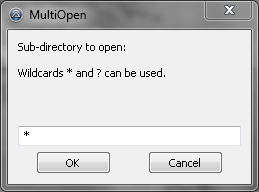
and you would enter 206 when you ran the program.

2012-12-06_16-40-23.png

If you enter nothing and hit OK, all the directories in MultiOpen.ini will be opened.
"I will not follow where the path may lead, but I will go where there is no path, and I will leave a trail." - Muriel Strode, 1903
« Last Edit: December 06, 2012, 05:40 AM by 4wd »

Contro

  • Supporting Member
  • Joined in 2007
  • **
  • Posts: 3,947
Re: DONE: Difficult Finder
« Reply #9 on: December 05, 2012, 02:07 PM »
Undertood completely now.
I'll try and comment.
Best Regards
:-* :Thmbsup:

Contro

  • Supporting Member
  • Joined in 2007
  • **
  • Posts: 3,947
Re: DONE: Difficult Finder
« Reply #10 on: December 05, 2012, 02:15 PM »
Nice indeed.
I need to propose the exact name of the folder.
That's : 206.12 goes well
206 don't open because is not the complete name.

Exist an option to look in subchains of the folders ?

The program goes marvellous and is fast.
:P

4wd

  • Pedantic Old Bastard
  • Supporting Member
  • Joined in 2006
  • **
  • Posts: 5,652
    • Coding Snacks
Re: DONE: Difficult Finder
« Reply #11 on: December 06, 2012, 05:44 AM »
Added wildcards.

eg. 206*
"I will not follow where the path may lead, but I will go where there is no path, and I will leave a trail." - Muriel Strode, 1903

Contro

  • Supporting Member
  • Joined in 2007
  • **
  • Posts: 3,947
Re: DONE: Difficult Finder
« Reply #12 on: December 06, 2012, 04:27 PM »
thank you !!!!!!!!!!!!!!

skwire

  • I eat Coding Snacks for breakfast...
  • Global Moderator
  • Joined in 2005
  • *****
  • Posts: 5,297
    • Participated in NANY Challenge Seventeen Times
    • Coding Snacks
    • Superboy Coder
    • Cody Award
    • Volunteers/Staff
    • Gathering Badge
Re: DONE: Difficult Finder
« Reply #13 on: December 06, 2012, 04:48 PM »
Nice work, all.  Contro, I assume we can call this one done?  If so, I'll move it to the finished section.

4wd

  • Pedantic Old Bastard
  • Supporting Member
  • Joined in 2006
  • **
  • Posts: 5,652
    • Coding Snacks
Re: DONE: Difficult Finder
« Reply #14 on: December 07, 2012, 02:06 AM »
Move it!  Quick!!

:P
"I will not follow where the path may lead, but I will go where there is no path, and I will leave a trail." - Muriel Strode, 1903

Original address: https://www.donationcoder.com/forum/index.php?topic=32337.0