DonationCoder.com forum
 
Read-only archive. This is a static copy of the DonationCoder.com forum. Reading and searching work as before; logging in, posting and private messages do not.
Archive of 2026-10-21 · About this archive · Main site

Author Topic: Directory Opus 10 ... Light!  (Read 9,915 times)

wraith808

  • Supporting Member
  • Joined in 2006
  • **
  • Posts: 11,205
    • Participated in NANY Challenge Fourteen Times
    • Coding Snacks
    • Writer
    • Hardware Hacker
Directory Opus 10 ... Light!
« on: September 23, 2012, 03:12 PM »
Has anyone else heard about Directory Opus 10 Light?  I'm still on 9 because there was no compelling reason to upgrade to 10 and it costs so much for the number of computers (all my own) that I use it on.  Looking at Light vs. Pro, I see that I'm still stuck with 9.  The inability to get the FTP plugin and replace explorer knocks that option out of the water for me. 

But someone else might benefit from it.

tomos

  • Charter Member
  • Joined in 2006
  • ***
  • Posts: 11,970
    • Gathering Badge
    • Participated in NANY Challenge Once
Re: Directory Opus 10 ... Light!
« Reply #1 on: September 23, 2012, 03:43 PM »
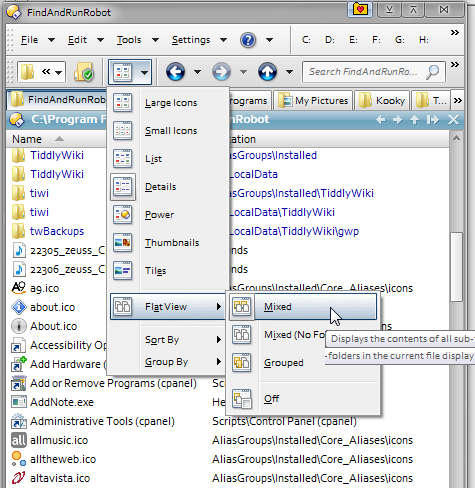
They've cut out a lot I'd miss too - no flat view, no sync, no admin mode, no multi-level undo.

They claim new reduced pricing -
I wonder are those prices in US or AU dollars??? Oops, I see there's almost no difference these days...
http://www.gpsoft.com.au/order_intro.html

29 / 69 dollars - of some sort or other ;-) :)
Tom

wraith808

  • Supporting Member
  • Joined in 2006
  • **
  • Posts: 11,205
    • Participated in NANY Challenge Fourteen Times
    • Coding Snacks
    • Writer
    • Hardware Hacker
Re: Directory Opus 10 ... Light!
« Reply #2 on: September 23, 2012, 03:56 PM »
What is flat view and sync?  (I know I don't use half of what dopus is capable of...)

tomos

  • Charter Member
  • Joined in 2006
  • ***
  • Posts: 11,970
    • Gathering Badge
    • Participated in NANY Challenge Once
Re: Directory Opus 10 ... Light!
« Reply #3 on: September 23, 2012, 06:08 PM »
Well Sync is straight-forward synchronising, can easily be replaced but is very convenient to compare folders within file manager.

Flat view will show all files in a folder *and* all it's sub-folders. They can be shown with or without folders; and grouped according to folder / or not.

Here's the FARR install folder - folders shown on top,
files below, parent folder shown in 'Location' column.

[attachthumb=#]
Tom

wraith808

  • Supporting Member
  • Joined in 2006
  • **
  • Posts: 11,205
    • Participated in NANY Challenge Fourteen Times
    • Coding Snacks
    • Writer
    • Hardware Hacker
Re: Directory Opus 10 ... Light!
« Reply #4 on: September 23, 2012, 06:34 PM »
That's pretty cool.  I know that I'm not using DO to its fullest potential, but there's just so much there!

tomos

  • Charter Member
  • Joined in 2006
  • ***
  • Posts: 11,970
    • Gathering Badge
    • Participated in NANY Challenge Once
Re: Directory Opus 10 ... Light!
« Reply #5 on: September 23, 2012, 06:47 PM »
I know that I'm not using DO to its fullest potential, but there's just so much there!

I'm no real power user myself but I've gotten into using a few aspects that make my worklife easier.

I presume you've seen the thread Configuring Directory Opus for Fun and Profit.
There's a few good tips there!
Practical tips start about here (but there are a couple before too, just more reading required...)
Tom

wraith808

  • Supporting Member
  • Joined in 2006
  • **
  • Posts: 11,205
    • Participated in NANY Challenge Fourteen Times
    • Coding Snacks
    • Writer
    • Hardware Hacker
Re: Directory Opus 10 ... Light!
« Reply #6 on: September 23, 2012, 07:15 PM »
Yes.. thanks!  I didn't get a chance to read before, just marked it.  There are some good things there... just getting the time to explore them.  *sigh*

Curt

  • Supporting Member
  • Joined in 2006
  • **
  • Posts: 7,565
Re: Directory Opus 10 ... Light!
« Reply #7 on: September 24, 2012, 12:06 PM »
Quote from: gpsoft
All transactions are processed in AUSTRALIAN DOLLARS.

DO Light: $29
USB/U3 Export: +$10

Minor rebate on bundles:

[attachimg=#]

cyberdiva

  • Supporting Member
  • Joined in 2006
  • **
  • Posts: 1,041
Re: Directory Opus 10 ... Light!
« Reply #8 on: September 24, 2012, 12:46 PM »
Perhaps someone has already mentioned this, but Directory Opus Light is on Bits du Jour today (Monday, Sept. 24, 2012) for $15.32, which is 48% off the regular price.  

Josh

  • Charter Honorary Member
  • Joined in 2005
  • ***
  • Posts: 3,411
    • Gathering Badge
    • Official Forum Clown
    • Coding Snacks
    • Plugin Coding Medal
    • Volunteers/Staff
    • Military Service Badge - US Army
    • Furry Fandom Badge - Furry Fandom
    • Linux User
Re: Directory Opus 10 ... Light!
« Reply #9 on: September 24, 2012, 02:00 PM »
I still say this program is grossly overpriced. Yes, it has a lot of functionality, but hell, I can get a copy of Windows and Office for cheaper than the cost of one license of DOpus.
Strength in Knowledge

tomos

  • Charter Member
  • Joined in 2006
  • ***
  • Posts: 11,970
    • Gathering Badge
    • Participated in NANY Challenge Once
Re: Directory Opus 10 ... Light!
« Reply #10 on: September 24, 2012, 02:11 PM »
I can get a copy of Windows and Office for cheaper than the cost of one license of DOpus.

we cant ;-)

but I still kind of agree with you.
Tom

superboyac

  • Is your software in my list?
  • Charter Member
  • Joined in 2005
  • ***
  • Posts: 6,347
Re: Directory Opus 10 ... Light!
« Reply #11 on: September 24, 2012, 02:57 PM »
DOpus is overpriced.  The problem is that no other program offers what it can do, so it's not like there's an alternative.  I tried mashing together a suite to replace it using freeware or cheaper stuff, but it took too many programs to accomplish it and became a headache.

I also take advantage of the portable license so I can use it on multiple computers and retain my settings.  You can save multiple profiles (layouts) per computer.

xyplorer is a good cheaper alternative.  and 40hz turned me on to Q-Dir a few weeks ago, which is VERY interesting and handy (and free).  If you're not committed to a file manager yet and are looking for free ones, start with Q-Dir.

Original address: https://www.donationcoder.com/forum/index.php?topic=32326.0