
Thanks guys, I'll give both of these a try :}
Re: IDEA: sort of launcher for command lines with parameter in a pre-defined place
« Reply #25 on: October 10, 2012, 06:33 AM »


 Topic: IDEA: sort of launcher for command lines with parameter in a pre-defined place (Read 61,515 times)


OK, I've been trying the latest version of Target's SUR and it works fine enough, however I have one problem, when running it under Windows 7 x64 —could not reproduce it under XP mode— when trying to run a telnet command, it fails with the following error message, even though I did install telnet in Windows 7 components, and can run the command manually.
Note : I have removed the ":" in the command line, which I should not have given as the correct syntax is "telnet target port", my bad.
Edit : There also seems to be weird issues with running commands which require confirmation — it doesn't run the right command when confirmation is given ?_?


 , as telnet is quite 'rudimentary' in features and looks.
what happens when you run the command from the run command (WIN+R)?Then it runs the command just fine.
well I did say I'd only done limited testingYes you did

can you give me a bit more detail on what happens with the offending commands, eg what command you requested, and what you gotHmm well this problem doesn't seem to happen anymore with the new version, for now ^^'
next iterationNice :]
now includes an editor - I'm not totally happy with the editor gui, but I suppose it gets the job done
Telnet is only installed in a x64 incarnation on Windows x64, AFAICS, and it's only available in the \Windows\System32 directory for 64 bit processes, but not in the 32 bit \Windows\SysWOW64 redirection directory for 32 bit processes.Hey, that works \o/
I haven't seen any easy solutions, other than copying telnet.exe over from System32 to the SysWOW64 directory.


Also, I'll need to take some time to see how exactly WinButtons work.Yeah, I hear you. My manual-writing capabilities haven't been fully applied on this one yet... I have a quite technical readme included with WinButtons, describing for each option available on how to use it, but not why or what-for you'd want to use it. There are some small examples in there, but the best part for your use would be in the WinButtons.wbuc file (as downloaded from the site), that I used to take the screenshot from. You need to define and use variables to 'connect' to some input-control, and use one or more variables in the command that is set for a button.

I'll look into thisCare to share your findings?



ToDo: Favorites...
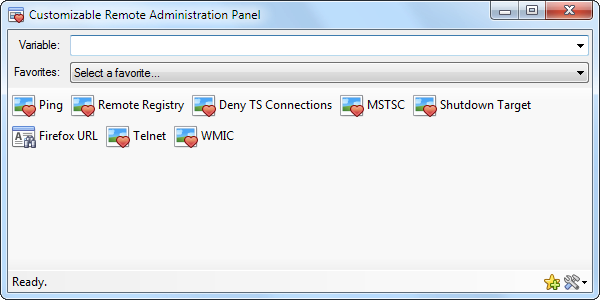
Care to share your findings?Sorry, I didn't take the time to look at it yet ^^'
Heres my take on it going by the posted gui layout a little and still in its early stages...[…]Nice, I'll have to try it out too ^_^
Hey hamradio I tested your implementation today and it really pleases me :}
So far I think I only found one small bug if the command suffix contains a "&", the & is not displayed in the status bar when previewing the final command
Edit : thought I had found 2 but one of them is almost not worth mentioning : if the path to an image is specified as "<appdir>\icons\..." instead of "<appdir>icons\..." then the image for that button is displayed only after opening and closing the button editor.
Do you mind if I have a few requests for small modifications ? :]
OK :]
Well then, would it be possible to use <appdir> in the command prefix, just like in the image path ?
That would allow for the user to get his custom scripts in a sub-folder of the program, thus improving portability — this way I could share the whole thing with my colleagues by sending them an archive.
Also, would it be possible to :
- have a visual "thing" to let the user know whether or not a button asks for confirmation without going in editor mode ? (For now I'm "cheating" by manually adding a "*" to the end of the button caption)
- have an option for a button not to use the Variable/target parameter (so the same interface can be used to run a command on the local machine which does not need or accept a target parameter, such as "ipconfig /flushdns")
- let the user place "separations" (such as a forced "carriage return" or even a horizontal line) between some groups of buttons ?
- let the user define a constant size that would apply to all buttons (so they get kinda aligned in the interface as if it were a table) ?
Edit : I almost forgot : an button or menu item to clear history ?
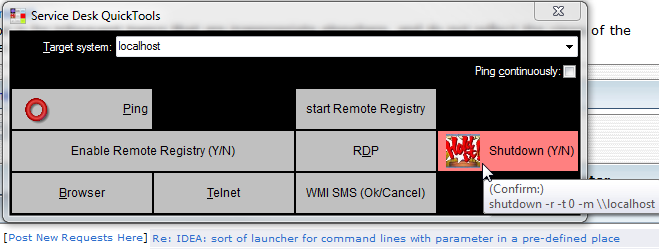
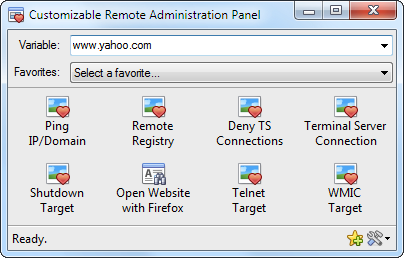
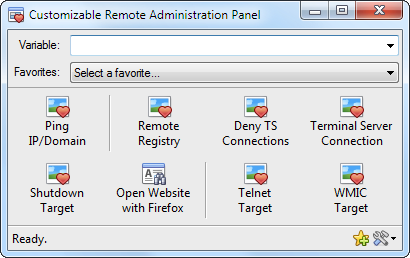
 but hey, this is software, and software is never finished
 Edit 2 : Huh, I ran WinButtons by dragging and dropping the ConstanceJill.wbuc file on the EXE and it looks like it's working OK, except the "close" button isn't responsive (?)Drag&Drop is in fact a feature of WinButtons, but not in the way you seem to expect: It hands the file to the drop-action defined for the button you drop the file(s) on, it doesn't use the .wbuc file as a configuration to open... (but I could make it do that, sounds quite logical, now that you mention it...)
Edit : looks like I can't get the \n trick to work in the latest version of CRAP ? =(
Original address: https://www.donationcoder.com/forum/index.php?topic=32031.0