DonationCoder.com forum
 
Read-only archive. This is a static copy of the DonationCoder.com forum. Reading and searching work as before; logging in, posting and private messages do not.
Archive of 2026-10-21 · About this archive · Main site

Author Topic: Arranges in a txt file  (Read 13,724 times)

Contro

  • Supporting Member
  • Joined in 2007
  • **
  • Posts: 3,947
Arranges in a txt file
« on: August 12, 2012, 12:06 PM »
Arranges in a txt file

I have a txt file with this :

first,    second,third,fourth


and i would like to transform automatically in :

"first","second","third","fourth"


How can I find a script for doing this works and many other similars ?

Best Regards

Renegade

  • Tell me something you don't know...
  • Charter Member
  • Joined in 2005
  • ***
  • Posts: 13,291
    • Participated in NANY Challenge Three Times
    • Furry Fandom Badge - Furry Fandom
    • Linux User
Re: Arranges in a txt file
« Reply #1 on: August 12, 2012, 12:18 PM »
You can probably just open it in Excel, then save it as a CSV.
Slow Down Music - Where I commit thought crimes...

Freedom is the right to be wrong, not the right to do wrong. - John Diefenbaker

Contro

  • Supporting Member
  • Joined in 2007
  • **
  • Posts: 3,947
Re: Arranges in a txt file
« Reply #2 on: August 12, 2012, 02:27 PM »
Nice idea indeed.
But i am looking for a soft for doing modifications automatically in a text file.
Do you know anyone ?

Best Regards

P.D. I begin just now to apply the great idea with excel.

:-*

Contro

  • Supporting Member
  • Joined in 2007
  • **
  • Posts: 3,947
Re: Arranges in a txt file
« Reply #3 on: August 12, 2012, 02:38 PM »
You can probably just open it in Excel, then save it as a CSV.

I don't know how to do it. I obtain
first;second;third;fourth
but without "
:-[

iphigenie

  • curiosity FTW!
  • Supporting Member
  • Joined in 2006
  • **
  • Posts: 1,170
Re: Arranges in a txt file
« Reply #4 on: August 12, 2012, 02:51 PM »
You can probably just open it in Excel, then save it as a CSV.

I don't know how to do it. I obtain
first;second;third;fourth
but without "
:-[

yeah, Outlook will only add "" if there is a space or a comma/semi colon in the text I think. Extremely annoying as I too have needed to get proper quotes everywhere in the past. Trying to remember what I did

eleman

  • Spam Killer
  • Supporting Member
  • Joined in 2009
  • **
  • Posts: 413
Re: Arranges in a txt file
« Reply #5 on: August 12, 2012, 03:21 PM »
Open the file in notepad (or word, or any text editor you like). Get to search and replace function (ctrl-h usually).
Replace all instances of  ,  with    ","
Adjust spaces as you like.

Ath

  • Supporting Member
  • Joined in 2006
  • **
  • Posts: 3,649
    • Participated in NANY Challenge Eleven Times
    • Coding Snacks
    • Linux User
    • Hardware Hacker
Re: Arranges in a txt file
« Reply #6 on: August 12, 2012, 05:11 PM »
You could try CSV Editor that has a lot of options specifically for csv files, also available in a Unicode-edition, and on top of that is free software :)
/Ton
Ath's software collection, Quote: "A problem well stated is a problem half-solved." (Charles Kettering)

jgpaiva

  • Artificial Idiocy
  • Global Moderator
  • Joined in 2006
  • *****
  • Posts: 4,727
    • Cody Award
    • Participated in NANY Challenge Once
    • Coding Snacks
    • Portugal Inhabitant
    • Linux User
Re: Arranges in a txt file
« Reply #7 on: August 12, 2012, 05:27 PM »
You could try CSV Editor that has a lot of options specifically for csv files, also available in a Unicode-edition, and on top of that is free software :)
That looks like an awesome recommendation  :Thmbsup:

barney

  • Charter Member
  • Joined in 2006
  • ***
  • Posts: 1,294
Re: Arranges in a txt file
« Reply #8 on: August 12, 2012, 06:16 PM »
You could try CSV Editor that has a lot of options specifically for csv files, also available in a Unicode-edition, and on top of that is free software :)
That looks like an awesome recommendation  :Thmbsup:

It is.  Been using CSVed for years - nothing else I've tried touches it.  It's not the automated result requested, but 'tis a beautiful alternative.
Make a good day ... barn

Contro

  • Supporting Member
  • Joined in 2007
  • **
  • Posts: 3,947
Re: Arranges in a txt file
« Reply #9 on: August 12, 2012, 10:08 PM »
Open the file in notepad (or word, or any text editor you like). Get to search and replace function (ctrl-h usually).
Replace all instances of  ,  with    ","
Adjust spaces as you like.

and the commas at the beginning and the end ?

Contro

  • Supporting Member
  • Joined in 2007
  • **
  • Posts: 3,947
Re: Arranges in a txt file
« Reply #10 on: August 12, 2012, 10:09 PM »
You could try CSV Editor that has a lot of options specifically for csv files, also available in a Unicode-edition, and on top of that is free software :)

Freeeetryinngggg

Best Regards

Contro

  • Supporting Member
  • Joined in 2007
  • **
  • Posts: 3,947
Re: Arranges in a txt file
« Reply #11 on: August 12, 2012, 10:25 PM »
Not bat, but I think CSV Editor is slow.

:-[

Any other idea ?

Best Regards

eleman

  • Spam Killer
  • Supporting Member
  • Joined in 2009
  • **
  • Posts: 413
Re: Arranges in a txt file
« Reply #12 on: August 13, 2012, 05:17 AM »
Open the file in notepad (or word, or any text editor you like). Get to search and replace function (ctrl-h usually).
Replace all instances of  ,  with    ","
Adjust spaces as you like.

and the commas at the beginning and the end ?

uh... there were none in your sample text :)

4wd

  • Pedantic Old Bastard
  • Supporting Member
  • Joined in 2006
  • **
  • Posts: 5,652
    • Coding Snacks
Re: Arranges in a txt file
« Reply #13 on: August 13, 2012, 07:52 AM »

and the commas at the beginning and the end ?

uh... there were none in your sample text :)

I think he meant the quotes inserted at the start/end.

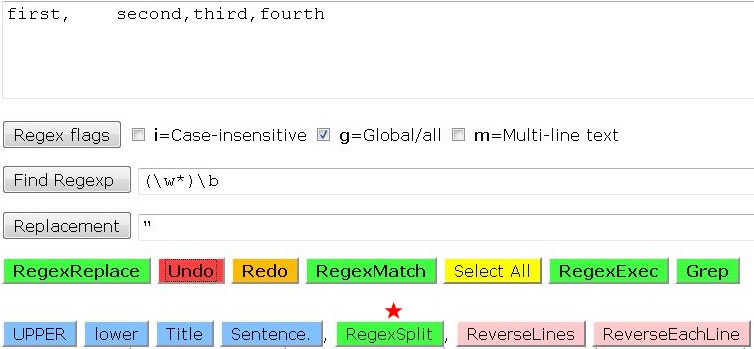
I'm pretty sure this could be done using regex but it's beyond my meagre knowledge.  I managed to get the quotes inserted but I couldn't get rid of the extraneous spaces.

eg. Using Online RegEx Editor:

2012-08-13_17-45-51.jpg

Pressing RegexSplit will give: "first",    "second","third","fourth"
"I will not follow where the path may lead, but I will go where there is no path, and I will leave a trail." - Muriel Strode, 1903

AbteriX

  • Member #520
  • Charter Honorary Member
  • Joined in 2005
  • ***
  • Posts: 1,150
Re: Arranges in a txt file
« Reply #14 on: August 13, 2012, 06:48 PM »
Code: (generic)
FROM:
first field,    second word, third column,  fourth item
TO:
first field,second word,third column,fourth item

Use RegEx
Find: ,\s+(\w)
Repl: ,\1


Code: (generic)
FROM:
first field,second word,third column,fourth item
TO:
"first field","second word","third column","fourth item"

Use RegEx
Find: ^(.+?),(.+?),(.+?),(.+)$
Repl: "\1","\2","\3","\4" 


At least this works with EmEditor.
For other regex engines the patter may slightly different.
And often "$1" is used instead of "\" .
Greetings, Stefan.

sword

  • Charter Member
  • Joined in 2005
  • ***
  • Posts: 200
Re: Arranges in a txt file
« Reply #15 on: August 13, 2012, 08:32 PM »
Re: Any other ideas...commas at beginning and end...CSV Editor is slow...many other similars

An idea, not a script:
WordPerfect Find and Replace> 'spaces' with 'nothing. Find and Replace> , (comma) with ",". Insert between two quotes for beginning and end.

skwire

  • I eat Coding Snacks for breakfast...
  • Global Moderator
  • Joined in 2005
  • *****
  • Posts: 5,297
    • Participated in NANY Challenge Seventeen Times
    • Coding Snacks
    • Superboy Coder
    • Cody Award
    • Volunteers/Staff
    • Gathering Badge
Re: Arranges in a txt file
« Reply #16 on: August 14, 2012, 03:05 PM »
How can I find a script for doing this works and many other similars ?

Contro, I'd like to offer some friendly advice, if I may.  Spend some time learning a scripting language so tasks like these can be easily solved on your own (rather than waiting, potentially days, on forum replies).

Here's an example in AutoHotkey.  Save this code to a .AHK file and then drag and drop one of your text files onto the .AHK file you created.

Code: (autohotkey)
sFile = %1% ; Dropped filename path.
If ( sFile )
{
    FileRead, myData, % sFile
    Loop, Parse, myData, `n, `r
    {
        ; Strip out extra whitespace.
        myLine := RegExReplace( A_LoopField, ",\s+(\w)", ",$1" )
        ; Replace all commas with quotes-comma-quotes.
        StringReplace, myLine, myLine, `,, "`,", All
        ; Rebuild file, adding quotes at the beginning and end
        ; of each line.
        myBlock .= """" . myLine . """`r`n"
    }
    ; Ask user to save file.
    FileSelectFile, mySelectedFile, S16, % sFile, Save as...,
    If ! ( ErrorLevel ) ; User did not cancel, proceed.
    {
        ; Delete original and save new file.  Yes, we should save
        ; to a temp folder and such but that's out of scope for this
        ; simple script.
        If FileExist( mySelectedFile )
        {
            FileDelete, % mySelectedFile
            If ( ErrorLevel ) ; Basic sanity check to see if the file deleted.
            {
                MsgBox, 16, Error!, Could not overwrite file.  Exiting...
                ExitApp
            }
        }
        ; Write file to disk.
        FileAppend, % myBlock, % mySelectedFile
    }
}
ExitApp
« Last Edit: August 14, 2012, 03:17 PM by skwire »

Stoic Joker

  • Honorary Member
  • Joined in 2008
  • **
  • Posts: 6,652
    • Cody Award
    • Participated in NANY Challenge Five Times
Re: Arranges in a txt file
« Reply #17 on: August 14, 2012, 04:49 PM »
Open the file in notepad (or word, or any text editor you like). Get to search and replace function (ctrl-h usually).
Replace all instances of  ,  with    ","
Adjust spaces as you like.

I've had to do that a few times. Second part is to search for \r\n and replace it with "\r\n" to get the beginning and ending quotes. Granted that will depend on the editor...but it works for me in EmEditor.

Original address: https://www.donationcoder.com/forum/index.php?topic=31917.0