DonationCoder.com forum
 
Read-only archive. This is a static copy of the DonationCoder.com forum. Reading and searching work as before; logging in, posting and private messages do not.
Archive of 2026-10-21 · About this archive · Main site

Author Topic: Paste As File  (Read 12,802 times)

c.gingerich

  • Supporting Member
  • Joined in 2011
  • **
  • Posts: 748
    • Participated in NANY Challenge Six Times
    • Coding Snacks
Paste As File
« on: August 05, 2012, 04:52 PM »
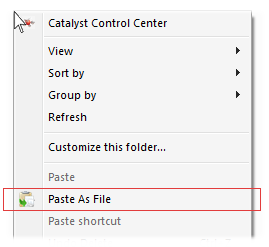
As a result of a topic here -> http://www.donationcoder.com/forum/index.php?topic=31798, I created Paste As File. It adds a "Paste As File" menu item to the background context menu of a windows explorer window and the desktop. It allows you to paste the contents of the clipboard to a file based on the clipboard contents. If it is text, it will past as a text file (with the default extension .txt) or as an image file (default extension of .png). Supported image file formats are jpg, pcx, png, bmp, tga, gif and tif.

Paste As File will remember the last extension used for either image or text and will show that the next time you paste.

You can download the latest version from my website -> http://starpunch.net/#PasteAsFile

Paste As File is freeware. If you like and use it, I accept donations. :-)
Clipboard_20120804.png
« Last Edit: August 05, 2012, 05:00 PM by Stephen66515 »

KynloStephen66515

  • Animated Giffer in Chief
  • Honorary Member
  • Joined in 2010
  • **
  • Posts: 3,772
    • Participated in NANY Challenge Three Times
    • Cody Award
    • Coding Snacks
    • Official Forum Clown
    • Volunteers/Staff
    • Writer
    • Hardware Hacker
    • DJ Badge - DJ
    • Linux User
Re: Paste As File
« Reply #1 on: August 05, 2012, 05:01 PM »
Awesome!

Off-Topic to C.Gingerich
(You made a small typo (Past As File will remember) so I fixed it before my brain exploded lol)

c.gingerich

  • Supporting Member
  • Joined in 2011
  • **
  • Posts: 748
    • Participated in NANY Challenge Six Times
    • Coding Snacks
Re: Paste As File
« Reply #2 on: August 05, 2012, 05:05 PM »
Thanks and thanks for the typo fix.  ;)

Awesome!

TaoPhoenix

  • 0 - 60 ... then back to 0 again!
  • Supporting Member
  • Joined in 2011
  • **
  • Posts: 4,642
    • Participated in NANY Challenge Three Times
Re: Paste As File
« Reply #3 on: August 05, 2012, 06:56 PM »
Awesome!
(You made a small typo (Past As File will remember) so I fixed it before my brain exploded lol)

No No No! I want an app that records my entire past as a file! Gawd knows I don't remember much more than three months tops as it is.   :tellme:
Use attachthumb=# to show an attached image as an expandable thumbnail, or attach=# to show full size. (With Brackets)

patku

  • Participant
  • Joined in 2011
  • *
  • Posts: 6
Re: Paste As File
« Reply #4 on: August 06, 2012, 03:40 PM »
Just tested the app on my work machine, and unfortunately the context menu button isn't showing up (whether or not there's something in the clipboard). I'm guessing it's a 64-bit shell issue (I'm running WinXP 64-bit, because I have to :-( ), although it didn't work when I ran in the 32-bit shell (%systemroot%\SysWow64\Explorer.exe) either. But it works like a charm on my 32-bit laptop :)

c.gingerich

  • Supporting Member
  • Joined in 2011
  • **
  • Posts: 748
    • Participated in NANY Challenge Six Times
    • Coding Snacks
Re: Paste As File
« Reply #5 on: August 06, 2012, 05:02 PM »
Hmm, odd. I made the app on my Win 7 64 bit system and it works fine. I'll look into your problem and see if I can fix it.

Do you have admin rights to the registry on your win xp 64 system?

jcamp

  • Participant
  • Joined in 2009
  • *
  • Posts: 4
Re: Paste As File
« Reply #6 on: September 13, 2018, 04:48 PM »
Just a quick update regarding "Paste As File".

I have recently taken over support and distribution for the "Paste As File" windows utility, you can now find it here:
https://pasteasfile.org/

I hope to enhance the product over time. Always welcome feedback as to how you are using the utility and any features that would be great to add.

Original address: https://www.donationcoder.com/forum/index.php?topic=31838.0