DonationCoder.com forum
 
Read-only archive. This is a static copy of the DonationCoder.com forum. Reading and searching work as before; logging in, posting and private messages do not.
Archive of 2026-10-21 · About this archive · Main site

Author Topic: Activate/deactive a windows service with a script  (Read 11,468 times)

Contro

  • Supporting Member
  • Joined in 2007
  • **
  • Posts: 3,947
Activate/deactive a windows service with a script
« on: August 04, 2012, 01:09 PM »
Activate/deactive a windows service with a script

I would like to be able with a script to activate a windows service for windows xp pro
The same, but deactivate that service.

P.D. Really I would like to run or stop the service, but may be more general and allow in some cases to abilitate the service o eliminate.

Best Regards

Stoic Joker

  • Honorary Member
  • Joined in 2008
  • **
  • Posts: 6,652
    • Cody Award
    • Participated in NANY Challenge Five Times
Re: Activate/deactive a windows service with a script
« Reply #1 on: August 04, 2012, 01:19 PM »
net stop [service name]
net start [service name]
net restart [service name]

AbteriX

  • Member #520
  • Charter Honorary Member
  • Joined in 2005
  • ***
  • Posts: 1,150
Re: Activate/deactive a windows service with a script
« Reply #2 on: August 04, 2012, 02:03 PM »
Quote
C:\>sc

DESCRIPTION:
        SC is a command line program used for communicating with the
        NT Service Controller and services.
USAGE:
        sc <server> [command] [service name] <option1> <option2>...
Greetings, Stefan.

Contro

  • Supporting Member
  • Joined in 2007
  • **
  • Posts: 3,947
Re: Activate/deactive a windows service with a script
« Reply #3 on: August 04, 2012, 03:19 PM »
:-[

Trying. i will comment. Are bat files ?¿
:-*

Shades

  • Member
  • Joined in 2006
  • **
  • Posts: 2,954
Re: Activate/deactive a windows service with a script
« Reply #4 on: August 04, 2012, 10:40 PM »
Watch out with 'sc'.

At least read the manual very carefully, as it is quite a powerful tool. And it can wreak havoc in your system if you select (unintentionally) the wrong option for any (critical) service running in Windows.

Just sayin'.
The easy path is usually downhill...

Stoic Joker

  • Honorary Member
  • Joined in 2008
  • **
  • Posts: 6,652
    • Cody Award
    • Participated in NANY Challenge Five Times
Re: Activate/deactive a windows service with a script
« Reply #5 on: August 05, 2012, 02:22 PM »
^Very good point^  :Thmbsup:

AndyM

  • Charter Member
  • Joined in 2006
  • ***
  • Posts: 616
Re: Activate/deactive a windows service with a script
« Reply #6 on: August 05, 2012, 06:53 PM »
I have two batch files to turn on and off 2 services:
Code
ServicesStart.bat:

@echo off
sc config wuauserv start= auto
sc config BITS start= auto
sc start wuauserv
sc start BITS


ServicesStop.bat

@echo off
sc config wuauserv start= disabled
sc config BITS start= disabled
sc stop wuauserv
sc stop BITS
Both have worked fine (Windows XP SP3) for years.

mwb1100

  • Supporting Member
  • Joined in 2006
  • **
  • Posts: 1,645
Re: Activate/deactive a windows service with a script
« Reply #7 on: August 06, 2012, 04:24 AM »
One nit to be aware of with sc is that the options that use an "=" sign are very particular about the whitespacing.  The "=" sign is actually part of the option name, so there cannot be a space before the equal sign, and there *must* be a space after.  So

Code
sc config wuauserv start= disabled

But not:

Code
sc config wuauserv start = disabled 
sc config wuauserv start=disabled

IainB

  • @Slartibartfarst
  • Supporting Member
  • Joined in 2008
  • **
  • Posts: 7,544
Re: Activate/deactive a windows service with a script
« Reply #8 on: August 06, 2012, 05:07 AM »
net stop [service name]
net start [service name]
net restart [service name]
Thanks @Stoic Joker. I had not known of this command previously.
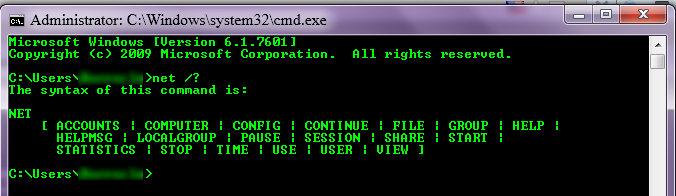
That's interesting. In Win7-64, the "NET" command only has these options - i.e., no RESTART:

[attach]
« Last Edit: August 06, 2012, 05:15 AM by IainB »

IainB

  • @Slartibartfarst
  • Supporting Member
  • Joined in 2008
  • **
  • Posts: 7,544
Re: Activate/deactive a windows service with a script
« Reply #9 on: August 06, 2012, 05:32 AM »
I have two batch files to turn on and off 2 services:
Code
ServicesStart.bat:
@echo off
sc config wuauserv start= auto
...
Both have worked fine (Windows XP SP3) for years.
Thanks @AndyM. I had not known of this command previously.
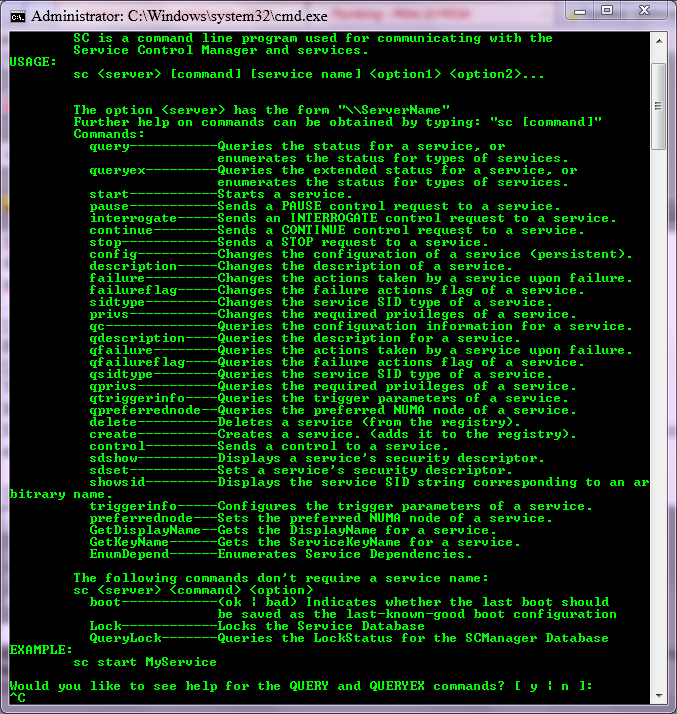
In Win7-64, the "SC" has these options (see image below).
I see that config is "persistent" and QUERY and QUERYEX look like they could be useful for avoiding redundant toggles - e.g., START or STOP of an already started or stopped service.

[attach]

skwire

  • I eat Coding Snacks for breakfast...
  • Global Moderator
  • Joined in 2005
  • *****
  • Posts: 5,297
    • Participated in NANY Challenge Seventeen Times
    • Coding Snacks
    • Superboy Coder
    • Cody Award
    • Volunteers/Staff
    • Gathering Badge
Re: Activate/deactive a windows service with a script
« Reply #10 on: August 06, 2012, 05:51 AM »
That's interesting. In Win7-64, the "NET" command only has these options - i.e., no RESTART:

You should be able to string it all together in one command like this: net stop <servicename> && net start <servicename>

Stoic Joker

  • Honorary Member
  • Joined in 2008
  • **
  • Posts: 6,652
    • Cody Award
    • Participated in NANY Challenge Five Times
Re: Activate/deactive a windows service with a script
« Reply #11 on: August 06, 2012, 11:34 AM »
That's interesting. In Win7-64, the "NET" command only has these options - i.e., no RESTART:

That probably has much to do with my not being a morning person, and it not actually existing.

IainB

  • @Slartibartfarst
  • Supporting Member
  • Joined in 2008
  • **
  • Posts: 7,544
Re: Activate/deactive a windows service with a script
« Reply #12 on: August 06, 2012, 01:04 PM »
That's interesting. In Win7-64, the "NET" command only has these options - i.e., no RESTART:
That probably has much to do with my not being a morning person, and it not actually existing.
Ahahaha! I see. I thought it was a feature in XP that must have been removed in Win7-64. I was developing "XP-envy"!

Original address: https://www.donationcoder.com/forum/index.php?topic=31830.0