^So what's your take on the programs output, should he draw three, hold, or fold?Hahaha. Yes, maybe.


 Topic: Should we pre-emptively retire old hard drives? (Read 62,305 times)


^So what's your take on the programs output, should he draw three, hold, or fold?Hahaha. Yes, maybe.


Also, a quick mention on SSDs... back up those things even more vigilantly than mechanical drives. Yes, in theory those flash cells should wear out gracefully, and even the MLC variants should last quite a bit longer under normal use than a mechanical disk. Funny thing is, though, that they don't. Or rather, the flash cells don't wear out, but either the firmware goes into retardo-mode (known to happen frequently with SandForce based drives), or other parts of the electronics just go frizzle. And then you're SOL. Really, bigtime SOL. At least with mechanical drives, you can send them off to data recovery services if the data was important enough... much less likely to be able to do that with SSDs, especially with the ones that have hardware encryption.
Me and a classmate had our Vertex2 SSDs die a few weeks apart, after... what, a month or so use? And my Intel X25-E (their ENTERPRISE SLC-based drive) died last month, after a few years of non-intensive use... I'm sure the SLC cells would have several years lifetime left, so it's probably some electronics that went fizzle. Scary that an enterprise drive dies like that :-(


Other manufacturers that I'd checked had mostly 1~1.5 MH MTBF (IIRC). I'd also read in several places about people having SSDs die suddenly within a year. Considering there are only 8,760 hours in a year, it really has to make you question things a bit. 1 year is about 0.5% of the rated life.

Other manufacturers that I'd checked had mostly 1~1.5 MH MTBF (IIRC). I'd also read in several places about people having SSDs die suddenly within a year. Considering there are only 8,760 hours in a year, it really has to make you question things a bit. 1 year is about 0.5% of the rated life.
No, it makes perfect sense.
MTBF = Mean Time Between Failures
That means you need to start with at least one failure to have a time "between" failures - so you can be sure you have a useful SSD life of 1000000 hours before you need to get worried again.
 Or 4 for mirrored raid?


So, just buy 2 then?
 ...A 4 drive (RAID1) mirror?

So, just buy 2 then?
 .
. 
This is the big struggle I'm in right now. Given the situation of a personal computer geek which is (like me) we have a bunch of hard drives we've collected over the years. Different sizes, different manufacturers, etc. How can we stick all these in a box and divy them up into various pools? Like 3 drives in one pool of random sizes, another 3 to back that one up, a couple more for dumping stuff into, etc.So, just buy 2 then?
Umm...Maybe Renegade is thinking of a RAID-10 (aka: "striped mirrors") since he's talking four disks? That would give the best performance and reliability since you get the benefits of both striping and mirroring. RAID-10 is used in many mission critical setups, although newer RAID controllers can give it a run for its money on performance using just RAID-5. It does rebuild more quickly than RAID-5 does following a drive replacement however. (I've only seen one in-production RAID-10 in my entire career BTW.)
The really big downside for personal use is that a controller that supports RAID-10 will be on the expensive side - and tends to be very fussy about the drives it uses. This is definitely more of an 'enterprise' level solution.
Old drives never die, they merely fall to bits.
I don't think there's a single anything off the shelf currently on Windows that will do all that. But you could mix & match to get it. Windows 8 will be including drive pooling and RAID-like features if that's any consolation.I don't think there is either, I've been looking! In that other thread, someone mentioned 3 programs that would run on a windows server that sounded like it would do what I want. Also, I read an article of someone talking about the new drive pooling features in windows 8 and server 2012, and saying it's not really up to speed yet. I forgot the reasons why, but something to do with wasting space in the pooling due to the smallest drive or something like that. You don't want that. I'll eventually build my server and show everyone how I went about doing it.
I'll eventually build my server and show everyone how I went about doing it.

Could you give some bullet points of what makes it stand out? I just did a few searches and couldn't really figure it out. If you think it's good for my server project, perhaps I'll make another video of me playing around with it to see what it can do.I'll eventually build my server and show everyone how I went about doing it.
Check out ClearOS Community Edition when/if you decide do a server. Amazing bit of tech. Very powerful free (i.e. community) edition available for download. Good docs too.


So, just buy 2 then?
Umm...Maybe Renegade is thinking of a RAID-10 (aka: "striped mirrors") since he's talking four disks?
Ah! I see, I install it, then use a regular web browser to manage and configure it. Pretty nifty, nice on the eyes, and so far easy to use.
(With thanks to mahes2k for getting back to you before I did! )


NexentaStor was made with a hassled storage admin in mind. Actions are laid out in a simple to understand manner. You'll be at home in no time.
The current Community Release is version 3.1.3.
- Free for up to 18 TB of raw storage capacity
- Support for user and group quotas
- The ability to automatically expand pools
- Copy on write
- Checksummed datablocks and metadata for reliability.


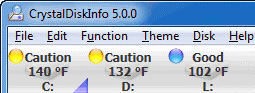
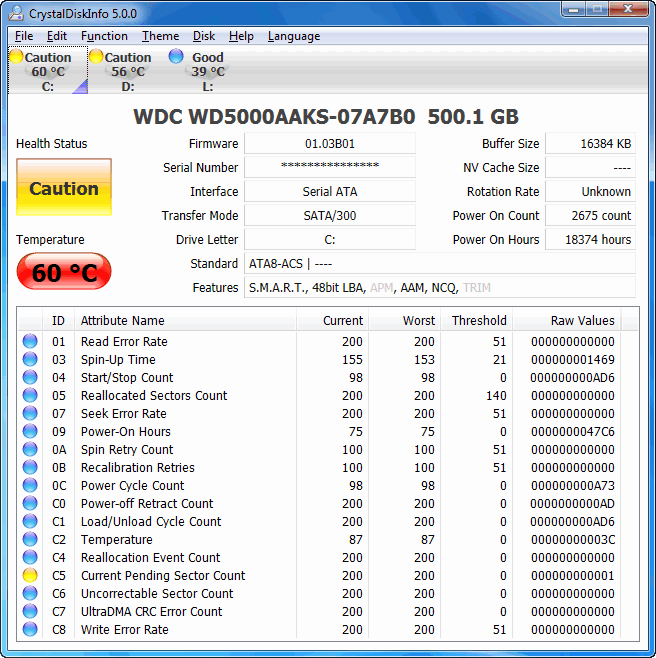
I hope CrystalDiskInfo wasn't made by some hardware manufacturer trying to trick me into purchasing a new computer...
(...) Here's a screenshot of one of my favorite tools (CrystalDiskInfo), showing smart data of my oldest drive, (...)



Original address: https://www.donationcoder.com/forum/index.php?topic=31811.0