DonationCoder.com forum
 
Read-only archive. This is a static copy of the DonationCoder.com forum. Reading and searching work as before; logging in, posting and private messages do not.
Archive of 2026-10-21 · About this archive · Main site

Author Topic: IDEA: Sticky window-specific reading guide.  (Read 9,835 times)

kunkel321

  • Supporting Member
  • Joined in 2009
  • **
  • Posts: 626
    • Participated in NANY Challenge Once
IDEA: Sticky window-specific reading guide.
« on: July 22, 2012, 08:19 PM »
I've been a long time fan of Mike Lin's excellent Cross Hair app http://www.mlin.net/CrossHair.shtml
I find that about 80% of the time, I'm using it as a reading guide on a webpage or on a CHM help file for an app.  When this is the case, I want it to be present only on the given window, not the entire screen.
In the image http://i.imgur.com/KJiRl.png I'm reading item #2 in this help file.  I'd like the reading guide (which I've drawn as a gray rectangle) to be associated with this window so that it is only visible over the given window.  If I click away from the window (see bottom of image) to work on another window, I want the reading guide to stay in place with the assigned (now inactive) window.  It would be like a placeholder for my reading, but also would stay out of my way.

Does that make sense and/or seem like a good idea?   

barney

  • Charter Member
  • Joined in 2006
  • ***
  • Posts: 1,294
Re: IDEA: Sticky window-specific reading guide.
« Reply #1 on: July 26, 2012, 01:10 AM »
Stationary hotkey: press to make the crosshairs remain fixed at your mouse cursor's current location. The default stationary hotkey is Control+1. (The 1 key is adjacent to Backtick on most keyboards.)

That will take care of one (1) item.  Cant help with the window limit - might try contacting Mike - he's generally pretty helpful.
Make a good day ... barn

Target

  • Honorary Member
  • Joined in 2006
  • **
  • Posts: 1,840
    • Coding Snacks
Re: IDEA: Sticky window-specific reading guide.
« Reply #2 on: August 02, 2012, 01:48 AM »
how about this...

ScrSht.png

runs in the background, and applies a 'cross hair' to the nominated window (only).  'Cross hairs' are hidden when that window is not active

Hotkey WIN+F1 toggles the 'cross hairs' on and off, ie to switch to another window/application, activate that window then toggle the hotkey off then on again.

Hotkey WIN+Right Mouse Button 'freezes the 'cross hairs'

Hotkey WIN+X to exit
Alcohol is photoshop, bottled
Askhole - someone who ask for advice, then ignores it
"Look wise, say nothing, and grunt. Speech was given to conceal thought" - Sir William Osler

barney

  • Charter Member
  • Joined in 2006
  • ***
  • Posts: 1,294
Re: IDEA: Sticky window-specific reading guide.
« Reply #3 on: August 02, 2012, 02:13 AM »
how about this...
(see attachment in previous post)
runs in the background, and applies a 'cross hair' to the nominated window (only).  'Cross hairs' are hidden when that window is not active

Hotkey WIN+F1 toggles the 'cross hairs' on and off, ie to switch to another window/application, activate that window then toggle the hotkey off then on again.

Hotkey WIN+Right Mouse Button 'freezes the 'cross hairs'

Hotkey WIN+X to exit

That works reasonably well.  First tried it in Windows Explorer ... went full screen.  After a moment's reflection, that makes sense, since explorer is the desktop  :-[ ;D.

Tried it again in Firefox ... worked just fine.  However, those lines are just a bit too fine for these old eyes.  Guess I could go in and play with it, since the .ahk file is part of the download.  Have to make the hotkeys adjustable - I hate hotkeys  :o - since those are occupied on my system.
Make a good day ... barn

Target

  • Honorary Member
  • Joined in 2006
  • **
  • Posts: 1,840
    • Coding Snacks
Re: IDEA: Sticky window-specific reading guide.
« Reply #4 on: August 02, 2012, 02:53 AM »

That works reasonably well.  First tried it in Windows Explorer ... went full screen.  After a moment's reflection, that makes sense, since explorer is the desktop  :-[ ;D.

Tried it again in Firefox ... worked just fine.  However, those lines are just a bit too fine for these old eyes.  Guess I could go in and play with it, since the .ahk file is part of the download.  Have to make the hotkeys adjustable - I hate hotkeys  :o - since those are occupied on my system.

it will only go full screen if the nominated window is also full screen - if you resize the window, then the cross hair window will resize to match

EDIT: I just tested this and it goes full screen on the desktop. :huh:  Window spy reports the desktop (in Win7) as 'program manager', so I assume that would explain the behaviour (kind of...)

hotkeys are very personal, so by all means change them.  This was a first cut, so I expected some feedback (I rarely use any of the snacks I do so I tend to re-use a standard set of hotkeys)

not sure if there's much you can do about the thickness of the lines.  This is really a kludge using group boxes, and I'm pretty sure there's not much scope for customising them.  

Actually, you can add a v e r y long literal (eg 5000 asterix) to the horizontal control.  This would be thicker than the controls outline, but should't be obtrusive (at least it looks OK ish on my desktop at 1680 X 1050)
Alcohol is photoshop, bottled
Askhole - someone who ask for advice, then ignores it
"Look wise, say nothing, and grunt. Speech was given to conceal thought" - Sir William Osler
« Last Edit: August 02, 2012, 05:37 AM by Target »

kunkel321

  • Supporting Member
  • Joined in 2009
  • **
  • Posts: 626
    • Participated in NANY Challenge Once
Re: IDEA: Sticky window-specific reading guide.
« Reply #5 on: August 02, 2012, 05:29 PM »
Sweet, Thanks!  Did you just make this, Target?  (It'll be kindof cool if you did make it--since it looks like a "target"  :)  )  It seems to work well.
I think I'll try the ************************  thing and see if I can get it to work. 

Target

  • Honorary Member
  • Joined in 2006
  • **
  • Posts: 1,840
    • Coding Snacks
Re: IDEA: Sticky window-specific reading guide.
« Reply #6 on: August 02, 2012, 11:16 PM »
Sweet, Thanks!  Did you just make this, Target?  (It'll be kindof cool if you did make it--since it looks like a "target"  :)  )  It seems to work well.
I think I'll try the ************************  thing and see if I can get it to work. 

you asked, so...

and for those that are interested, but not inclined to fiddle with the script, attached is a version with the aforementioned change
Alcohol is photoshop, bottled
Askhole - someone who ask for advice, then ignores it
"Look wise, say nothing, and grunt. Speech was given to conceal thought" - Sir William Osler

kunkel321

  • Supporting Member
  • Joined in 2009
  • **
  • Posts: 626
    • Participated in NANY Challenge Once
Re: IDEA: Sticky window-specific reading guide.
« Reply #7 on: August 03, 2012, 07:42 PM »
I'm glad you posted that last one...  Simple as the change may seem, I probably never would have figured it out. 

Over the years I've tried multiple times to self-teach myself AHK.  I'll study for a while and learn a couple concepts, then get frustrated because I can't accomplish the simplest of things--then give up for a while and start all over.  :-\

Speaking-of-which....  I'm curious:  If a person wanted to change the color of the ************, how would they do it? 
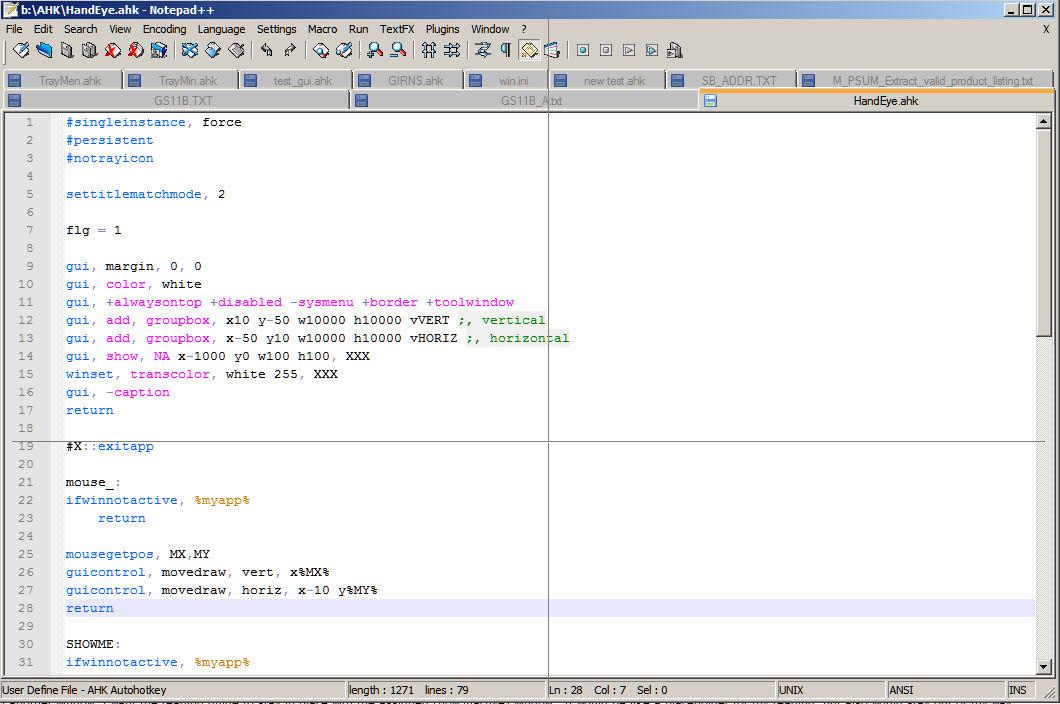
I tried changing both places that have "white"  Lines 10 and 15, but that fills the entire window. 

On the bright side, I *did* figure out that I could get rid of the vertical line altogether by commenting-out line 12.   ;)

Target

  • Honorary Member
  • Joined in 2006
  • **
  • Posts: 1,840
    • Coding Snacks
Re: IDEA: Sticky window-specific reading guide.
« Reply #8 on: August 04, 2012, 09:23 AM »
you're most welcome :)

The vertical line was included because it was in the app you quoted (Cross Hair).  If you don't need it then as you already worked out it's not a problem to remove it

to change the colour of the font insert the following -

Code
gui, font, cRED [sXX BOLD]

you can substitute any colour you like for <RED>, but you'll need to provide the RGB value for anything that's not in the standard pallete.

The 'sXX' option will set the font size, and the 'BOLD' will, well, make the font bold.  You don't need to use either of these, but feel free to experiment and find something that's comfortable for you

FYI, that line of code needs to be added before the line adding the groupbox (ie line 13)
Alcohol is photoshop, bottled
Askhole - someone who ask for advice, then ignores it
"Look wise, say nothing, and grunt. Speech was given to conceal thought" - Sir William Osler

Original address: https://www.donationcoder.com/forum/index.php?topic=31723.0