DonationCoder.com forum
 
Read-only archive. This is a static copy of the DonationCoder.com forum. Reading and searching work as before; logging in, posting and private messages do not.
Archive of 2026-10-21 · About this archive · Main site

Author Topic: Raspberry Pi ...  (Read 4,937 times)

Carol Haynes

  • Waffles for England (patent pending)
  • Global Moderator
  • Joined in 2005
  • *****
  • Posts: 8,073
    • Cody Award
    • Furry Fandom Badge - Furry Fandom
Raspberry Pi ...
« on: May 26, 2012, 09:28 PM »
Got my Raspberry Pi this morning. Not sure what I am going to do with it but it looks like a bit of fun.

I was a bit surprised to see it arrive with absolutely no documentation - not even a single side of A5 with a diagram explaining the ports. Most are obvious but there are a couple of ribbon headers on the board which look interesting - off to the forums to see if anyone can enlighten me further.

4wd

  • Pedantic Old Bastard
  • Supporting Member
  • Joined in 2006
  • **
  • Posts: 5,652
    • Coding Snacks
Re: Raspberry Pi ...
« Reply #1 on: May 27, 2012, 01:56 AM »
I'm on the list for mine, got an email saying the first 4000 people can order theirs - unfortunately I wasn't included  :(

Ribbon header is for GPIO, (General Purpose Input/Output), like the Arduino - so you can hook up sensors, switches, etc.
"I will not follow where the path may lead, but I will go where there is no path, and I will leave a trail." - Muriel Strode, 1903

Carol Haynes

  • Waffles for England (patent pending)
  • Global Moderator
  • Joined in 2005
  • *****
  • Posts: 8,073
    • Cody Award
    • Furry Fandom Badge - Furry Fandom
Re: Raspberry Pi ...
« Reply #2 on: May 27, 2012, 01:08 PM »
There is a second single row of pins that don't seem to be documented at all - they don't even appear on the circuit layout on the website.

4wd

  • Pedantic Old Bastard
  • Supporting Member
  • Joined in 2006
  • **
  • Posts: 5,652
    • Coding Snacks
Re: Raspberry Pi ...
« Reply #3 on: May 28, 2012, 07:34 AM »
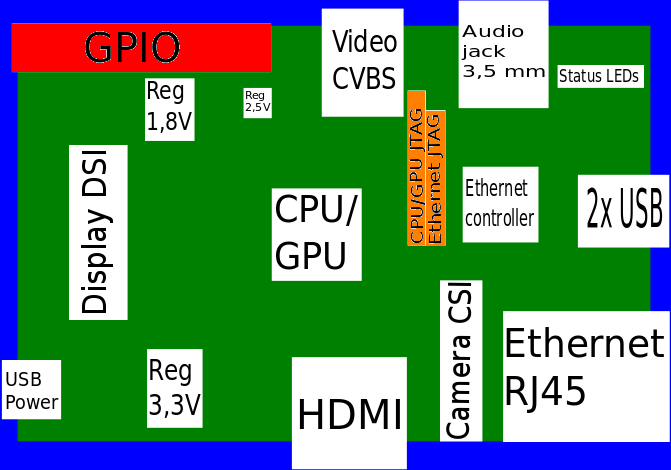
There's the double row header connection which is the GPIO and there is also two rows for JTAGw communication.

The JTAG is used for test access, hardware/firmware debugging and firmware loading - not something the average user of the board will be doing.

691px-Raspberrypi_pcb_overview_v03.svg.png
Pic from Wikipedia.

On the schematics for the Rev.B, one row is used for the LAN controller, (connector P3, sheet 2, ref A4), and the other is for the CPU/GPU and is connector P2, sheet 4, ref G2.

Unless you specifically want to bang the hardware directly, there's not much point in worrying about them.

On a side note, the choices are hotting up: Raspberry Pi faces challenge from Android-based rivals
"I will not follow where the path may lead, but I will go where there is no path, and I will leave a trail." - Muriel Strode, 1903
« Last Edit: May 28, 2012, 07:44 AM by 4wd »

Original address: https://www.donationcoder.com/forum/index.php?topic=31126.0