DonationCoder.com forum
 
Read-only archive. This is a static copy of the DonationCoder.com forum. Reading and searching work as before; logging in, posting and private messages do not.
Archive of 2026-10-21 · About this archive · Main site

Author Topic: Get the most out of your multi-processor computer  (Read 12,981 times)

Contro

  • Supporting Member
  • Joined in 2007
  • **
  • Posts: 3,947
Get the most out of your multi-processor computer
« on: May 05, 2012, 09:49 PM »
Get the most out of your multi-processor computer

"Ashampoo Core Tuner" allows use all the capacity of the multi-processor.

My system is windows xp pro sp 3
I uses a i7 computer.

Is that type of software really useful for my system and pc ?

What alternatives exists ?

Where can I find additional information ?

Best Regards

db90h

  • Coding Snacks Author
  • Charter Member
  • Joined in 2005
  • ***
  • Posts: 481
    • Coding Snacks
    • Military Service Badge - US Army
    • Linux User
Re: Get the most out of your multi-processor computer
« Reply #1 on: May 05, 2012, 11:50 PM »
The premise of that is simply untrue or misleading, there is no way to 'unlock those unused cores'. They are unused because most operations require another operation to be done before them (they are single threaded, or linear). This creates a condition where there is excess CPU capacity because operation X or Y must be done before Z. I've written more on this marketing myth before. Other than that, I won't go into detail. But if you think that some program can come and 'make use of those extra cores'.. well, that's not going to happen. I wrote more the other day here, under my Myths and Lies section: https://bitsum.com/forum/index.php/topic,1394.0.html

An alternative would be Process Lasso, it has all the same capabilities - though doesn't make such extraordinary claims about what is possible. However, from what I can tell, that program you mention uses 'foreground boosting', something Process Lasso supports, but does not enable by default because it was shown to be ineffective and potentially unsafe. Windows already does foreground boosting. More info on this here: http://bitsum.com/about_probalance.php

Do not fall for this marketing lie..
« Last Edit: May 06, 2012, 07:46 AM by db90h »

Contro

  • Supporting Member
  • Joined in 2007
  • **
  • Posts: 3,947
Re: Get the most out of your multi-processor computer
« Reply #2 on: May 06, 2012, 12:03 AM »
The premise of that is simply untrue, there is no way to 'unlock those unused cores'. They are unused because most operations require another operation to be done before them (they are single threaded, or linear). This creates a condition where there is excess CPU capacity because operation X or Y must be done before Z. I've written more on this marketing myth before. Other than that, I won't go into detail. But if you think that some program can come and 'make use of those extra cores'.. well, that's not going to happen. I wrote more the other day here, under my Myths and Lies section: https://bitsum.com/forum/index.php/topic,1394.0.html

An alternative would be Process Lasso, it has all the same capabilities. However, from what I can tell, that program you mention uses 'foreground boosting', something Process Lasso supports, but does not enable by default because it was shown to be ineffective and potentially unsafe. Windows already does foreground boosting. More info on this here: http://bitsum.com/about_probalance.php

Do not fall for this marketing lie..

Understood. I will not use any software of this kind

Best Regards

Ath

  • Supporting Member
  • Joined in 2006
  • **
  • Posts: 3,649
    • Participated in NANY Challenge Eleven Times
    • Coding Snacks
    • Linux User
    • Hardware Hacker
Re: Get the most out of your multi-processor computer
« Reply #3 on: May 06, 2012, 05:58 AM »
The premise of that is simply untrue, there is no way to 'unlock those unused cores'.
I will not use any software of this kind
Just use multiple software packages/tools at the same time, and have/give them some data to crunch on, that'll put those CPU-Cores to work :tellme: :up:
/Ton
Ath's software collection, Quote: "A problem well stated is a problem half-solved." (Charles Kettering)

db90h

  • Coding Snacks Author
  • Charter Member
  • Joined in 2005
  • ***
  • Posts: 481
    • Coding Snacks
    • Military Service Badge - US Army
    • Linux User
Re: Get the most out of your multi-processor computer
« Reply #4 on: May 06, 2012, 07:19 AM »
Just use multiple software packages/tools at the same time, and have/give them some data to crunch on, that'll put those CPU-Cores to work :tellme: :up:

LOL.. that is actually what it comes down to. There is nothing I *hate* as marketing .. umm.. distortions. I don't want to call them lies, as a distortion can be phrased so that the person interprets it wrong, then its not technically a lie (wonderfully world we live in).

I think everyone gets the point though. I don't want to be disparaging of this company's software at all. It may be that their software offers compelling features. In fact, it offers many of the same features as Process Lasso, though I don't make such marketing claims. They aren't identical though - You'll find lots of features in Process Lasso not in other software, and vice-versa. Instead of marketing them to do miraculous things, these features are for *advanced* users who have specific needs, and under no (or only the rarest of rare) circumstances could a system be tweaked to out-perform its default state with regards to utilization of cores. Exceptions do apply for particular architectures if they are too new for the Windows scheduler. However, the software mentioned here lacks the capacity to improve Windows core management, as XP *is* aware of Hyper-Threaded cores, and that is the *only* deficiency possible for an i7 platform. If this were way back in Windows 2000, then maybe by replacing the scheduler they could really optimize things, but that's a hell of a chore under Windows, and certainly NOT something this software does.


TaoPhoenix

  • 0 - 60 ... then back to 0 again!
  • Supporting Member
  • Joined in 2011
  • **
  • Posts: 4,642
    • Participated in NANY Challenge Three Times
Re: Get the most out of your multi-processor computer
« Reply #5 on: May 06, 2012, 09:11 AM »
I think we're on the edge of a crash in Moore's Law for a bit with the whole Cores thing. I have one of the first Quad Cores, and 6 years later app writers are struggling to make threaded apps. Then let's say you write your app for 4 cores, then next year Intel does an 8 core comp, boom, you're back to wasted comp power again.

Meanwhile we gotta be close to some hard limits on the die shrink side as well, so for once MS might need to prune its code instead of relying on hardware.

Edit:

Does anyone have a utility that shows you all (here, four) cores and separate out the processes by core?  So then you can see an older app using all of one core and none of the other three maybe?
Use attachthumb=# to show an attached image as an expandable thumbnail, or attach=# to show full size. (With Brackets)

Ath

  • Supporting Member
  • Joined in 2006
  • **
  • Posts: 3,649
    • Participated in NANY Challenge Eleven Times
    • Coding Snacks
    • Linux User
    • Hardware Hacker
Re: Get the most out of your multi-processor computer
« Reply #6 on: May 06, 2012, 11:25 AM »
Then let's say you write your app for 4 cores, then next year Intel does an 8 core comp, boom, you're back to wasted comp power again.
If you (not personal) had taken the correct approach, you'd either code for 0, 1 or n cores, meaning not, single-threading or (unlimited) multi-threading, and not for a specific number of cores 8) (and that could start a whole new discussion, I know, please don't take it there) I'm just saying that limiting to a specific number of cores (or other array-like structures) is just wrong. By design.
/Ton
Ath's software collection, Quote: "A problem well stated is a problem half-solved." (Charles Kettering)

Ath

  • Supporting Member
  • Joined in 2006
  • **
  • Posts: 3,649
    • Participated in NANY Challenge Eleven Times
    • Coding Snacks
    • Linux User
    • Hardware Hacker
Re: Get the most out of your multi-processor computer
« Reply #7 on: May 06, 2012, 11:26 AM »
separate out the processes by core?
Would Process Explorer do?
/Ton
Ath's software collection, Quote: "A problem well stated is a problem half-solved." (Charles Kettering)

tomos

  • Charter Member
  • Joined in 2006
  • ***
  • Posts: 11,970
    • Gathering Badge
    • Participated in NANY Challenge Once
Re: Get the most out of your multi-processor computer
« Reply #8 on: May 06, 2012, 04:54 PM »
separate out the processes by core?
Would Process Explorer do?

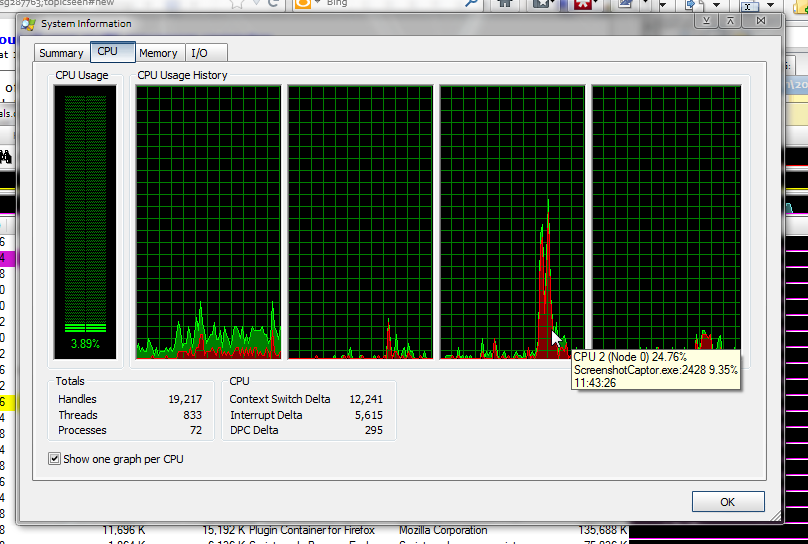
I thought of that, but it doesnt do the next request:
> separate out the processes by core

still, it's a start

[attachthumb=#]
Tom

Ath

  • Supporting Member
  • Joined in 2006
  • **
  • Posts: 3,649
    • Participated in NANY Challenge Eleven Times
    • Coding Snacks
    • Linux User
    • Hardware Hacker
Re: Get the most out of your multi-processor computer
« Reply #9 on: May 06, 2012, 06:17 PM »
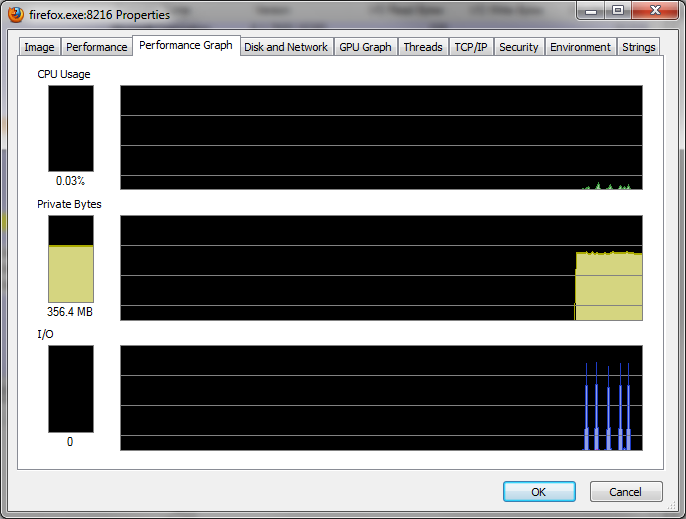
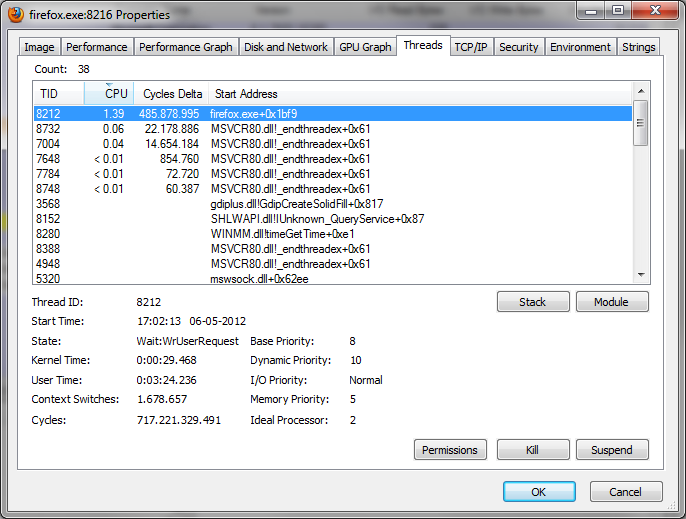
Well, it can give a few graphs for a single application, and a listview of the threads owned by that application-instance, if you double-click an application:

[attachthumb=#]

[attachthumb=#]

But true, that's not a graph per cpu-core :huh:

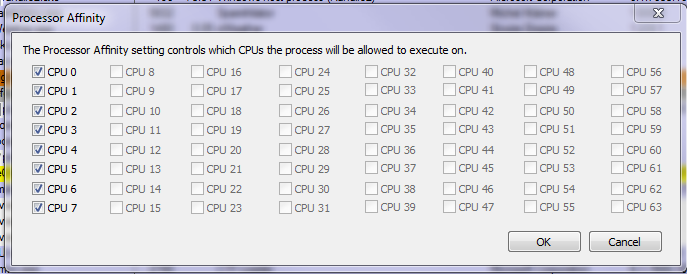
But you can limit the cpu-affinity to 1 or more CPU's (default it's to all, like on my i7-860):

[attachthumb=#]
/Ton
Ath's software collection, Quote: "A problem well stated is a problem half-solved." (Charles Kettering)

Original address: https://www.donationcoder.com/forum/index.php?topic=30905.0