DonationCoder.com forum
 
Read-only archive. This is a static copy of the DonationCoder.com forum. Reading and searching work as before; logging in, posting and private messages do not.
Archive of 2026-10-21 · About this archive · Main site

Author Topic: windows xp sound device problems  (Read 10,211 times)

FLueR00

  • Supporting Member
  • Joined in 2012
  • **
  • Posts: 5
windows xp sound device problems
« on: April 27, 2012, 05:43 AM »
:( Hi, I am new on this site. I am having problems with not able hear sounds through my computer speaker or even to adjust the volume and etc under sound device manager or (what ever it is called). Any advice anyone, I need help!!  :( :(

Ath

  • Supporting Member
  • Joined in 2006
  • **
  • Posts: 3,649
    • Participated in NANY Challenge Eleven Times
    • Coding Snacks
    • Linux User
    • Hardware Hacker
Re: windows xp sound device problems
« Reply #1 on: April 27, 2012, 09:33 AM »
A few silly questions, but they have to be asked:
a) Do you have the correct drivers installed? (No exclamations/warnings in the system hardware configuration?)
b) Does any sound produced give a VU-meter like animation in the extended volume controller?
c) Are the speakers plugged into the right (green-ringed usually) output connector?
d) Do the speakers work on another system?
/Ton
Ath's software collection, Quote: "A problem well stated is a problem half-solved." (Charles Kettering)

Stoic Joker

  • Honorary Member
  • Joined in 2008
  • **
  • Posts: 6,652
    • Cody Award
    • Participated in NANY Challenge Five Times
Re: windows xp sound device problems
« Reply #2 on: April 27, 2012, 12:05 PM »
Is this a desktop, or laptop?
Can you clarify the "Can't adjust volume part"?

Less is not more when it comes to details. :)

FLueR00

  • Supporting Member
  • Joined in 2012
  • **
  • Posts: 5
Re: windows xp sound device problems
« Reply #3 on: April 27, 2012, 12:12 PM »
My computer is a desktop. Yes, the speakers are plug in correctly. No I have not tried them on another device but I will. Yes the drivers are correct. Question B I don't understand what you mean.  :huh: Thanks for replying to my question you guys!! :Thmbsup:

Carol Haynes

  • Waffles for England (patent pending)
  • Global Moderator
  • Joined in 2005
  • *****
  • Posts: 8,073
    • Cody Award
    • Furry Fandom Badge - Furry Fandom
Re: windows xp sound device problems
« Reply #4 on: April 27, 2012, 01:53 PM »
Have you checked the mixer (right click on the speaker). Make sure the speakers are enabled and that the correct sound device is selected in the Control Panel sounds section.

Do you have an HDMI cable to your monitor - sometimes this throws systems into digital only mode and the sound stops working.

Ath

  • Supporting Member
  • Joined in 2006
  • **
  • Posts: 3,649
    • Participated in NANY Challenge Eleven Times
    • Coding Snacks
    • Linux User
    • Hardware Hacker
Re: windows xp sound device problems
« Reply #5 on: April 27, 2012, 01:58 PM »
About b)

Windows 7 has an animation in the volume controls if sounds is actually 'passing through' that channel. Hm, I now see that XP doesn't have that :o

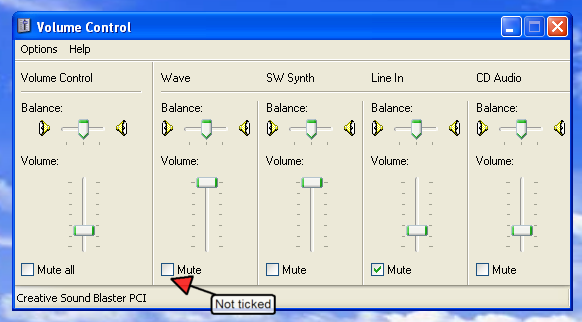
You could check if the Wave channel is accidentally muted: (just like Carol said)
[attach=#]
/Ton
Ath's software collection, Quote: "A problem well stated is a problem half-solved." (Charles Kettering)

x16wda

  • what am I doing in this handbasket?
  • Supporting Member
  • Joined in 2007
  • **
  • Posts: 888
    • Participated in NANY Challenge Once
Re: windows xp sound device problems
« Reply #6 on: April 27, 2012, 02:02 PM »
To add to what Carol said, don't forget to look on the Volume tab at the options in there and in the Advanced buttons and see if anything looks odd.
vi vi vi - editor of the beast
« Last Edit: April 27, 2012, 02:03 PM by x16wda »

FLueR00

  • Supporting Member
  • Joined in 2012
  • **
  • Posts: 5
Re: windows xp sound device problems
« Reply #7 on: April 27, 2012, 08:20 PM »
:wallbash: thanks everyone but to no avail nothing is still working. My control panel is icon is not working. I did check audio, video device status and every thing is blank or unable to change it. I don't how to explain it. I am getting can not find sound card, or detect any speaker. I am going to just reboot with my cd rom for microsoft again. I am just fed up with this!! >:(

Ath

  • Supporting Member
  • Joined in 2006
  • **
  • Posts: 3,649
    • Participated in NANY Challenge Eleven Times
    • Coding Snacks
    • Linux User
    • Hardware Hacker
Re: windows xp sound device problems
« Reply #8 on: April 27, 2012, 08:34 PM »
Sounds like Windows is terribly hosed in some way. A re-install should work wonders... :-\
/Ton
Ath's software collection, Quote: "A problem well stated is a problem half-solved." (Charles Kettering)

Carol Haynes

  • Waffles for England (patent pending)
  • Global Moderator
  • Joined in 2005
  • *****
  • Posts: 8,073
    • Cody Award
    • Furry Fandom Badge - Furry Fandom
Re: windows xp sound device problems
« Reply #9 on: April 27, 2012, 09:04 PM »
Can you see the sound device in the device manager?

If it is a separate sound card try reseating it in its slot - it may have a poor connection or dust in the socket.

Tinman57

  • Duck! It's another MicroSoft Patch!
  • Charter Member
  • Joined in 2006
  • ***
  • Posts: 1,702
    • Military Service Badge - US Air Force
Re: windows xp sound device problems
« Reply #10 on: May 01, 2012, 01:06 AM »
  Before you start re-installing Windows, first go into Device Manager and expand Sound, Video and Game Controllers.  Right mouse click on your sound card and select Uninstall.  If it tells you to reboot, go ahead.  When you boot up Windows will automatically detect and install your sound card, unless you have that function turned off under services.  If you don't have to reboot, XP will automatically detect your sound card and install the drivers, usually without any input from you.  If not, then reboot.  If it don't detect it after reboot, then open your control panel and click Add New Hardware and go from there.
  However, if XP don't detect the new hardware even after a reboot, or Add New Hardware don't produce any results, then obviously somethings probably wrong with your sound card.  Shut down your computer and remove the sound card.  Clean the contacts on the card with a pencil eraser, the red ones work best.  Re-insert the card and boot up.  If the system still don't detect it, then most likely your sound card is trashed..... :o
((((TINMAN))))

sword

  • Charter Member
  • Joined in 2005
  • ***
  • Posts: 200
Re: windows xp sound device problems
« Reply #11 on: May 04, 2012, 10:40 PM »
I had this same problem twice in XP. It seems XP resets the default to "Mute". Try going to controls, to sound and then just unclick the box for "mute".

Tinman57

  • Duck! It's another MicroSoft Patch!
  • Charter Member
  • Joined in 2006
  • ***
  • Posts: 1,702
    • Military Service Badge - US Air Force
Re: windows xp sound device problems
« Reply #12 on: May 05, 2012, 12:41 AM »
I had this same problem twice in XP. It seems XP resets the default to "Mute". Try going to controls, to sound and then just unclick the box for "mute".

  I had that problem on Win 98SE, but never on XP.  I wonder if it has something to do with what sound card your using.  With my Audigy 2 ZS, when I go to Mute, the word "MUTE" is displayed on the upper left hand side of the monitor.
((((TINMAN))))

Original address: https://www.donationcoder.com/forum/index.php?topic=30814.0