DonationCoder.com forum
 
Read-only archive. This is a static copy of the DonationCoder.com forum. Reading and searching work as before; logging in, posting and private messages do not.
Archive of 2026-10-21 · About this archive · Main site

Author Topic: scroll down to next picture  (Read 7,806 times)

DyNama

  • Are you a good witch or a bad witch?
  • Supporting Member
  • Joined in 2010
  • **
  • Posts: 73
scroll down to next picture
« on: March 30, 2012, 04:08 AM »
hi, gang! i frequently end up browsing blogs that start each post with a picture. the pic of course has no relation to how much the webpage scrolls down when i click in the scroll bar. if i'm interested in seeing every picture, i end up clicking once in the scroll bar, then clicking the up or down arrows a couple times, which is irritating. anyone know of a program or firefox addon that scrolls down to the next picture with 1 click? an example blog would be this cooking blog, http://mykentuckyhome-kim.blogspot.com/, that i wish i could press a button and scroll right down to the next picture.

Curt

  • Supporting Member
  • Joined in 2006
  • **
  • Posts: 7,565
Re: scroll down to next picture
« Reply #1 on: March 30, 2012, 04:35 PM »
-your request defeats the very purpose of writing a blog.

Maybe you want an easy download-all-pictures-on-this-page application?

mouser

  • First Author
  • Administrator
  • Joined in 2005
  • *****
  • Posts: 40,931
    • Gathering Badge
    • Plugin Coding Medal
    • Participated in NANY Challenge Seventeen Times
    • Cody Award
    • Coding Snacks
    • Volunteers/Staff
Re: scroll down to next picture
« Reply #2 on: March 30, 2012, 06:44 PM »
Does seem like it could be a useful idea though -- something to press that would scroll to bring the the next image on the page into view.

TaoPhoenix

  • 0 - 60 ... then back to 0 again!
  • Supporting Member
  • Joined in 2011
  • **
  • Posts: 4,642
    • Participated in NANY Challenge Three Times
Re: scroll down to next picture
« Reply #3 on: March 30, 2012, 07:32 PM »
-your request defeats the very purpose of writing a blog.

Maybe you want an easy download-all-pictures-on-this-page application?

In Firefox, and prob other browsers, you can do this as File/Save As Webpage Complete. Then you go to PageName_files and all the pictures are in there. Then any photo viewer would work.
Use attachthumb=# to show an attached image as an expandable thumbnail, or attach=# to show full size. (With Brackets)

DyNama

  • Are you a good witch or a bad witch?
  • Supporting Member
  • Joined in 2010
  • **
  • Posts: 73
Re: scroll down to next picture
« Reply #4 on: March 30, 2012, 10:10 PM »
i am just reading the blog, not just looking at pictures (not always, anyway), but i hate when a page down cuts a pic in half so i have to arrow down to get the whole pic on the screen. i hit the arrow button a few times...not enough, a few more times...still not enough. what can i say, i let little things like that bother me.  :)

[attach]

Renegade

  • Tell me something you don't know...
  • Charter Member
  • Joined in 2005
  • ***
  • Posts: 13,291
    • Participated in NANY Challenge Three Times
    • Furry Fandom Badge - Furry Fandom
    • Linux User
Re: scroll down to next picture
« Reply #5 on: March 31, 2012, 03:43 AM »
-your request defeats the very purpose of writing a blog.

Maybe you want an easy download-all-pictures-on-this-page application?

The pornzilla set of extensions and bookmarklets for Firefox has a lot of things to deal with images, including one that "rips" all the images out of a page.

Yeah, I know... pornzilla... for porn, but they really have assembled some really good scripts.

The "For linked images" is likely good for what you're looking for as blogs tend to link to images even if they are full sized.

But the script just rips images out of the page, so you couldn't really read at the same time... so, it's like half a solution...


Slow Down Music - Where I commit thought crimes...

Freedom is the right to be wrong, not the right to do wrong. - John Diefenbaker

cmpm

  • Charter Member
  • Joined in 2006
  • ***
  • Posts: 2,026
Re: scroll down to next picture
« Reply #6 on: March 31, 2012, 05:04 PM »
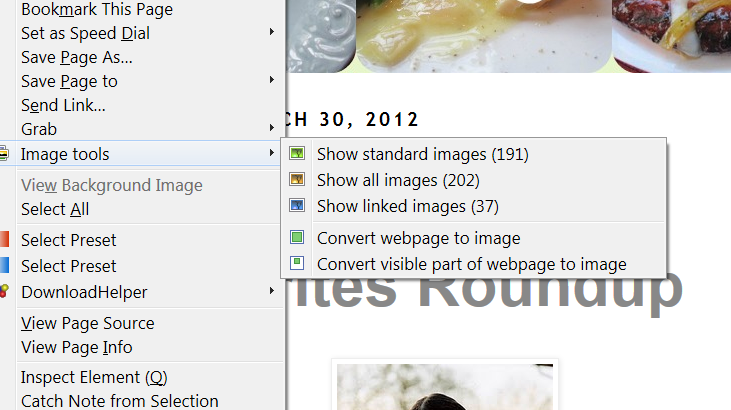
This addon for FF can open different sets of images in another tab.
Either all Images or what it determines as the main highlights.
Or it an make the whole page an image, it is an interesting addon imo.

https://addons.mozilla.org/en-US/firefox/addon/imagetools/?src=api

DyNama

  • Are you a good witch or a bad witch?
  • Supporting Member
  • Joined in 2010
  • **
  • Posts: 73
Re: scroll down to next picture
« Reply #7 on: April 03, 2012, 07:51 AM »
if i wanted to rip the pictures, the download manager i use, DownThemAll, will do that, plus i have Bulk Image Downloader registered shareware. no, all i want is more control over scrolling on a webpage. thanx gang!

do any of you even think something like that, pressing a button or a key to jump to the next photo, is even possible? or a button that pops up a menu of jump links to each picture on the page, like a table of contents (not links to where the picture is stored)? i would rather type "n" or pick "next" on a menu than scroll independent of the pictures. javascript to extract all the "img src" in the html or something?
« Last Edit: April 03, 2012, 08:10 AM by DyNama »

Renegade

  • Tell me something you don't know...
  • Charter Member
  • Joined in 2005
  • ***
  • Posts: 13,291
    • Participated in NANY Challenge Three Times
    • Furry Fandom Badge - Furry Fandom
    • Linux User
Re: scroll down to next picture
« Reply #8 on: April 03, 2012, 03:24 PM »
if i wanted to rip the pictures, the download manager i use, DownThemAll, will do that, plus i have Bulk Image Downloader registered shareware. no, all i want is more control over scrolling on a webpage. thanx gang!

do any of you even think something like that, pressing a button or a key to jump to the next photo, is even possible? or a button that pops up a menu of jump links to each picture on the page, like a table of contents (not links to where the picture is stored)? i would rather type "n" or pick "next" on a menu than scroll independent of the pictures. javascript to extract all the "img src" in the html or something?

I was just thinking... this could be relatively easily done in jQuery by adding an <a name="pic001"></a> before each <img> tag, then using a hotkey, e.g. left/right arrow keys, to cycle back and forth.

Does anyone know a development environment to write a plugin for Chrome/FF/Opera? (Nobody cares about Safarty or IE, or at least I don't. :P ) And preferably a development environment that doesn't suck as bad as the target platform... :P


Slow Down Music - Where I commit thought crimes...

Freedom is the right to be wrong, not the right to do wrong. - John Diefenbaker

Original address: https://www.donationcoder.com/forum/index.php?topic=30478.0