DonationCoder.com forum
 
Read-only archive. This is a static copy of the DonationCoder.com forum. Reading and searching work as before; logging in, posting and private messages do not.
Archive of 2026-10-21 · About this archive · Main site

Author Topic: Auto-Ping?  (Read 5,839 times)

CodeTRUCKER

  • Bush Flying... where I'd rather be.
  • Supporting Member
  • Joined in 2006
  • **
  • Posts: 1,086
    • Participated in NANY Challenge Once
    • Military Service Badge - US Navy
Auto-Ping?
« on: March 08, 2012, 09:10 PM »
My search did not yield any useful result, so I apologize if I missed something.  I am not sure if "Auto-Ping" is the right name, but what I am looking for is a way to monitor whether a web site is "up" or "down."

If there is nothing available I will post a request in "Coding Snacks."  Thanks.


DISCLAIMER - I have made and make many threads for questions and even project posts across the Internet. Unfortunately, many are in limbo because I cannot remember where they are at. If anyone knows of an open thread or an unanswered inquiry, please PM me. Thank you.
   
Notice: Unless stated otherwise, I receive no compensation for anything I post here.

rgdot

  • Supporting Member
  • Joined in 2009
  • **
  • Posts: 2,197
Re: Auto-Ping?
« Reply #1 on: March 08, 2012, 09:14 PM »
May be PingInfoView?
http://www.nirsoft.net/utils/multiple_ping_tool.html

4wd

  • Pedantic Old Bastard
  • Supporting Member
  • Joined in 2006
  • **
  • Posts: 5,652
    • Coding Snacks
Re: Auto-Ping?
« Reply #2 on: March 09, 2012, 04:28 AM »
Try this, it's just a quick butcher of my iFallover script elsewhere.

OK, I've deleted it because it was a complete screwup, my brain certainly was dormant at the time  :-[

However, I will have another up shortly...just one question:

Do you want to check for the existence of the website or the machine it's hosted on?

A ping will show the latter but won't tell you if the website is actually up.

Also, what do you consider necessary criteria for a website to be 'up', eg. Error 404 means a webserver is up but the page you were looking for isn't on it.
"I will not follow where the path may lead, but I will go where there is no path, and I will leave a trail." - Muriel Strode, 1903
« Last Edit: March 11, 2012, 01:50 AM by 4wd »

4wd

  • Pedantic Old Bastard
  • Supporting Member
  • Joined in 2006
  • **
  • Posts: 5,652
    • Coding Snacks
Re: Auto-Ping?
« Reply #3 on: March 11, 2012, 02:39 AM »
OK, as Bullwinkle always said, 'This time for sure!'

The new improved version that seems to work.  Comes with a cast iron executable guarantee*.

It checks for the existence of a website by trying to retrieve the website page at set intervals and changes the SysTray icon accordingly.

If all is well then it will look like this:

2012-03-11_13-23-34.jpg

If the website is down then, (in theory), you'll get a 5 second popup tooltip:
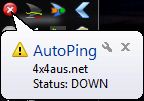
2012-03-11_13-22-18.jpg

The icon will change to a red circle with cross and the tooltip will change to:

2012-03-11_13-23-04.jpg

Explanation of the lines:
1) No connection to the website - this could be because the host machine has died or the webserver program on the host machine is not running.
2) A ping to Google was either OK or not - a failed ping to Google could indicate you have a network problem at your end, (since Google is up most of the time).  If this fails you won't get line 3 - not much point.
3) It passes the website address to http://www.checksite.us and displays the result, this will either be it's down for Everyone or Just You.

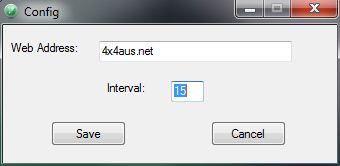
Configuration:
2012-03-11_13-24-16.jpg

It'll open the first time the program is run or if you select it from the tray icon menu.

The first connection is attempted at the end of the first elapsed interval after program execution, so until then the SysTray icon will look like the executable icon.

You can put the executable anywhere you like, you can name it anything you like - the config file will be located in the same directory and have the same name, (except extension), as the executable.

Have one for each site and name them accordingly, eg. google.exe, donationcoder.exe, etc.exe

Source, executable, icons, etc in the archive.

* It'll work until the moment you execute it.

Updated: 20120312 - Fixed some typos and added an option for the popup to the config.
"I will not follow where the path may lead, but I will go where there is no path, and I will leave a trail." - Muriel Strode, 1903
« Last Edit: March 12, 2012, 12:27 PM by 4wd »

Deozaan

  • Charter Member
  • Joined in 2006
  • ***
  • Posts: 9,827
    • Participated in NANY Challenge Eight Times
    • Cody Award
Re: Auto-Ping?
« Reply #4 on: March 13, 2012, 01:22 AM »
Assuming you have internet access and just want to verify that a certain website is working, you can use other websites such as:

http://isitup.org/
http://isup.me/

CodeTRUCKER

  • Bush Flying... where I'd rather be.
  • Supporting Member
  • Joined in 2006
  • **
  • Posts: 1,086
    • Participated in NANY Challenge Once
    • Military Service Badge - US Navy
Re: Auto-Ping?
« Reply #5 on: March 14, 2012, 02:39 AM »
Thank you for the assistance.  I will test them out and report back.  :)
DISCLAIMER - I have made and make many threads for questions and even project posts across the Internet. Unfortunately, many are in limbo because I cannot remember where they are at. If anyone knows of an open thread or an unanswered inquiry, please PM me. Thank you.
   
Notice: Unless stated otherwise, I receive no compensation for anything I post here.

Original address: https://www.donationcoder.com/forum/index.php?topic=30236.0