DonationCoder.com forum
 
Read-only archive. This is a static copy of the DonationCoder.com forum. Reading and searching work as before; logging in, posting and private messages do not.
Archive of 2026-10-21 · About this archive · Main site

Author Topic: Launch, stay open and continue searching  (Read 13,775 times)

Filipe Meira Castro

  • Supporting Member
  • Joined in 2010
  • **
  • Posts: 104
Launch, stay open and continue searching
« on: February 21, 2012, 11:14 PM »
Hi Mouser,

The option ctrl+dlbclick to launch and stay open works really well.

A great functionality that could be added would be to continue the search after launching
(at the moment, if I am searching for some subject, the results are being populated, but, as soon as one file is launched the search stops... that is ok for normal launching.. but with the "launch and stay open" it would be much better if the search would continue...)

What do you think of this idea?

Have a great day!
« Last Edit: February 25, 2012, 09:51 AM by Filipe Meira Castro »

Filipe Meira Castro

  • Supporting Member
  • Joined in 2010
  • **
  • Posts: 104
Re: Launch, stay open and continue searching
« Reply #1 on: February 29, 2012, 03:38 PM »
Not good?!

mouser

  • First Author
  • Administrator
  • Joined in 2005
  • *****
  • Posts: 40,931
    • Gathering Badge
    • Plugin Coding Medal
    • Participated in NANY Challenge Seventeen Times
    • Cody Award
    • Coding Snacks
    • Volunteers/Staff
Re: Launch, stay open and continue searching
« Reply #2 on: February 29, 2012, 04:30 PM »
let me chew on it a bit.. i see what you are saying im just not sure how to handle it.

Filipe Meira Castro

  • Supporting Member
  • Joined in 2010
  • **
  • Posts: 104
Re: Launch, stay open and continue searching
« Reply #3 on: February 29, 2012, 04:48 PM »
Hehehhehehe, sure!

I hope you can find an easy solution :)
It can be really handy, especially when searching some network files!

Filipe Meira Castro

  • Supporting Member
  • Joined in 2010
  • **
  • Posts: 104
Re: Launch, stay open and continue searching
« Reply #4 on: June 09, 2012, 10:35 PM »
Complicated?!

Filipe Meira Castro

  • Supporting Member
  • Joined in 2010
  • **
  • Posts: 104
Re: Launch, stay open and continue searching
« Reply #5 on: August 18, 2013, 05:06 PM »
Hi, Hi,

Hopefully you are managing a way on this :)

There is a small annoyance on this Ctrl dbl click because some applications will also detect the CTRL key for other purposes... ex: if I am launching a .docx word will prompt to open in safe mode, and if launching a .pdf acrobat will prompt for default language...

Maybe would be nice to include a checkbox near the search bar for this, for example... or have a different combination of keys maybe shift key will not interfere as much...

Keep FARR on great standard, it's an awesome app :)

« Last Edit: August 18, 2013, 05:17 PM by Filipe Meira Castro »

mouser

  • First Author
  • Administrator
  • Joined in 2005
  • *****
  • Posts: 40,931
    • Gathering Badge
    • Plugin Coding Medal
    • Participated in NANY Challenge Seventeen Times
    • Cody Award
    • Coding Snacks
    • Volunteers/Staff
Re: Launch, stay open and continue searching
« Reply #6 on: August 22, 2013, 02:28 PM »
Quote
There is a small annoyance on this Ctrl dbl click because some applications will also detect the CTRL key for other purposes.

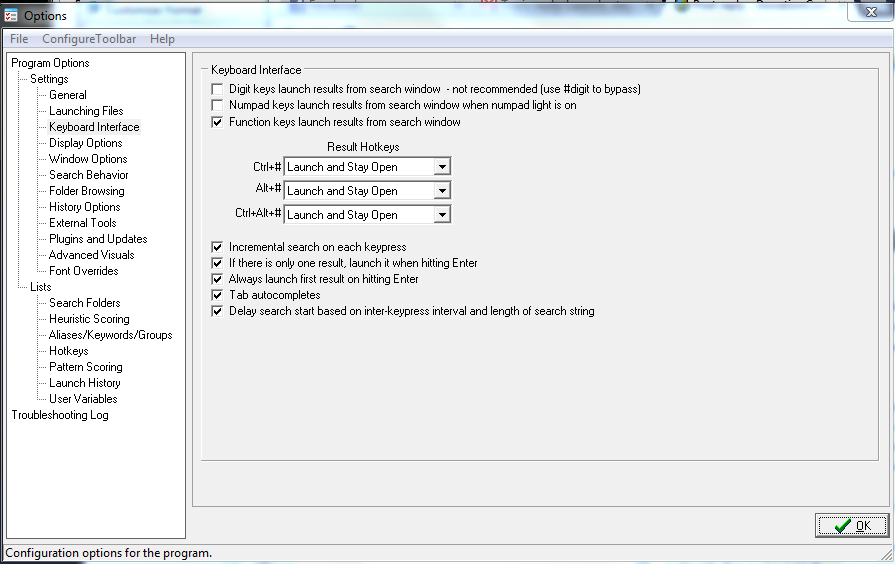
On the keyboard options tab you can change the ctrl/alt behaviors -- you could change it so that ALT was for launch and stay open.

Filipe Meira Castro

  • Supporting Member
  • Joined in 2010
  • **
  • Posts: 104
Re: Launch, stay open and continue searching
« Reply #7 on: August 23, 2013, 10:28 PM »
Hi,

Thank you for your comments :)
The Alt key is not keeping FARR opened even it is on the settings...
[attach]

mouser

  • First Author
  • Administrator
  • Joined in 2005
  • *****
  • Posts: 40,931
    • Gathering Badge
    • Plugin Coding Medal
    • Participated in NANY Challenge Seventeen Times
    • Cody Award
    • Coding Snacks
    • Volunteers/Staff
Re: Launch, stay open and continue searching
« Reply #8 on: August 27, 2013, 03:11 PM »
Looks like maybe with those settings with keyboard launch and not click?

Filipe Meira Castro

  • Supporting Member
  • Joined in 2010
  • **
  • Posts: 104
Re: Launch, stay open and continue searching
« Reply #9 on: August 27, 2013, 03:38 PM »
Yes, seems like, Have tested with ALT# and works but ALT Click then it does not!

Filipe Meira Castro

  • Supporting Member
  • Joined in 2010
  • **
  • Posts: 104
Re: Launch, stay open and continue searching
« Reply #10 on: April 27, 2020, 01:25 PM »
Hi Mouser,

This is an old topic, but the "Launch, stay open and continue searching" is something that could be really handy when searching multiple document of one topic/keyword.

I understand it might be difficult to implement and was thinking of some "Workaround" or way to make it easier to improve here.

Whenever we have a result and the user clicks an item, FARR stops populating results - This is what is happening now and I guess it might be because the user can then trigger the context menu and would also be annoying to have the selection being moved all the time.

So a workaround solution, would be to have the searched "Paused" or just running in a different thread when the user has selected something, but as soon as an action is triggered or the user selects the search field again, the search could resume or the background tread able to put the newly found item in the list!

Doable challenge?! :D

Nod5

  • Supporting Member
  • Joined in 2006
  • **
  • Posts: 1,175
    • Coding Snacks
    • Participated in NANY Challenge Three Times
    • Plugin Coding Medal
Re: Launch, stay open and continue searching
« Reply #11 on: April 27, 2020, 05:54 PM »
Another small wrinkle related to the current launch and stay open option: FARR moves focus to the searchbox, instead of keeping focus at the line of the result that was launched.

Here is an AutoHotkey script that somewhat works around both issues. Somewhat since it only works when launching a result that points to file/folder path (not a complex alias result that launches multiple files, passes parameters or other extras). I imagine the script might also fail to keep focus in some situations, depending on how long it takes for the launched file to open in the default app for that extension.

Code: (Autohotkey)
#NoEnv
SendMode Input
SetWorkingDir %A_ScriptDir%
#SingleInstance force
SetBatchLines, -1
SetWinDelay, -1
SetControlDelay, -1

; FARR helper script to launch a file and continue search and keep focus in results list

; 2020-04-27 by Nod5

; Hotkey: Alt+Enter 
; - launches the selected FARR result (a file or folder)
; - FARR continues searching
; - FARR stays open and keeps its focus in the results window

; note: does nothing if the selected result is not an existing file/folder.
; In other words does nothing if the result is an complex alias result.

#IfWinActive, ahk_exe FindAndRunRobot.exe
!Enter::
  ; only react if user has focused FARR results list
  ControlGetFocus, vFocusControl, A
  if (vFocusControl != "TNextGrid1")
    Return
  ; get FARR window handle
  vHwnd := WinExist("A")
  ; use ctrl+C to get the path to selected file in FARR results
  ; note: only works if result is a path to a single file (not a complex alias result)
  clip := ClipToVar()
  If !FileExist(clip)
    Return
  ; run the file
  Run % clip
  ; keep the FARR window active
  While WinActive("ahk_id " vHwnd) and (A_Index < 100)
    sleep 10
  WinActivate, % "ahk_id " vHwnd
Return
#IfWinActive

;function: copy selection to clipboard to variable
ClipToVar() {
  cliptemp := clipboardall ;backup
  clipboard = 
  send ^c
  clipwait, 1
  clip := clipboard
  clipboard := cliptemp    ;restore
  return clip
}

mouser

  • First Author
  • Administrator
  • Joined in 2005
  • *****
  • Posts: 40,931
    • Gathering Badge
    • Plugin Coding Medal
    • Participated in NANY Challenge Seventeen Times
    • Cody Award
    • Coding Snacks
    • Volunteers/Staff
Re: Launch, stay open and continue searching
« Reply #12 on: April 29, 2020, 02:22 AM »
I'll see how easy it would be for me to add an option for this. Maybe it's no big deal.

Filipe Meira Castro

  • Supporting Member
  • Joined in 2010
  • **
  • Posts: 104
Re: Launch, stay open and continue searching
« Reply #13 on: April 29, 2020, 08:46 AM »
:Thmbsup: :Thmbsup: :Thmbsup:

Original address: https://www.donationcoder.com/forum/index.php?topic=30043.0