DonationCoder.com forum
 
Read-only archive. This is a static copy of the DonationCoder.com forum. Reading and searching work as before; logging in, posting and private messages do not.
Archive of 2026-10-21 · About this archive · Main site

Author Topic: Thunderbird attachment processing  (Read 9,339 times)

oblivion

  • Supporting Member
  • Joined in 2010
  • **
  • Posts: 499
    • Participated in NANY Challenge Once
Thunderbird attachment processing
« on: February 14, 2012, 11:30 AM »
A robot sends me emails, sometimes several times a day. The email always has an attachment (a textfile) that always has the same name, although the contents will vary (and, if everything works as it's supposed to, will never be the same twice.)

What I want to be able to do is find some means of saving those attachments into a single folder but with unique filenames.

I used to use The Bat, which could be persuaded to do something helpful in this regard. But now I use Thunderbird, so although I can make it give me a list of all the emails from the robot sender, I can't find a way to save off all those attachments in any way that's not extremely tedious.

I don't really care how they're named -- and as they're textfiles, I don't even care if they're all concatenated into a single output file. Just something I can search afterwards...

I suppose a good general purpose approach would be to name the files yyyymmddnnn.txt and maybe a hotkey trigger to paste the next filename in sequence into the "save as" editbox might be one possibility... wouldn't save all the hard work but would simplify things a lot. Better yet, though, would be the ability to take the date info from the currently selected email, but that might be asking rather a lot. ;)

-- bests, Tim

...this space unintentionally left blank.

4wd

  • Pedantic Old Bastard
  • Supporting Member
  • Joined in 2006
  • **
  • Posts: 5,652
    • Coding Snacks
Re: Thunderbird attachment processing
« Reply #1 on: February 14, 2012, 12:07 PM »
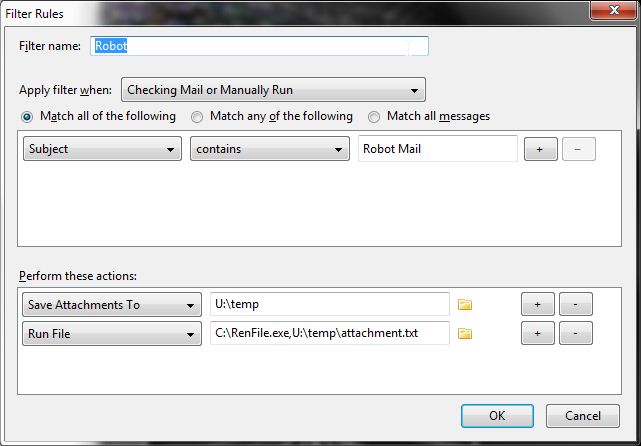
You could use the FiltaQuilla addon to add filter actions such as Save Attachments To, Detach Attachments To and Run File.

Then set a Message Filter to:
1) Match Subject/Body/etc
2) Save Attachment To <some dir>
3) Run File rename.cmd,attachment.txt

All you need to do then is knock up a command file to do the rename or a simple AHK or AutoIT script.

Here's a AutoIT script that'll take a single argument and change the filename to YYYYMMDDhhmmss.txt

eg. RenFile.exe U:\temp\attachment.txt

Code: (autoit)
#Region ;**** Directives created by AutoIt3Wrapper_GUI ****
#AutoIt3Wrapper_UseUpx=n
#AutoIt3Wrapper_Res_requestedExecutionLevel=asInvoker
#EndRegion ;**** Directives created by AutoIt3Wrapper_GUI ****

; RenFile.exe <filename> [new filename, no path, no extension]
; eg.
; RenFile.exe file1.txt                 <- new file called 20120215143523.txt
; RenFile.exe file1.tmp file2         <- new file called file2.tmp

If $CmdLine[0] = 0 Then Exit

$path = ''
$ext = ''
If StringInStr($CmdLine[1], '\') > 0 Then
	$path = StringMid($CmdLine[1], 1, StringInStr($CmdLine[1], '\', 0, -1))
EndIf
$ext = StringMid($CmdLine[1], StringInStr($CmdLine[1], '.', 0, -1))
If $CmdLine[0] = 1 Then
	$newName = $path & @YEAR & @MON & @MDAY & @HOUR & @MIN & @SEC & $ext
Else
	$newName = $path & StringStripWS($CmdLine[2], 7) & $ext
EndIf
If FileMove($CmdLine[1], $newName) < 1 Then
	MsgBox(48, 'RenFile', 'Failed to rename: ' & $CmdLine[1])
EndIf

Source and compiled executable attached.

You should be able to set a Message Filter similar to:
2012-02-14_23-35-29.jpg

So the theory goes ;)

UPDATE: RenFile.exe will take an optional extra argument which will be the filename to rename the file to, (filename only sans extension, no path input).  No second argument will default it to YYYYMMDDhhmmss.<ext>

It retains the extension of the file passed in the first argument, so no need to add an extension to the optional second argument.

So you could change the Run File action in the message filter to, (using example above):

Run File: RenFile.exe,U:\temp\attachment.txt,@DATE@

This should rename the saved attachment to match the date string of the message.
"I will not follow where the path may lead, but I will go where there is no path, and I will leave a trail." - Muriel Strode, 1903
« Last Edit: February 15, 2012, 04:11 AM by 4wd »

tomos

  • Charter Member
  • Joined in 2006
  • ***
  • Posts: 11,970
    • Gathering Badge
    • Participated in NANY Challenge Once
Re: Thunderbird attachment processing
« Reply #2 on: February 14, 2012, 03:28 PM »
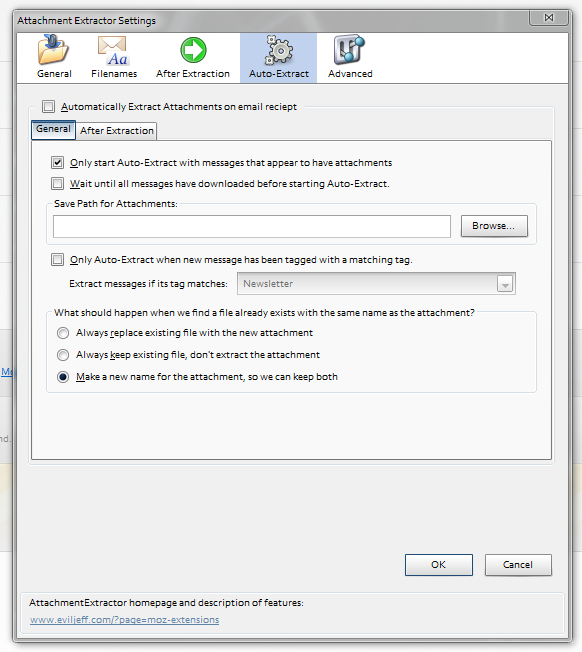
I think Attachment Extractor would cover your request - but I only use it manually (to a custom folder) so cannot say for sure.

He does give a warning on the add-on page that it might not be fully functionally.

[attachthumb=#]

It *is* working for me (as described) with TB 9.0.1
Tom

oblivion

  • Supporting Member
  • Joined in 2010
  • **
  • Posts: 499
    • Participated in NANY Challenge Once
Re: Thunderbird attachment processing
« Reply #3 on: February 14, 2012, 07:24 PM »
I think Attachment Extractor would cover your request
Certainly looks promising, at first glance. I'll try this and the FiltaQuilla solutions and see what works best -- thanks, both!
-- bests, Tim

...this space unintentionally left blank.

4wd

  • Pedantic Old Bastard
  • Supporting Member
  • Joined in 2006
  • **
  • Posts: 5,652
    • Coding Snacks
Re: Thunderbird attachment processing
« Reply #4 on: February 15, 2012, 04:00 AM »
Squashed a couple of really stupid bugs in the AutoIT script and added optional second parameter.  See above.
"I will not follow where the path may lead, but I will go where there is no path, and I will leave a trail." - Muriel Strode, 1903

Original address: https://www.donationcoder.com/forum/index.php?topic=29952.0