DonationCoder.com forum
 
Read-only archive. This is a static copy of the DonationCoder.com forum. Reading and searching work as before; logging in, posting and private messages do not.
Archive of 2026-10-21 · About this archive · Main site

Author Topic: Reinstall  (Read 12,193 times)

ginger

  • Charter Member
  • Joined in 2005
  • ***
  • Posts: 13
Reinstall
« on: February 07, 2012, 03:09 PM »
How can I do a clean reinstall of processtamer. I've uninstalled and gone through the registry to deleted entries I could find using search term 'processtamer', but when I reinstall I see the same custom confg setup that I had before the uninstall (even though I deleted old directory & installed into a new one).

The issue I'm having is that not all of the process's running are being picked up by processtamer, and even if I add a manual rule, they are not taming the specific processes specified in the rule.
cmpm

  • Charter Member
  • Joined in 2006
  • ***
  • Posts: 2,026
Re: Reinstall
« Reply #1 on: February 07, 2012, 04:40 PM »
The settings should be in an application data folder.
Under your user name, open that folder.
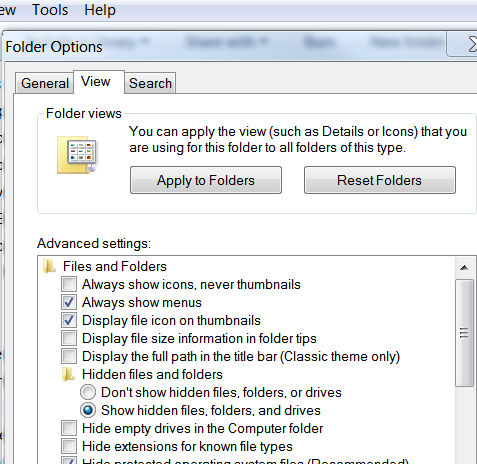
Under 'tools'-'folder options'-'view' tab.
Click 'show hidden files, folders, and drives'.
Search for files in 'AppData'.

ginger

  • Charter Member
  • Joined in 2005
  • ***
  • Posts: 13
Re: Reinstall
« Reply #2 on: February 07, 2012, 05:00 PM »
Thanks cmpm - good suggestion.
However, I've been through the app folders for the logged in user & deleted relevant files for donationcoder/processtamer - reinstalled again, but have still got old config!
Must be storing it somewhere else.

cmpm

  • Charter Member
  • Joined in 2006
  • ***
  • Posts: 2,026
Re: Reinstall
« Reply #3 on: February 07, 2012, 05:18 PM »
hm, it should be a .ini file somewhere...I guess
Since it's dealing with process', it may be somewhere else.
Search the computer for ".ini" files, without the quotes.
You will get a lot of them probably.

I don't use process tamer myself , so I can't help much.
Maybe someone who uses it can help more.

db90h

  • Coding Snacks Author
  • Charter Member
  • Joined in 2005
  • ***
  • Posts: 481
    • Coding Snacks
    • Military Service Badge - US Army
    • Linux User
Re: Reinstall
« Reply #4 on: February 07, 2012, 06:01 PM »
Try c:\ProgramData\...   though I dunno.
« Last Edit: February 07, 2012, 06:26 PM by db90h »

ginger

  • Charter Member
  • Joined in 2005
  • ***
  • Posts: 13
Re: Reinstall
« Reply #5 on: February 07, 2012, 07:51 PM »
Hi, I found the ini file - it was in C:\Users\%USERNAME%\Documents\DonationCoder\ProcessTamer
Thanks guys :)

Original address: https://www.donationcoder.com/forum/index.php?topic=29884.0