DonationCoder.com forum
 
Read-only archive. This is a static copy of the DonationCoder.com forum. Reading and searching work as before; logging in, posting and private messages do not.
Archive of 2026-10-21 · About this archive · Main site

Author Topic: Timed screen capture  (Read 7,911 times)

jjerry

  • Participant
  • Joined in 2012
  • *
  • Posts: 3
Timed screen capture
« on: February 01, 2012, 06:23 AM »
I'd like to have a timed screen capture, which means it starts capture screenshot at time T1.
After each time interval Td it will capture another screen short, it goes on till it reaches T2.
Hopefully each file can be saved automatically.
However, I can't even find timed capture function anywhere.
Can what I described be performed?

Thank you.

mouser

  • First Author
  • Administrator
  • Joined in 2005
  • *****
  • Posts: 40,931
    • Gathering Badge
    • Plugin Coding Medal
    • Participated in NANY Challenge Seventeen Times
    • Cody Award
    • Coding Snacks
    • Volunteers/Staff
Re: Timed screen capture
« Reply #1 on: February 01, 2012, 06:28 AM »
you can set the interval, and the maximum screenshots to take, and then engage th auto capture timer.

the only thing you mention that you can't do it tell it not to begin until a certain time of day..

jjerry

  • Participant
  • Joined in 2012
  • *
  • Posts: 3
Re: Timed screen capture
« Reply #2 on: February 01, 2012, 06:55 AM »
Thanks.
How can I set the parameters you described?
I could not find ways to adjust the auto capture timer in the most current version of the screenshot captor.
Mouser:
I am new here, pointers about instructions, online manuals regarding to the current version will be highly appreciated.
« Last Edit: February 01, 2012, 09:17 AM by jjerry »

ewemoa

  • Honorary Member
  • Joined in 2008
  • **
  • Posts: 2,922
    • Plugin Coding Medal
    • Participated in NANY Challenge Three Times
Re: Timed screen capture
« Reply #3 on: February 01, 2012, 09:16 AM »
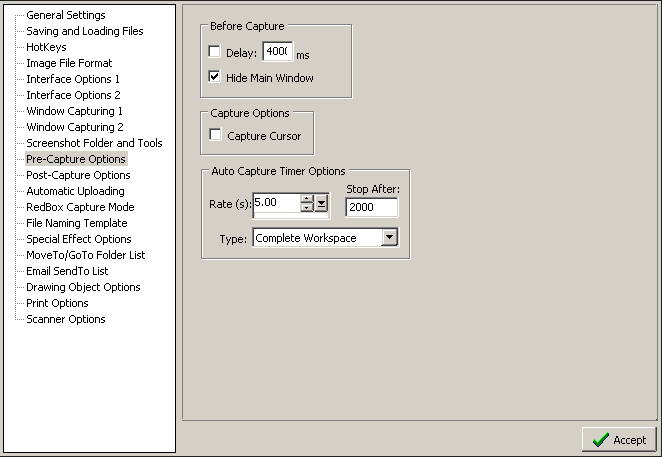
How about the following from the pre-capture options of the preferences dialog:

sc-precapture-options.png

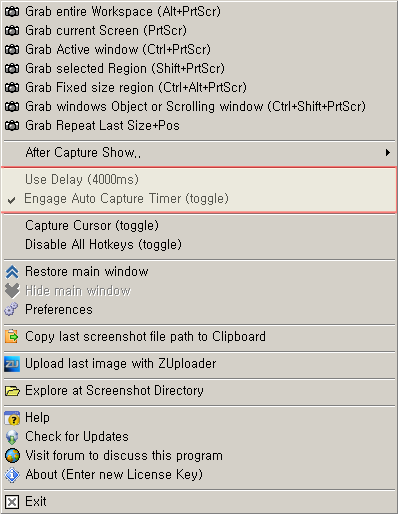
and the tray icon menu:

traymenu_options.png

?
« Last Edit: February 01, 2012, 11:03 AM by ewemoa »

jjerry

  • Participant
  • Joined in 2012
  • *
  • Posts: 3
Re: Timed screen capture
« Reply #4 on: February 01, 2012, 09:55 AM »
Thanks a million, ewemoa.
I found the pre capture options menu, but my tray icon menu does not show the same - many choices are missing.
I just downloaded this software, and it is v2.103.01.
I wonder if they changed something in this version.

ewemoa

  • Honorary Member
  • Joined in 2008
  • **
  • Posts: 2,922
    • Plugin Coding Medal
    • Participated in NANY Challenge Three Times
Re: Timed screen capture
« Reply #5 on: February 01, 2012, 11:01 AM »
Ah sorry about that.  The tray icon menu image I posted was obtained from an older source of info -- I wasn't at a machine running Windows at the time.

I've updated the image to be what I see currently.

cranioscopical

  • Friend of the Site
  • Supporting Member
  • Joined in 2006
  • **
  • Posts: 4,776
    • Cody Award
    • Official Forum Clown
    • rotten turkey sandwich - Rotten Turkey Sandwich
Re: Timed screen capture
« Reply #6 on: February 01, 2012, 01:50 PM »
the only thing you mention that you can't do it tell it not to begin until a certain time of day..
@jjerry There is all kinds of free stuff to launch an application at a given time. The built-in Windows Tasks (or Scheduler) is a good, safe, easy one.
Chris

rjbull

  • Charter Member
  • Joined in 2005
  • ***
  • Posts: 3,217
Re: Timed screen capture
« Reply #7 on: February 01, 2012, 09:26 PM »
the only thing you mention that you can't do it tell it not to begin until a certain time of day..
@jjerry There is all kinds of free stuff to launch an application at a given time. The built-in Windows Tasks (or Scheduler) is a good, safe, easy one.
You beat me to that comment, but, does SSC support command-line operation?  If it doesn't, there's mouser's other screen capture program MiniCap :
Quote
MiniCap is a minimal screenshot capture app, with good commandline support, including the ability to launch (and then terminate) apps, capture windows by handle, processid, process name, or interactively.

MiniCap has a convenient interactive capture mode (based on Screenshot Captor's Redbox Capture mode) which may be useful if you don't want to have something like Screenshot Captor running in the background. But where MiniCap really shines is it's use as a non-interactive commandline tool.

Original address: https://www.donationcoder.com/forum/index.php?topic=29774.0