DonationCoder.com forum
 
Read-only archive. This is a static copy of the DonationCoder.com forum. Reading and searching work as before; logging in, posting and private messages do not.
Archive of 2026-10-21 · About this archive · Main site

Author Topic: How to force "Register DLL"?  (Read 26,232 times)

Curt

  • Supporting Member
  • Joined in 2006
  • **
  • Posts: 7,565
How to force "Register DLL"?
« on: January 26, 2012, 07:55 PM »
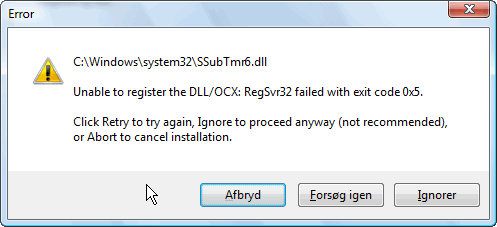
Lately I have been getting "Unable to register the DLL/OCX: RegSvr32 failed with exit code 0x5" a few times too many from different programs I was installing. But not being able to repair my ageing 32-bits Vista Home Premium, I was hoping for a get-around solution. Can I somehow force Vista to register such a DLL at next Start, or something?
:tellme:


[attachimg=#]

Ath

  • Supporting Member
  • Joined in 2006
  • **
  • Posts: 3,649
    • Participated in NANY Challenge Eleven Times
    • Coding Snacks
    • Linux User
    • Hardware Hacker
Re: How to force "Register DLL"?
« Reply #1 on: January 26, 2012, 08:13 PM »
It's quite pre-Windows 7 this DLL, and it probably needs to be RegSvr32'd from an elevated command-prompt, or with UAC turned off (but that requires a reboot if it's currently on).
It's not an OS-used DLL, so it won't need to be done while (re)starting. It might help if AV is turned off during the RegSvr32 action, but usually that's not required.
Worst case it's missing some required file(s).

It's actually a fail in the installer, that should take care of things like that, but if if the installer is really old it couldn't know, ofcourse.
/Ton
Ath's software collection, Quote: "A problem well stated is a problem half-solved." (Charles Kettering)

Curt

  • Supporting Member
  • Joined in 2006
  • **
  • Posts: 7,565
Re: How to force "Register DLL"?
« Reply #2 on: January 26, 2012, 08:34 PM »
-sorry. I should of course have told that I have tried many solutions, including turning off security related programs. UAC has not been enabled since day one; I am the only user.

But if the failure was done by the installer, I will contact the various companies.
Thank you!

Ath

  • Supporting Member
  • Joined in 2006
  • **
  • Posts: 3,649
    • Participated in NANY Challenge Eleven Times
    • Coding Snacks
    • Linux User
    • Hardware Hacker
Re: How to force "Register DLL"?
« Reply #3 on: January 26, 2012, 08:53 PM »
Looked it up to be sure, 0x5 is simply Access Denied.

The installer should be run as administrator, sometimes _even_ if UAC is turned off. Could also be a 32 vs 64 bit issue.
/Ton
Ath's software collection, Quote: "A problem well stated is a problem half-solved." (Charles Kettering)

4wd

  • Pedantic Old Bastard
  • Supporting Member
  • Joined in 2006
  • **
  • Posts: 5,652
    • Coding Snacks
Re: How to force "Register DLL"?
« Reply #4 on: January 26, 2012, 11:47 PM »
Could also be a 32 vs 64 bit issue.

Shouldn't be, Curt's trying to install on a 32bit system - 64bit programs normally won't install, (well, they didn't want to when I was running 32bit :) ).

Perhaps try changing the Owner of the install file before running it elevated?
"I will not follow where the path may lead, but I will go where there is no path, and I will leave a trail." - Muriel Strode, 1903

Ath

  • Supporting Member
  • Joined in 2006
  • **
  • Posts: 3,649
    • Participated in NANY Challenge Eleven Times
    • Coding Snacks
    • Linux User
    • Hardware Hacker
Re: How to force "Register DLL"?
« Reply #5 on: January 26, 2012, 11:54 PM »
Could also be a 32 vs 64 bit issue.

Shouldn't be, Curt's trying to install on a 32bit system ...
I missed that from the original message :-[

Perhaps try changing the Owner of the install file before running it elevated?
That's not going to change anything, just running it elevated forcibly should solve it. This issue also exists for installers on Server 2008, that are not UAC/Vista+ aware, or recognized by the OS as being an installer. The last situation is most likely the case here.
/Ton
Ath's software collection, Quote: "A problem well stated is a problem half-solved." (Charles Kettering)

lanux128

  • Global Moderator
  • Joined in 2005
  • *****
  • Posts: 6,277
    • Coding Snacks
    • Volunteers/Staff
    • Gathering Badge
    • Participated in NANY Challenge Once
    • Linux User
Re: How to force "Register DLL"?
« Reply #6 on: January 27, 2012, 03:00 AM »
fwiw, i have an app that uses ssubtmr6.dll in a 64-bit environment so the installer just needs to be "elevated" before running..

4wd

  • Pedantic Old Bastard
  • Supporting Member
  • Joined in 2006
  • **
  • Posts: 5,652
    • Coding Snacks
Re: How to force "Register DLL"?
« Reply #7 on: January 27, 2012, 03:09 AM »
Perhaps try changing the Owner of the install file before running it elevated?
That's not going to change anything, just running it elevated forcibly should solve it. This issue also exists for installers on Server 2008, that are not UAC/Vista+ aware, or recognized by the OS as being an installer. The last situation is most likely the case here.

I'm sure I've had trouble previously running programs, (whether elevated or not), until I specifically 'owned' the executable.  But then again, my memory may be alcohol distorted :)

But not being able to repair my ageing 32-bits Vista Home Premium, ....

Just going back to the OP, why can't you do a Repair Install Curt?
"I will not follow where the path may lead, but I will go where there is no path, and I will leave a trail." - Muriel Strode, 1903

Curt

  • Supporting Member
  • Joined in 2006
  • **
  • Posts: 7,565
Re: How to force "Register DLL"?
« Reply #8 on: January 27, 2012, 09:15 AM »
why can't you do a Repair Install Curt?

-OEM, plus the initial backup was lost / corrupted. Today, most companies cannot offer me a Vista installation disk, and the one that could tried to charge me full OS price, just for a repair.

Curt

  • Supporting Member
  • Joined in 2006
  • **
  • Posts: 7,565
Re: How to force "Register DLL"?
« Reply #9 on: January 27, 2012, 03:05 PM »
Does any of you already have an account at experts-exchange.com?

http://www.experts-exchange.com/Programming/Languages/Visual_Basic/Q_21398615.html seems to tell what I can do, but I have to create an account if I want to know the answer.
:tellme:

PhilB66

  • Supporting Member
  • Joined in 2007
  • **
  • Posts: 1,522
Re: How to force "Register DLL"?
« Reply #10 on: January 27, 2012, 04:38 PM »
Does any of you already have an account at experts-exchange.com?

http://www.experts-exchange.com/Programming/Languages/Visual_Basic/Q_21398615.html seems to tell what I can do, but I have to create an account if I want to know the answer.
:tellme:


Post your link (http://www.experts-exchange.com/Programming/Languages/Visual_Basic/Q_21398615.html) into a google search, click on the result and scroll all the way down to read the answers.

Curt

  • Supporting Member
  • Joined in 2006
  • **
  • Posts: 7,565
Re: How to force "Register DLL"?
« Reply #11 on: January 27, 2012, 10:48 PM »
-thanks, PhilB66. Your Google page must clearly be different from mine, because I don't get the blocked text. Can/will you copy&paste and PM it for/to me?

PhilB66

  • Supporting Member
  • Joined in 2007
  • **
  • Posts: 1,522
Re: How to force "Register DLL"?
« Reply #12 on: January 28, 2012, 12:20 AM »
-thanks, PhilB66. Your Google page must clearly be different from mine, because I don't get the blocked text. Can/will you copy&paste and PM it for/to me?
Nope. Should work with any google search.

Curt

  • Supporting Member
  • Joined in 2006
  • **
  • Posts: 7,565
Re: How to force "Register DLL"?
« Reply #13 on: January 28, 2012, 09:40 AM »
-yes, it works.
I didn't know about this feature and didn't understand that I first should click the link.
Thank you!

Curt

  • Supporting Member
  • Joined in 2006
  • **
  • Posts: 7,565
Re: How to force "Register DLL"?
« Reply #14 on: February 07, 2012, 10:22 PM »
just saying that experts-exchange weren't experts,
so in all I never got an useful answer to my initial question:
Can I somehow force RegSvr32 to register a DLL?  :tellme:


I've just ruined my beloved Explorer, by updating QTTabBar,
because the very important QTFileTools.dll refuses to register (elevated or not).  :(

Ath

  • Supporting Member
  • Joined in 2006
  • **
  • Posts: 3,649
    • Participated in NANY Challenge Eleven Times
    • Coding Snacks
    • Linux User
    • Hardware Hacker
Re: How to force "Register DLL"?
« Reply #15 on: February 07, 2012, 10:40 PM »
And what have the supplier of that DLL been able to tell you about this issue?

RegSvr32 normally always forces registration, but all it does is call the entrypoint for that, inside the DLL. If it fails, it's directly to do with the environment of the DLL, so Access denied, can be either or both access to a file, access to the registry, or missing dependencies.
Do you need to update some (MS C++?) system DLL's first, before this one will stick? (Windows Updates does wonders sometimes, even on Vista ;))
/Ton
Ath's software collection, Quote: "A problem well stated is a problem half-solved." (Charles Kettering)

Carol Haynes

  • Waffles for England (patent pending)
  • Global Moderator
  • Joined in 2005
  • *****
  • Posts: 8,073
    • Cody Award
    • Furry Fandom Badge - Furry Fandom
Re: How to force "Register DLL"?
« Reply #16 on: February 08, 2012, 01:56 AM »
Have you tried unregistering the DLL and removing it and then registering the new version. You might need to use Safe Mode to unregister it and remove the old version if it loads with windows.

If it was installed and being updated it might be giving an access denied because it is actually in use.

Alternatively can you completely uninstall QTTabBar and manually ensure that it is totally removed before installing the new version? (I find the registry cleaner in CCLeaner handy for tracking down registry bits and pieces that should have been removed).

Original address: https://www.donationcoder.com/forum/index.php?topic=29732.0