DonationCoder.com forum
 
Read-only archive. This is a static copy of the DonationCoder.com forum. Reading and searching work as before; logging in, posting and private messages do not.
Archive of 2026-10-21 · About this archive · Main site

Author Topic: copy and combine multiple text  (Read 12,981 times)

kalos

  • Member
  • Joined in 2006
  • **
  • Posts: 1,824
copy and combine multiple text
« on: January 25, 2012, 09:29 PM »
hello!

I want to use a special key and copy multiple texts (one by one) and then use another key to paste all that text combined (each text, seperated in a newline)

any suggestion?

thanks!

skwire

  • I eat Coding Snacks for breakfast...
  • Global Moderator
  • Joined in 2005
  • *****
  • Posts: 5,297
    • Participated in NANY Challenge Seventeen Times
    • Coding Snacks
    • Superboy Coder
    • Cody Award
    • Volunteers/Staff
    • Gathering Badge
Re: copy and combine multiple text
« Reply #1 on: January 25, 2012, 09:49 PM »
Are these snippets simple plain-text?  As in, they're not copied from Word or Excel docs, right?

skwire

  • I eat Coding Snacks for breakfast...
  • Global Moderator
  • Joined in 2005
  • *****
  • Posts: 5,297
    • Participated in NANY Challenge Seventeen Times
    • Coding Snacks
    • Superboy Coder
    • Cody Award
    • Volunteers/Staff
    • Gathering Badge
Re: copy and combine multiple text
« Reply #2 on: January 25, 2012, 09:59 PM »
If they're just simple plain-text snippets, you could use something like this:

Code: (autohotkey)
^g:: ; Ctrl+G to copy.
{
    SendInput, ^c ; Copy selected text to clipboard.
    myBlock .= Clipboard . "`n" ; Concatenate block of saved text.
}
Return

^h:: ; Ctrl+H to paste.
{
    Clipboard := myBlock ; Put saved block of text on clipboard.
    SendInput, ^v ; Paste into application.
    myBlock := "" ; Clear block of text.
}
Return
« Last Edit: February 22, 2012, 07:32 PM by skwire »

kalos

  • Member
  • Joined in 2006
  • **
  • Posts: 1,824
Re: copy and combine multiple text
« Reply #3 on: January 26, 2012, 09:57 AM »
thanks!

IainB

  • @Slartibartfarst
  • Supporting Member
  • Joined in 2008
  • **
  • Posts: 7,544
Re: copy and combine multiple text
« Reply #4 on: January 28, 2012, 09:44 AM »
Umm, I think can do all that - and more - in mouser's Clipboard Help and Spell. It's called "merge clips" - and they don't have to be sequential either.
And no restrictions on whether you are copying from plain-text, Word, Excel or any other docs.

kalos

  • Member
  • Joined in 2006
  • **
  • Posts: 1,824
Re: copy and combine multiple text
« Reply #5 on: January 29, 2012, 12:24 AM »
Umm, I think can do all that - and more - in mouser's Clipboard Help and Spell. It's called "merge clips" - and they don't have to be sequential either.
And no restrictions on whether you are copying from plain-text, Word, Excel or any other docs.

I just tried that

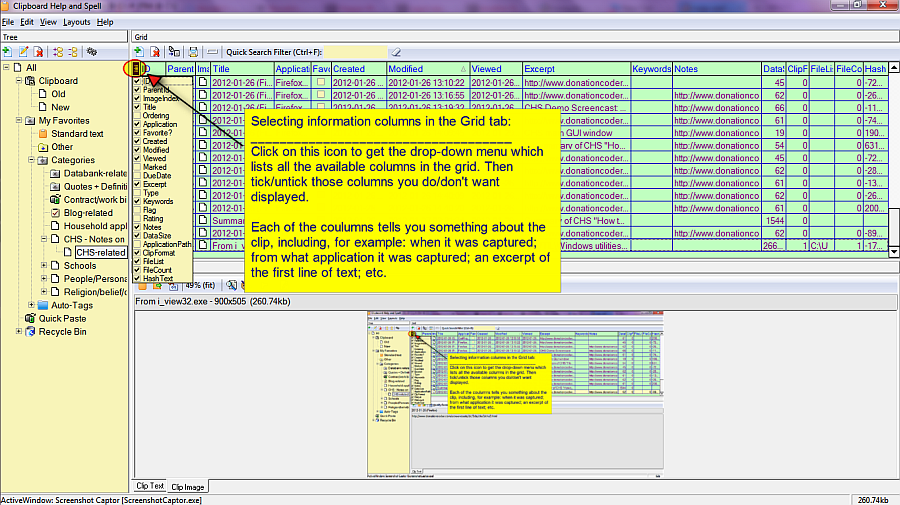
the problem is that the program does not offer a display of all clips stored with the timestamp on which, each clip was created and the application from which, each clip was created, so that I can easily choose which to merge (basically, there is no column that displays the clip content)

mouser

  • First Author
  • Administrator
  • Joined in 2005
  • *****
  • Posts: 40,931
    • Gathering Badge
    • Plugin Coding Medal
    • Participated in NANY Challenge Seventeen Times
    • Cody Award
    • Coding Snacks
    • Volunteers/Staff
Re: copy and combine multiple text
« Reply #6 on: January 29, 2012, 01:31 AM »
Quote
the problem is that the program does not offer a display of all clips stored with the timestamp on which, each clip was created and the application from which, each clip was created,

yes it does.

kalos

  • Member
  • Joined in 2006
  • **
  • Posts: 1,824
Re: copy and combine multiple text
« Reply #7 on: January 29, 2012, 01:39 AM »
Quote
the problem is that the program does not offer a display of all clips stored with the timestamp on which, each clip was created and the application from which, each clip was created,

yes it does.

can you tell me please how?
thanks

IainB

  • @Slartibartfarst
  • Supporting Member
  • Joined in 2008
  • **
  • Posts: 7,544
Re: copy and combine multiple text
« Reply #8 on: January 29, 2012, 02:58 AM »
I just tried that
...the problem is that the program does not offer a display of all clips stored with the timestamp on which, each clip was created and the application from which, each clip was created, so that I can easily choose which to merge (basically, there is no column that displays the clip content)
Ah, I think I understand. In this instance, a picture is probably worth a thousand words...
Spoiler (click to show/hide)
[attach]
« Last Edit: January 29, 2012, 03:30 AM by IainB »

kalos

  • Member
  • Joined in 2006
  • **
  • Posts: 1,824
Re: copy and combine multiple text
« Reply #9 on: January 29, 2012, 03:41 PM »
ooo yeah thanks!

kalos

  • Member
  • Joined in 2006
  • **
  • Posts: 1,824
Re: copy and combine multiple text
« Reply #10 on: February 02, 2012, 07:26 PM »
FWIMC:
skwire's Cliptrap does it too
http://skwire.dcmembers.com/wb/pages/software/cliptrap.php

Contro

  • Supporting Member
  • Joined in 2007
  • **
  • Posts: 3,947
Re: copy and combine multiple text
« Reply #11 on: February 05, 2012, 02:51 PM »
FWIMC:
skwire's Cliptrap does it too
http://skwire.dcmembers.com/wb/pages/software/cliptrap.php

Pues me he enganchado a Cliptrap aunque utilizo Ditto.
Gracias skwire. Aunque lo hiciste combinando con ArsClip, también es útil combinado con Ditto

Original address: https://www.donationcoder.com/forum/index.php?topic=29718.0