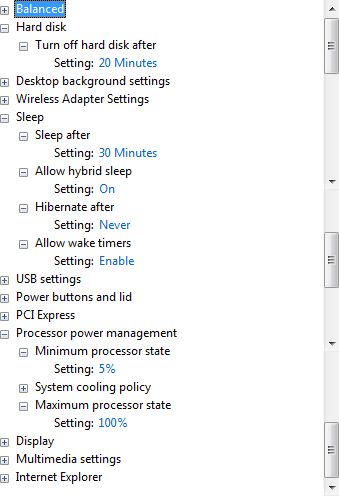
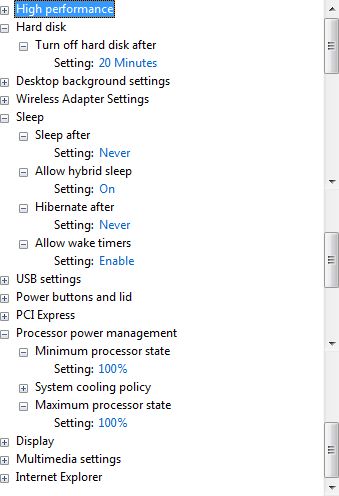
#Region ;**** Directives created by AutoIt3Wrapper_GUI ****
#AutoIt3Wrapper_Icon=klaptopdaemon.ico
#AutoIt3Wrapper_UseUpx=n
#AutoIt3Wrapper_Res_requestedExecutionLevel=asInvoker
#EndRegion ;**** Directives created by AutoIt3Wrapper_GUI ****
;PowerMaxTemp

#include <Array.au3>
#include <Constants.au3>
#include <GUIConstantsEx.au3>
#include <WindowsConstants.au3>
#include <StaticConstants.au3>
#include "_Startup.au3"
#include "_OsVersionInfo.au3"

Global $schemes, $MaxPowSch, $CurrPowSch, $Progress

If _OsVersionTest($VER_GREATER_EQUAL, 6, 0) Then
	$Progress = 'Vista/7 ' & StringLower(@CPUArch) & ' or higher'
Else
	$Progress = 'XP/2003 ' & StringLower(@CPUArch)
EndIf
$Progress = $Progress & @CRLF

_RevertOldSch()
_GetAllScheme()
_GetMaxPower()
_GetCurrentScheme()
_ResetPowerScheme()
_SetPowerScheme()
_Exit()


; Get me outta here!
Func _Exit()
	MsgBox(64, 'PowerMaxTemp', $Progress)
	Exit
EndFunc


; Get all power schemes using powercfg.exe /list
Func _GetAllScheme()
	Local $error
	Local $foo = Run(@comspec & ' /c powercfg.exe /list"', '.', @SW_HIDE, $STDOUT_CHILD + $STDERR_CHILD)
	If @error Then
		MsgBox(48, 'PowerMaxTemp error', 'Failed to run powercfg.exe /list')
	EndIf
	$PowSchList = ''
	While 1
		$PowSchList &= StdoutRead($foo)
	    If @error <> 0 Then ExitLoop
	WEnd
	$error = ''
	While 1
		$error &= StderrRead($foo)
	    If @error <> 0 Then ExitLoop
		If @extended > 0 Then
			$Progress = $Progress & 'Power schemes not read' & ' - Code: ' & @error & @CRLF & 'Exiting...'
			_Exit()
		EndIf
	WEnd
	StdioClose($foo)
	$schemes = StringSplit(StringStripWS($PowSchList, 4), @CR)
EndFunc


; Get the Maximum power scheme:
; XP: Always On
; Vista/7: High performance
Func _GetMaxPower()
	Local $i
	For $i = 1 To $schemes[0]
		If _OsVersionTest($VER_GREATER_EQUAL, 6, 0) Then
			If StringInStr($schemes[$i], 'High performance') > 0 Then $MaxPowSch = StringMid($schemes[$i], 20, (StringInStr($schemes[$i], ' ', 0, 1, 20) - 20))
		Else
			If StringInStr($schemes[$i], 'Always On') > 0 Then $MaxPowSch = "Always On"
		EndIf
	Next
	$Progress = $Progress & 'New scheme:		' & $MaxPowSch & @CRLF
EndFunc


; Get the current power scheme, in Vista/7 it's marked in the list with '*'.
; In XP we have to issue a powercfg /query command
; Vista/7 uses the GUID, XP uses the plain text name  -  Standards, who needs them?
Func _GetCurrentScheme()
	Local $i, $output, $error
	$Progress = $Progress & 'Current scheme:		'
	If _OsVersionTest($VER_GREATER_EQUAL, 6, 0) Then
		For $i = 1 To $schemes[0]
			If StringInStr($schemes[$i], '*') > 0 Then $CurrPowSch = StringMid($schemes[$i], 20, (StringInStr($schemes[$i], ' ', 0, 1, 20) - 20))
		Next
	Else
		Local $foo = Run(@comspec & ' /c powercfg.exe /query"', '.', @SW_HIDE, $STDOUT_CHILD + $STDERR_CHILD)
		If @error Then
			MsgBox(48, 'PowerMaxTemp error', 'Failed to run powercfg.exe /query')
		EndIf
		$output = ''
		While 1
			$output &= StdoutRead($foo)
			If @error <> 0 Then ExitLoop
		WEnd
		$error = ''
		While 1
			$error &= StderrRead($foo)
			If @error <> 0 Then ExitLoop
			If @extended > 0 Then
				$Progress = $Progress & 'Not read' & ' - Code: ' & @error & @CRLF
			EndIf
		WEnd
		StdioClose($foo)
		Local $XP = StringSplit(StringStripWS($output, 4), @CR)
		For $i = 0 To $XP[0]
			If StringLeft($XP[$i], 4) = 'Name' Then $CurrPowSch = StringStripWS(StringMid($XP[$i], 6), 4)
		Next
	EndIf
	If @extended <= 0 Then $Progress = $Progress & $CurrPowSch & @CRLF
EndFunc


; Set RunOnce to restore the current power scheme on reboot
Func _ResetPowerScheme()
	If _OsVersionTest($VER_GREATER_EQUAL, 6, 0) Then
		If _StartupRegistry_Install("PMT", "powercfg.exe /setactive " & $CurrPowSch, 1, 1) = 0 Then
			$Progress = $Progress & 'Install RunOnce:		Fail' & @CRLF
		Else
			$Progress = $Progress & 'Install RunOnce:		Done' & @CRLF
		EndIf
	Else
		If _StartupRegistry_Install("PMT", 'powercfg.exe /setactive "' & $CurrPowSch & '"', 1, 1) = 0 Then
			$Progress = $Progress & 'Install RunOnce:		Fail' & @CRLF
		Else
			$Progress = $Progress & 'Install RunOnce:		Done' & @CRLF
		EndIf
	EndIf
EndFunc


; Change the system to use the maximum power scheme, for XP we put quotes around it
Func _SetPowerScheme()
	Local $error
	If _OsVersionTest($VER_GREATER_EQUAL, 6, 0) Then
		Local $foo = Run(@comspec & ' /c powercfg.exe /setactive ' & $MaxPowSch, '.', @SW_HIDE, $STDOUT_CHILD + $STDERR_CHILD)
	Else
		Local $foo = Run(@comspec & ' /c powercfg.exe /setactive "' & $MaxPowSch & '"', '.', @SW_HIDE, $STDOUT_CHILD + $STDERR_CHILD)
	EndIf
	If @error Then
		MsgBox(48, 'PowerMaxTemp error', 'Failed to run powercfg.exe /setactive')
	EndIf
	$cps = ''
	While 1
		$cps &= StdoutRead($foo)
	    If @error <> 0 Then ExitLoop
	WEnd
	$error = ''
	While 1
		$error &= StderrRead($foo)
	    If @error <> 0 Then ExitLoop
		If @extended > 0 Then
			$Progress = $Progress & 'Set scheme:		Fail' & ' - Code: ' & @error & @CRLF
		EndIf
	WEnd
	StdioClose($foo)
	If @extended <= 0 Then $Progress = $Progress & 'Set scheme:		Done' & @CRLF
EndFunc


; When PMT is run, RunOnce is checked for key 'pmt'.
; If it exists: the old scheme is read, the command executed, and the 'pmt' key removed.
; If it doesn't exist the program carries on with setting High performance/Always On scheme.
Func _RevertOldSch()
	If @CPUArch = 'X64' Then
		Local $OldPowSch = RegRead("HKEY_LOCAL_MACHINE64\SOFTWARE\Microsoft\Windows\CurrentVersion\RunOnce", "pmt")
	Else
		Local $OldPowSch = RegRead("HKEY_LOCAL_MACHINE\SOFTWARE\Microsoft\Windows\CurrentVersion\RunOnce", "pmt")
	EndIf
	If $OldPowSch = '' Then
		$Progress = $Progress & 'Revert:			No' & @CRLF
		Return
	EndIf
	$Progress = $Progress & 'Revert:			Yes' & @CRLF
	Local $foo = Run(@comspec & ' /c ' & $OldPowSch, '.', @SW_HIDE, $STDOUT_CHILD + $STDERR_CHILD)
	If @error Then
		MsgBox(48, 'PowerMaxTemp error', 'Failed to run ' & $OldPowSch)
	EndIf
	$cps = ''
	While 1
		$cps &= StdoutRead($foo)
	    If @error <> 0 Then ExitLoop
	WEnd
	$error = ''
	While 1
		$error &= StderrRead($foo)
	    If @error <> 0 Then ExitLoop
		If @extended > 0 Then
			$Progress = $Progress & 'Scheme reset:		Fail' & ' - Code: ' & @error & @CRLF
		EndIf
	WEnd
	StdioClose($foo)
	If @extended <= 0 Then $Progress = $Progress & 'Scheme reset:		Done' & @CRLF
	If _StartupRegistry_Uninstall("PMT", $OldPowSch, 1, 1) = 0 Then
		$Progress = $Progress & 'Remove RunOnce:		Fail' & @CRLF
	Else
		$Progress = $Progress & 'Remove RunOnce:		Done' & @CRLF
	EndIf
	_Exit()
EndFunc


 PMT.zip


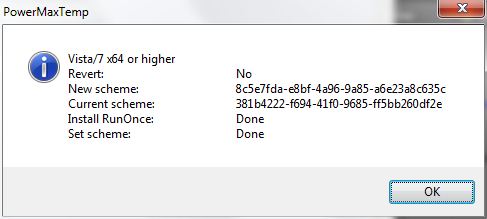
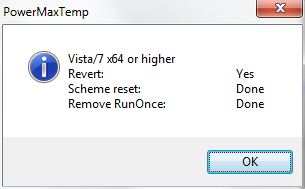


 vevola, please confirm this works for you and I'll mark and move this thread to Finished Programs.