DonationCoder.com forum
 
Read-only archive. This is a static copy of the DonationCoder.com forum. Reading and searching work as before; logging in, posting and private messages do not.
Archive of 2026-10-21 · About this archive · Main site

Author Topic: send email after some delay  (Read 7,726 times)

kalos

  • Member
  • Joined in 2006
  • **
  • Posts: 1,824
send email after some delay
« on: January 03, 2012, 01:15 PM »
hello!!

in Microsoft Office Outlook 2003, I want two buttons to appear in the 'compose email' window:
"Send"
and
"Send after some delay" (the delay can be a default delay or I can customize it in each email I send)

is it possible?

thanks!

Deozaan

  • Charter Member
  • Joined in 2006
  • ***
  • Posts: 9,827
    • Participated in NANY Challenge Eight Times
    • Cody Award
Re: send email after some delay
« Reply #1 on: January 03, 2012, 07:19 PM »
This probably isn't very helpful, but Gmail can do something like this already. It gives you a few seconds to "Undo Send" in case you want to change something.

[attachimg=#]

You can find/enable it in Gmail Labs from the Settings page.

kalos

  • Member
  • Joined in 2006
  • **
  • Posts: 1,824
Re: send email after some delay
« Reply #2 on: January 03, 2012, 07:47 PM »
the problem is that I am limited to Outlook :S

Stoic Joker

  • Honorary Member
  • Joined in 2008
  • **
  • Posts: 6,652
    • Cody Award
    • Participated in NANY Challenge Five Times
Re: send email after some delay
« Reply #3 on: January 03, 2012, 07:55 PM »
Unsend only works if the receiving server wants to let it (most don't...). So unless Gmail is intentionally tarpit-ing their outbount mail...that "feature" is a crap shoot.

skwire

  • I eat Coding Snacks for breakfast...
  • Global Moderator
  • Joined in 2005
  • *****
  • Posts: 5,297
    • Participated in NANY Challenge Seventeen Times
    • Coding Snacks
    • Superboy Coder
    • Cody Award
    • Volunteers/Staff
    • Gathering Badge

kalos

  • Member
  • Joined in 2006
  • **
  • Posts: 1,824
Re: send email after some delay
« Reply #5 on: January 03, 2012, 08:35 PM »
http://www.howtogeek.com/howto/microsoft-office/use-outlook-rules-to-prevent-oh-no-after-sending-emails/

Might be worth a look...

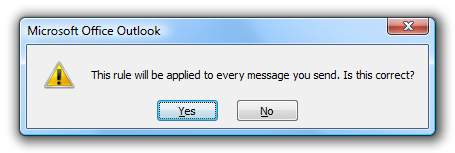
thanks, however I already know this and the problem I encounter is actually this:
del.png

I want to choose each time, by clicking the appropriate button ("Send now", "Send after 5 minutes", "Send after minutes you specify")

maybe an add-on exists?

Ath

  • Supporting Member
  • Joined in 2006
  • **
  • Posts: 3,649
    • Participated in NANY Challenge Eleven Times
    • Coding Snacks
    • Linux User
    • Hardware Hacker
Re: send email after some delay
« Reply #6 on: January 03, 2012, 08:53 PM »
This Office.com article might help
/Ton
Ath's software collection, Quote: "A problem well stated is a problem half-solved." (Charles Kettering)

Deozaan

  • Charter Member
  • Joined in 2006
  • ***
  • Posts: 9,827
    • Participated in NANY Challenge Eight Times
    • Cody Award
Re: send email after some delay
« Reply #7 on: January 04, 2012, 06:46 PM »
Unsend only works if the receiving server wants to let it (most don't...). So unless Gmail is intentionally tarpit-ing their outbount mail...that "feature" is a crap shoot.

When the feature is enabled, Gmail intentionally delays the sending of the e-mail for a few seconds.

Stoic Joker

  • Honorary Member
  • Joined in 2008
  • **
  • Posts: 6,652
    • Cody Award
    • Participated in NANY Challenge Five Times
Re: send email after some delay
« Reply #8 on: January 04, 2012, 10:59 PM »
Unsend only works if the receiving server wants to let it (most don't...). So unless Gmail is intentionally tarpit-ing their outbount mail...that "feature" is a crap shoot.

When the feature is enabled, Gmail intentionally delays the sending of the e-mail for a few seconds.

Which loosely qualifies as tar-pitting. But OP mentioned they're using Outlook which Google may not honor requests from. Historically unsend is iffy outside of a closed system because the receiving server can (and typically does) refuse the delete request.

Deozaan

  • Charter Member
  • Joined in 2006
  • ***
  • Posts: 9,827
    • Participated in NANY Challenge Eight Times
    • Cody Award
Re: send email after some delay
« Reply #9 on: January 06, 2012, 04:56 AM »
Unsend only works if the receiving server wants to let it (most don't...). So unless Gmail is intentionally tarpit-ing their outbount mail...that "feature" is a crap shoot.

When the feature is enabled, Gmail intentionally delays the sending of the e-mail for a few seconds.

Which loosely qualifies as tar-pitting. But OP mentioned they're using Outlook which Google may not honor requests from. Historically unsend is iffy outside of a closed system because the receiving server can (and typically does) refuse the delete request.

I'm not really intending on dragging this thread off topic, and you seem much more knowledgeable about this than I am, but I just thought what Google did with Undo Send was to put your mail on a delay timer so that it wasn't sent at all until after the time you had to "Undo Send" had passed. I didn't think it actually sent it immediately and then tried to take it back if you pressed the undo button.

kalos

  • Member
  • Joined in 2006
  • **
  • Posts: 1,824
Re: send email after some delay
« Reply #10 on: January 06, 2012, 02:27 PM »
I would still need two buttons  :-\, a "send" and a "send later", is it possible?

Original address: https://www.donationcoder.com/forum/index.php?topic=29498.0