Hi, folks!
Today we want to introduce you a simple (for now) image batch processor, that can help you edit multiple images at the click of one button. ImBatch supports 30+ image formats (BMP, DIB, RLE, TIF, TIFF, FAX, G3N, G3F, XIF, GIF, JPG, JPEG, JPE, JIF, PCX, PNG, TGA, TARGA, VDA, ICB, VST, PIX, PXM, PPM, PGM, PBM, WBMP, JP2, J2K, JPC, J2C, DCX, DAT, PSD, WDP, HDP).
This is a simple introducing tutorial.
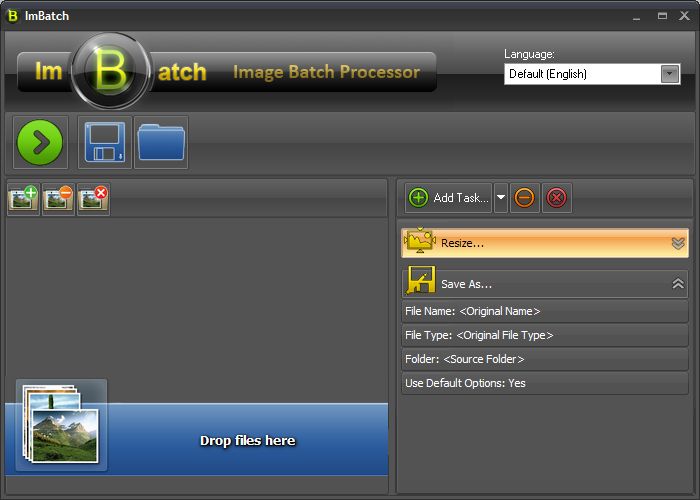
First add images for processing. To do that just click on button (Hot Key Ctrl+A) or drag and drop image files from Windows Explorer or another file manager. After that add several tasks to make image processing sequence by clicking on
  button (Hot Key Ctrl+T).
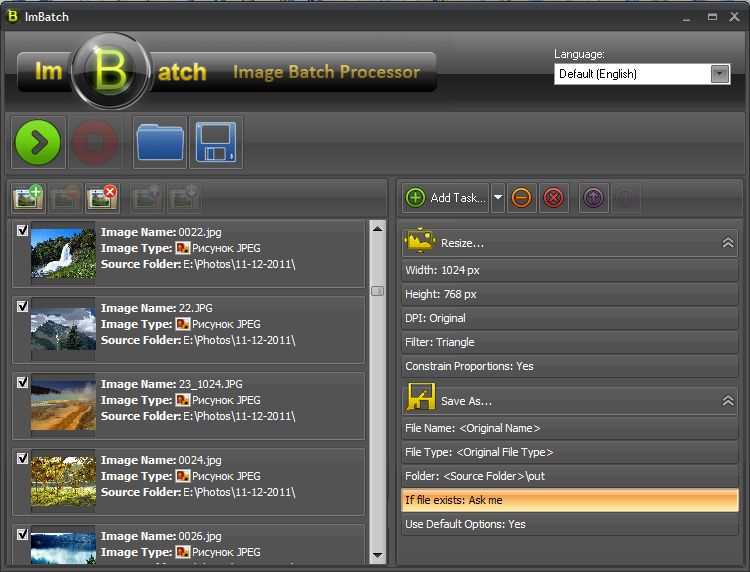
You can configure any task for your needs. To do that, you must expand task by clicking on icon on the right part of task header. Then choose any task's parameter, you want to edit and double-click on it.
Now you can use only two type of tasks: 'Save As' and 'Resize', but soon we shall add a lot of new tasks.
We hope you enjoy ImBatch. We are looking forward to your feedback regarding the program.
P.S. And one more thing: ImBatch is totally FREE for personal use without any kind of malware or adware.
Home Page
Download (latest version, EXE)
Screenshots
Today we want to introduce you a simple (for now) image batch processor, that can help you edit multiple images at the click of one button. ImBatch supports 30+ image formats (BMP, DIB, RLE, TIF, TIFF, FAX, G3N, G3F, XIF, GIF, JPG, JPEG, JPE, JIF, PCX, PNG, TGA, TARGA, VDA, ICB, VST, PIX, PXM, PPM, PGM, PBM, WBMP, JP2, J2K, JPC, J2C, DCX, DAT, PSD, WDP, HDP).
This is a simple introducing tutorial.
First add images for processing. To do that just click on
button (Hot Key Ctrl+A) or drag and drop image files from Windows Explorer or another file manager. After that add several tasks to make image processing sequence by clicking on button (Hot Key Ctrl+T). You can configure any task for your needs. To do that, you must expand task by clicking on
icon on the right part of task header. Then choose any task's parameter, you want to edit and double-click on it.Now you can use only two type of tasks: 'Save As' and 'Resize', but soon we shall add a lot of new tasks.
We hope you enjoy ImBatch. We are looking forward to your feedback regarding the program.
P.S. And one more thing: ImBatch is totally FREE for personal use without any kind of malware or adware.
Home Page
Download (latest version, EXE)
Screenshots