


Hi,
on my Windows XP Professional I use a Directory Folder in Launchbar Commander which points to a directory with .rdp-files (Remote Desktop Session files). Everytime I click on one of those files in launchbar commander I get an error which says (translated from german): "C:\_LocalCopy\Config\RemoteDesktop\Fook.rdp Wrong Parameter".
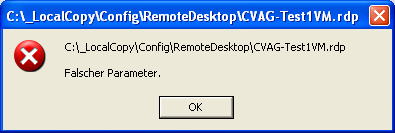
When I chose other links from folders parallel to the RemoteDesktop-folder which are of another file-type it works fine. Also I can open the rdp-files via explorer and they start normally.
What I tried so far without success:
- create a new link to the directory folder - same error
- directly link a .rdp-file as command - same error
This might be a bug in the new release, or I have to change some configuration - any hints / advice for me? Is there a way to see the commandline that LBC tries to execute when clicking on the link?
on my Windows XP Professional I use a Directory Folder in Launchbar Commander which points to a directory with .rdp-files (Remote Desktop Session files). Everytime I click on one of those files in launchbar commander I get an error which says (translated from german): "C:\_LocalCopy\Config\RemoteDesktop\Fook.rdp Wrong Parameter".
When I chose other links from folders parallel to the RemoteDesktop-folder which are of another file-type it works fine. Also I can open the rdp-files via explorer and they start normally.
What I tried so far without success:
- create a new link to the directory folder - same error
- directly link a .rdp-file as command - same error
This might be a bug in the new release, or I have to change some configuration - any hints / advice for me? Is there a way to see the commandline that LBC tries to execute when clicking on the link?


