All versions of Action Outline, one of the many two-pane outliners/notekeepers, are on offer via Bits du Jour today, 2011-11-21.
Action Outline on offer at Bits du Jour, 2011-11-21
« on: November 21, 2011, 08:43 PM »

 Topic: Action Outline on offer at Bits du Jour, 2011-11-21 (Read 19,039 times)


Roberto Porcar James: http://www.actionoutline.com/ao_whatsnew.php
take a look by yourself... only you can know if its worth the price.
update 1: add colours
update 2: add undo
update 3: add pictures

AO is a nice outliner. But I don't see anything in it that's compelling enough to justify the price or upgrade policy when there are so many other products out there that offer as much for less.
I think there are brief mentions of Action Outline in the famous "General brainstorming for Note-taking software" thread. I didn't realise the upgrade policy was so stingy, given that, as I understand it, it isn't updated very often, and I'm not much excited by fancy appearance either.
I also have a distinct preference for single-pane outliners.I nearly said, single-pane (and three-pane) outliners are now rare compared to two-pane, and it would be nice to see more. You have an alternative to TKoutline in another single-pane outliner that's been mentioned on DC before: Noteliner. It's just been updated, too, October 28, 2011:
[...]
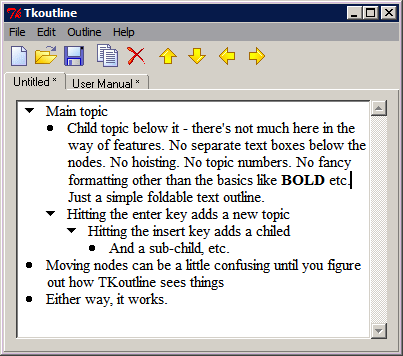
For quick & dirty stuff I use the freebie TKoutline.
As simple and lightweight as a text editor, with the power of an outliner, and the metadata of a to-do list--and now TABLES!Whether it has the right balance of simplicity vs. features is for you to decide
the rather expensive (creative writing oriented) Outline 4D.It looks a bit like it's trying to be a modern ECCO. If it fits that bill, I suppose it justifies its price.
 )
)Thx for the link to Noteliner. I'll definitely check that one out.I reported that Noteliner 3.3 Build2b wouldn't open for me on Vista Home Premium. The author e-mailed back to say there did seem some compatibility issues with Vista/7 that he hopes to iron out in the next release. Version 2.7.08, the last one I had, does work.
re: Outline 4D - actually not much like Ecco which I also used to use. It's primarily designed to be a writing/plot outlining tool for movie scripts and novelsYes, that would be different; I always thought ECCO was heavily slanted towards business.
A little warning:
the right to update (upgrade, they call it) is per year, not per version's number.
I have 3.3, but must pay for 3.4 (if I would, which I won't).
I really need the hit table AND Boolean search, if I want to avoid having tenfold "hits" I then have to discard.I hear you
[...]
nowhere in all these, you'll get "semantic search", i.e. automatic inclusion of "dog" in your search when you'll search for "spaniel" or "retriever"
[...]
the real prob is, you'll (hopefully) use all sorts of synonyms all over the place
[...] and how to find something then, without Boolean search?
 I used to use the mighty Dialog online information system with its large collection of huge patent, scientific and technical databases, with literally millions of records. I was used to building complex Boolean searches. I don't think there is anything like what you're asking for as a desktop application with an affordable price. The closest would be DB/TextWorks by Inmagic Corp., but this is meant for powering corporate libraries and the like, with price to match. It's true that they made the DOS version of Inmagic (which used to cost $1,200) free: see the Information, Reference, Research page of the Free Software for DOS Web site. That's good, but obviously DOS software is getting harder to use on later versions of Windows. Even then, Inmagic has (if I remember correctly) only a limited number of synonyms, but it does have serious Boolean searching power.
I regret the demise of askSam - AS, as it was, but being stable and without all these hellish bugs making people lose data, would have been preferable to them all.Do you mean that the most recent version of askSam isn't reliable?
So much for little outliners. ;-)They do have their uses
But IMHO they aren't ideal for really big jobs.Oops, I mixed up my accounts I'd been really angry about my contributions being called spam and myself being thrown outYou mean, clean and helmut85 are the same person?
I had very well understood there's some smart and affable folks around here.I'm glad you felt able to come back. You'd have to ask the moderators about why you were spammed out; it's usually because a post looks like some kind of advertising.
I once stumbled upon DT/TextWorks, and would be willing to pay 1,200 bucks for a prog that really "has it all", but I discarded it then because of their "ask us for a trial (instead of just downloading it) and for a quote (instead of giving the price) - so I never even got to a screenshot of it, let alone a trial.I don't think this is suspicious of shady practice. They're a serious software company, with a serious product, but they're probably expecting to deal with medium-sized enterprises needing to run a company-wide library system. In that case, they're probably expecting to face aggressive purchasing departments.
Then, it's a db, which means it's not a tree superposed upon such a db, as UR and MI and IQ and others are, and even the later AS got trees-on-the-flyTrue, but for large data sets that doesn't bother me. I was used to searching Dialog, after all.
As I today said in my KEdit thread, lately it's MI that seems to leave UR trailing, not because MI was so good suddenly, but because there is steady if slow development, whilst UR don't do much upon their roadmap ("not much" being an euphemism for "nothing" here).I didn't upgrade to the latest version of UR for that very reason, and there are even people in the UR forums saying the same.
And there's another thing, many such "basic" desktop pim's do not even allow for searching "just in the tree" / "text only" / both, but invariably search everywhereHorst Schaeffer's MemPad does, but, Horst made it as a tool for keeping one's own thoughts in, with the tree structure as very much the primary way of organising and finding things. I'm still looking for the ideal text database.
As for Notefrog, if I understand this prog well (without ever having trialled for more than just 2 or 3 minutes or so), it relies exclusively upon searching, since there is no tree: at the left, it's the hit table!That's more or less right. The list at the left is note titles. That narrows down as you add text into the search box(es); it has a very nice "search as you type" "live search." But, it isn't truly a heavyweight application.
even Boolean search isn't good enough, it should include "semantic search", i.d. half-automatic synonym provision.In my limited experience, it isn't a common feature of desktop products. Apart from Inmagic, I've only seem something like it in Dialog's EXPAND command (or the STN equivalent). It was very useful for collecting together all variations of a company name, including the most likely misspellings. In desktop apps, I think I'd like to be able to swith synonymy on and off, maybe even to have multiple synonym sets I could switch between. Pipe dream...
I know of a list one very early Dos text db which offered some semantic search (but not in the sophisticated I describe here)Maybe Anyword? I tinkered with it a little, but it indexes existing text and gives you a nice Dialog-like way of searching it. If you changed the text, you had to re-index. I wanted something more integrated. It was a very old program, and I couldn't get it to work under later Windows.
Your link is for defunct progs that are much more special and much more interestingDisclaimer, of sorts; I contributed to the Free Software for DOS list
And this, 35 years after the intro of personal computing. /rantI feel your pain
Most modern Windows software is intended for novices to get something done at all, and to be "easy to use." But that's turned into patronising users as unable to get to grips with anything above the trivial, and bamboozling them with eye-candy.Original address: https://www.donationcoder.com/forum/index.php?topic=28762.0