Dear Friends,
Due to working in lots of project in different platform, both at office and home, I urgently need a sticky note for a given document, program, website etc. Better if it could sync with Simplenote web server. I also found discussion in DC here on similar subject.
Now I searched and tried GumNotes http://www.gumnotes.com/, which does what I want, but...after two days it is not working. All my notes have vanished and giving error "can not connect Simplenote" though same password works if I connect from browser.
Next I tried ResophNotes http://www.resoph.com/ResophNotes/, more or less like QuickNote http://www.quicknote.de/ and can sync with simplenote. But can not mark note to a doc/prog like GumNotes.
Next I tried Stickes http://www.zhornsoftware.co.uk/, which can mark note to a doc/prog but the logic is not good as like GumNotes.
I have more or less decided to make one for myself and use ResophNotes's text file option to sync with Simplenote.
Before I embark, please throw light to me to see another free one which does all these and may be more, and I will embrace it.
Embarked and brought the fruit below
Description
I use many programs which has one good feature, which I like, compare to others.
Now it so happens that the developer of the program names the exe in a small
way. If it is a portable then it is near to impossible for me to find out the
program whose that feature I remember and need it.
Also it may so happens that I found a 6 month old program on my computer and do
not remember what feature is better in it, or did I even liked it.
I need some sort of note to put against each program where I mention which
feature I like and can use in future.
I searched but none available free once could do do the job satisfactorily.
I developed Stick A Note.
Features
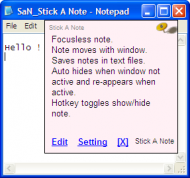
Focusless note.
Note moves with window.
Saves notes in text files.
Auto hides or shows if window is inactive or active.
Hotekey toggle show/hide note.
Planned Features
Search in notes.
Screenshots
Usage
Installation
Unzip all the files into a directory you want, then launch it.
Using the Application
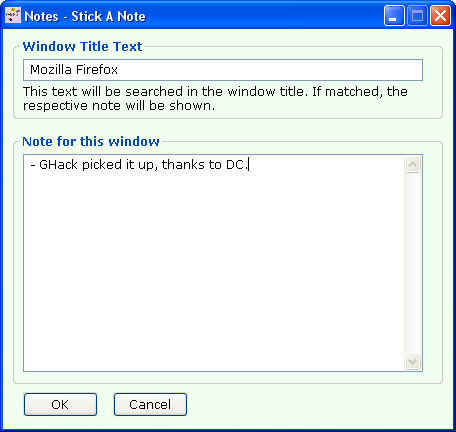
After run the program will sit in the system tray. Press Win+n key to show a note for the active window.
Uninstallation
Delete all files and remove folder.
Regards,
Anand
Due to working in lots of project in different platform, both at office and home, I urgently need a sticky note for a given document, program, website etc. Better if it could sync with Simplenote web server. I also found discussion in DC here on similar subject.
Now I searched and tried GumNotes http://www.gumnotes.com/, which does what I want, but...after two days it is not working. All my notes have vanished and giving error "can not connect Simplenote" though same password works if I connect from browser.
Next I tried ResophNotes http://www.resoph.com/ResophNotes/, more or less like QuickNote http://www.quicknote.de/ and can sync with simplenote. But can not mark note to a doc/prog like GumNotes.
Next I tried Stickes http://www.zhornsoftware.co.uk/, which can mark note to a doc/prog but the logic is not good as like GumNotes.
I have more or less decided to make one for myself and use ResophNotes's text file option to sync with Simplenote.
Before I embark, please throw light to me to see another free one which does all these and may be more, and I will embrace it.
Embarked and brought the fruit below
NANY 2012 Entry Information
| Application Name | Stick A Note |
| Version | 2.1.0 |
| Short Description | Stick a text note to a window of program or document. The note shows only on that window and moves with it. |
| Supported OSes | WinXp and above |
| Web Page | https://sites.google.com/site/stickanote/ |
| Download Link | https://sites.google.com/site/stickanote/home/download/ |
| Author | Anand K Gupta |
Description
I use many programs which has one good feature, which I like, compare to others.
Now it so happens that the developer of the program names the exe in a small
way. If it is a portable then it is near to impossible for me to find out the
program whose that feature I remember and need it.
Also it may so happens that I found a 6 month old program on my computer and do
not remember what feature is better in it, or did I even liked it.
I need some sort of note to put against each program where I mention which
feature I like and can use in future.
I searched but none available free once could do do the job satisfactorily.
I developed Stick A Note.
Features
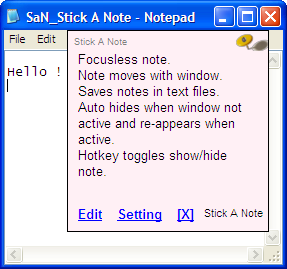
Focusless note.
Note moves with window.
Saves notes in text files.
Auto hides or shows if window is inactive or active.
Hotekey toggle show/hide note.
Planned Features
Search in notes.
Screenshots
Usage
Installation
Unzip all the files into a directory you want, then launch it.
Using the Application
After run the program will sit in the system tray. Press Win+n key to show a note for the active window.
Uninstallation
Delete all files and remove folder.
Regards,
Anand