DonationCoder.com forum
 
Read-only archive. This is a static copy of the DonationCoder.com forum. Reading and searching work as before; logging in, posting and private messages do not.
Archive of 2026-10-21 · About this archive · Main site

Author Topic: Plug-ins not showing...  (Read 6,809 times)

kunkel321

  • Supporting Member
  • Joined in 2009
  • **
  • Posts: 626
    • Participated in NANY Challenge Once
Plug-ins not showing...
« on: November 06, 2011, 05:13 PM »
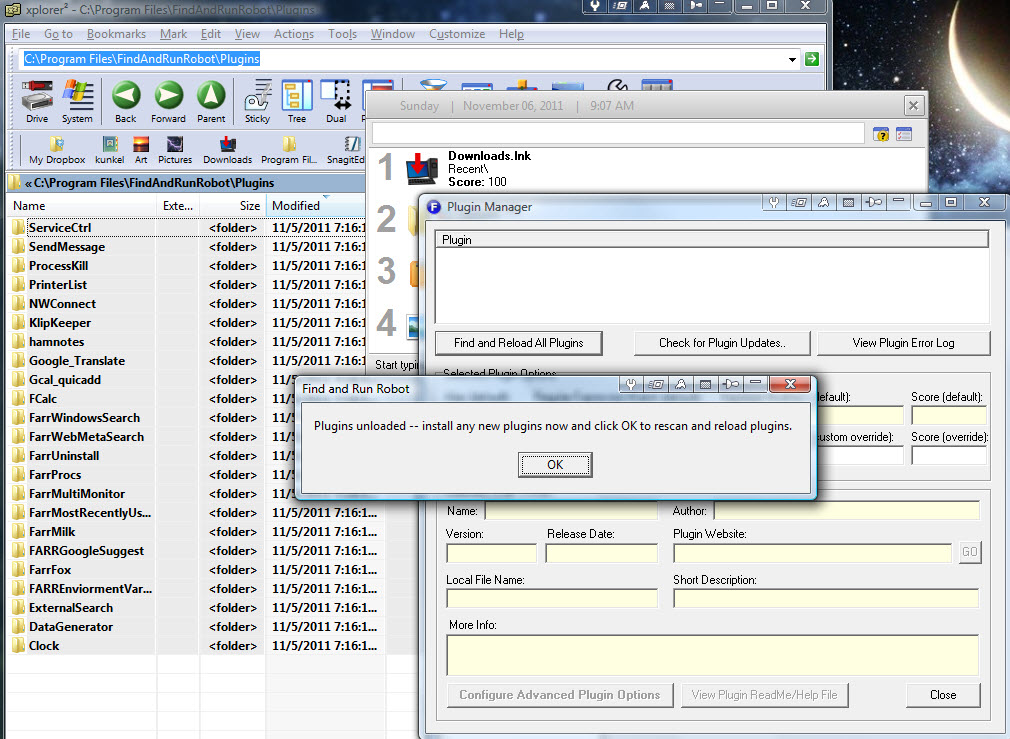
It's probably just an id10t error...  But,  shouldn't these plugins (see pic) show up here (see pic again)?
[attach]

mouser

  • First Author
  • Administrator
  • Joined in 2005
  • *****
  • Posts: 40,931
    • Gathering Badge
    • Plugin Coding Medal
    • Participated in NANY Challenge Seventeen Times
    • Cody Award
    • Coding Snacks
    • Volunteers/Staff
Re: Plug-ins not showing...
« Reply #1 on: November 06, 2011, 05:27 PM »
This is the result of something that confuses a lot of people.
The FARR default install comes with all of those folders, but they are just placeholders to help DcUpdater know what plugins are available for install.  The actual plugins are not installed by default, so they will not show up from within FARR.

thewoodshopguy

  • Participant
  • Joined in 2012
  • *
  • Posts: 3
Re: Plug-ins not showing...
« Reply #2 on: August 16, 2012, 03:22 PM »
Can you provide more info on this. I have removed all of these folders, downloaded some plugins and put into the plugins folder. But no matter what I do, they never show in this plugins list. I am at a complete loss for how to install and use plugins.?

I have been unzipping the plugin into a folder by the plugins name, and then putting its contents into the plugins folder. But no luck, I have also tried putting all the files in the plugin folder directly into the plugins folder, also no luck. I have also put the zip file in the plugins folder, no luck.

Thanks for your help/

mouser

  • First Author
  • Administrator
  • Joined in 2005
  • *****
  • Posts: 40,931
    • Gathering Badge
    • Plugin Coding Medal
    • Participated in NANY Challenge Seventeen Times
    • Cody Award
    • Coding Snacks
    • Volunteers/Staff
Re: Plug-ins not showing...
« Reply #3 on: August 16, 2012, 04:22 PM »
It sounds like you are doing things right.. can you tell me what Operating System you have, and give me the path to your plugins folder?

You can email me directly if you prefer (mouser@donationcoder.com).

thewoodshopguy

  • Participant
  • Joined in 2012
  • *
  • Posts: 3
Re: Plug-ins not showing...
« Reply #4 on: August 16, 2012, 04:47 PM »
Sure: Windows XP Sp3
Path: c:\program files\FindAndRunRobot\Plugins

Also, since posting I tried 2 different plugins that seems to be working now: FarrProcs and FarrMostRecentlyUsed. They both show in the list now. The one I was trying was the CZB_pack because I was trying to get google calculate and no matter how I try that one, it will not work. Thanks.

mouser

  • First Author
  • Administrator
  • Joined in 2005
  • *****
  • Posts: 40,931
    • Gathering Badge
    • Plugin Coding Medal
    • Participated in NANY Challenge Seventeen Times
    • Cody Award
    • Coding Snacks
    • Volunteers/Staff
Re: Plug-ins not showing...
« Reply #5 on: August 16, 2012, 06:08 PM »
ah, czb pack is somewhat unusual, it has its own system of showing it's sub-plugins.  more info on it here: http://www.donationcoder.com/forum/index.php?topic=17153.0

you type "fssc" to list the subplugins of czb pack.

thewoodshopguy

  • Participant
  • Joined in 2012
  • *
  • Posts: 3
Re: Plug-ins not showing...
« Reply #6 on: August 16, 2012, 11:29 PM »
Okay. Thanks for the assistance.

P.S. I am new to the program. I came from a mac running Alfred, and this is the closest thing I could find. Nice job!

Original address: https://www.donationcoder.com/forum/index.php?topic=28599.0